

Command the Room: The 5 Best Laser Pointers for Presentations in 2026
Delivering an impactful presentation requires more than just great slides; it demands absolute control over your delivery. Fumbling with a laptop or standing frozen behind a podium can instantly disconnect you from your audience. A high-quality presentation clicker gives you the freedom to move naturally, emphasize key details, and command the room with confidence.
In our hands-on testing, we evaluated the leading presentation remotes on the market. We focused on wireless range, laser visibility, ergonomics, and advanced features like digital highlighting and air mouse controls. Whether you are a teacher looking for basic reliability or a corporate executive needing digital-screen compatibility, here are the best laser pointers for presentations available today.
Table of Contents
At a Glance: Top 5 Laser Pointers for Presentations
| Product Name | Key Features | Ideal Use |
|---|---|---|
| Logitech R400 | Red Laser, 50-ft Range, Plug-and-Play | Classrooms & Basic Slides |
| Logitech Spotlight | Digital Highlighting, Bluetooth, Smart Timer | Modern LCD/LED Screens & Virtual Meetings |
| DINOSTRIKE 2.4GHz | Air Mouse, 164-ft Range, Rechargeable | Interactive & Multi-Window Presentations |
| MIPREZT R800 | High-Power Green Laser, Aluminum Body, Star Cap | Large Venues, Outdoors & Construction |
| Logitech R800 | Green Laser, LCD Timer Screen, 100-ft Range | Professional Boardrooms & Large Auditoriums |
Top 5 Best Laser Pointers for Presentations 2026
🥇 1. Logitech R400 Laser Pointer
No products found.
Best for straightforward plug-and-play reliability in classrooms and lecture halls. The Logitech R400 remains the gold standard for presenters who want a dependable, distraction-free tool. During our testing, we loved how the intuitive, contoured buttons let us navigate slides entirely by touch.
- Bright Red Laser: The Class 2 red laser dot is highly visible against most projection screens.
- 50-Foot Range: Offers plenty of room to walk away from the podium and engage with the crowd.
- No Software Required: Simply plug the USB receiver into your laptop and start presenting instantly.
- Smart Receiver Storage: The USB dongle slides directly into the remote’s body so you never lose it.
- Long Battery Life: Runs efficiently for months on two standard AAA batteries.
| Pros | Cons |
|---|---|
| • Extremely simple plug-and-play setup | • Red laser can wash out on bright LCD/LED screens |
| • Comfortable, ergonomic shape fits naturally | • Lacks advanced mouse cursor controls |
| • Built-in receiver storage prevents loss | |
| • Reliable 2.4GHz wireless connection |
🥈 2. Logitech Spotlight Laser Pointer
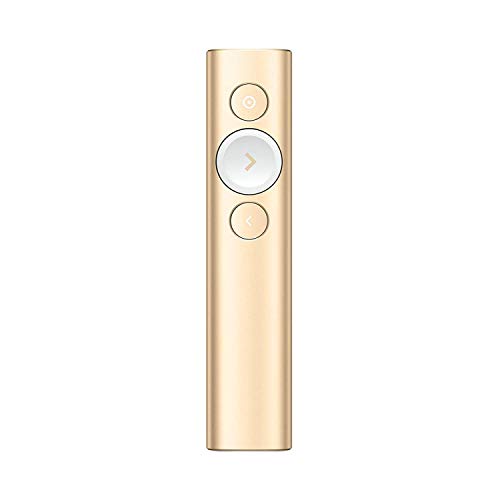

Best for virtual presentations and modern LCD/LED flat-panel displays. Traditional physical lasers disappear on modern flat-screen TVs, but the Logitech Spotlight solves this with its advanced digital on-screen cursor. We found the magnification and digital spotlighting features incredibly professional for high-stakes corporate pitches.
- Advanced Digital Highlighting: Highlight, magnify, or pinpoint areas on screen digitally.
- On-Screen Cursor: Acts as a wireless mouse to click links and play videos directly from the stage.
- Vibration Time Alerts: Set silent vibrating milestones to keep your speech perfectly on schedule.
- Dual Connectivity: Connects seamlessly via Bluetooth or the included USB receiver.
- Fast Rechargeable Battery: Just one minute of charging provides up to three hours of presentation time.
| Pros | Cons |
|---|---|
| • Works perfectly on digital screens and Zoom calls | • Requires software installation for full features |
| • Sleek, premium metallic design and feel | • Significantly more expensive than basic clickers |
| • Excellent smart time management features | |
| • Quick-charging rechargeable battery |
🥉 3. DINOSTRIKE 2.4GHz Laser Pointer
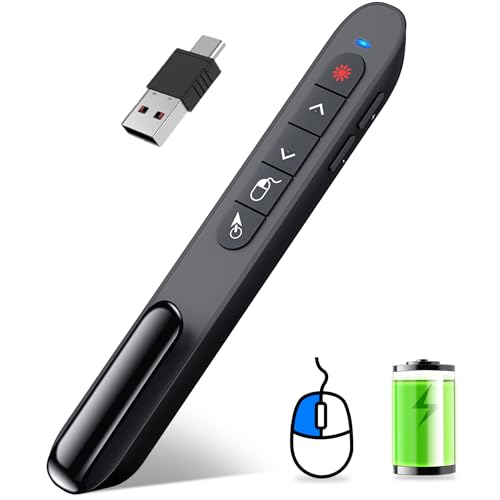
Best for tech-savvy speakers who need full mouse control and media interaction. The DINOSTRIKE TK701 is an absolute powerhouse of functionality at a budget-friendly price point. Our favorite feature was the built-in air mouse, which let us control the computer cursor smoothly just by waving our hand.
- Built-In Air Mouse: Gives you full wireless cursor control to navigate complex applications.
- Impressive Range: Features up to a 164-foot wireless control range for massive rooms.
- Multi-Functional Keys: Controls volume, switches windows, opens hyperlinks, and toggles full screen.
- USB-A & USB-C Receiver: The hybrid receiver ensures compatibility with older laptops and newer MacBooks.
- Rechargeable Battery: The 300mAh lithium battery charges quickly and lasts for weeks.
| Pros | Cons |
|---|---|
| • Dynamic air mouse control for cursor navigation | • Button layout has a slight learning curve |
| • Dual USB-A and USB-C compatibility | • Plastic chassis feels less premium than metal |
| • Outstanding wireless range up to 164 feet | |
| • Eco-friendly rechargeable battery |
🏅 4. MIPREZT R800 Laser Pointer
![MIPREZT [Professional] Rechargeable Green Laser Pointer High...](https://m.media-amazon.com/images/I/41lw0k1MjPL.jpg)
Best heavy-duty pointer for construction, astronomy, and large lecture halls. The MIPREZT R800 is built like a tank from premium aluminum alloy, making it perfect for demanding environments. In our testing, the green laser beam was incredibly bright and visible even in broad daylight.
- Ultra-Bright Green Laser: Highly visible over long distances and in bright environments.
- Aluminum Alloy Body: Tactical, non-slip design that can withstand drops and heavy daily use.
- Removable Star Cap: Rotates to project fun, creative starlight patterns for astronomy or classrooms.
- USB Rechargeable: Easily charges via any standard USB-A port without needing replacement batteries.
- Long-Distance Beam: Projects a solid green line thousands of feet in dark settings.
| Pros | Cons |
|---|---|
| • Extremely bright green laser with great visibility | • Lacks slide navigation buttons |
| • Rugged, durable tactical aluminum build | • Can be too bright for small, dark rooms |
| • Fun starlight patterns for creative uses | |
| • Convenient USB-A direct charging |
🏅 5. Logitech R800 Laser Pointer
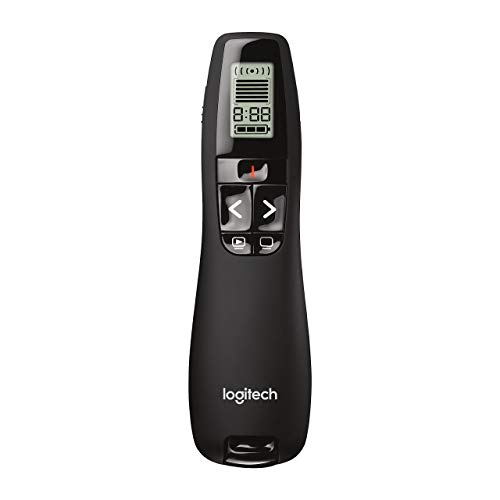
Best professional presentation clicker for large boardrooms and auditoriums. If you want the ultimate professional presentation remote, the Logitech R800 is the industry standard. Its brilliant green laser is up to twice as visible as red lasers, and the built-in LCD screen keeps your timing flawless.
- Brilliant Green Laser: Highly visible on any presentation screen, even in brightly lit rooms.
- Integrated LCD Display: Displays wireless signal strength, battery life, and a presentation timer.
- 100-Foot Wireless Range: Move around massive stages and auditoriums without losing connection.
- Silent Vibrating Alerts: Notifies you when you have 5, 2, or 0 minutes left to speak.
- Intuitive Touch Keys: Easy-to-find buttons allow smooth, blind navigation of your slideshow.
| Pros | Cons |
|---|---|
| • Green laser is incredibly bright and clear | • Higher price point than standard red laser models |
| • LCD timer display keeps you on track | • Requires two AAA batteries (not rechargeable) |
| • Massive 100-foot wireless operating range | |
| • Silent vibration alerts prevent running overtime |
The Verdict
For most everyday presenters, teachers, and students, the Logitech R400 is the absolute best choice due to its simplicity, ergonomics, and rock-solid reliability. If you frequently present on digital LCD/LED screens or deliver virtual webinars, the Logitech Spotlight is a must-have premium tool. For large-scale auditoriums where a green laser and strict time management are critical, we highly recommend the Logitech R800.
| Product | Best For |
|---|---|
| Logitech R400 | Everyday Lectures & Simple Slideshows |
| Logitech Spotlight | Digital Screen Presentations & Virtual Meetings |
| DINOSTRIKE 2.4GHz | Complex Demos & Air Mouse Cursor Control |
| MIPREZT R800 | Outdoor, Construction, & Astronomy Demonstrations |
| Logitech R800 | High-Stakes Professional Auditoriums |
Frequently Asked Questions
What is the difference between red and green laser pointers?
Green lasers are significantly brighter and more visible to the human eye than red lasers, making them ideal for large, brightly lit rooms. However, green lasers consume more battery power and are typically more expensive than red laser pointers.
Do laser pointers work on modern LCD or LED screens?
Traditional physical laser pointers (both red and green) do not show up well on LCD or LED TV screens because the glass and backlighting absorb or reflect the light. For digital screens, you need a digital presenter like the Logitech Spotlight, which projects a software-based digital highlight on the screen.
Do presentation clickers require software installation?
Most basic presentation clickers, like the Logitech R400, are “plug-and-play” and require no software. You simply plug the USB receiver into your laptop, and it acts as a keyboard emulator. Advanced digital pointers, however, may require a lightweight app to enable highlighting and cursor control.
How long do rechargeable presentation clickers last?
Rechargeable presentation remotes typically last anywhere from several weeks to a few months on a single charge, depending on how often you use the laser. Many modern remotes also feature quick-charging capabilities, giving you hours of use from just a 1-minute charge.
Can I use these presentation clickers with Mac and Keynote?
Yes, almost all modern presentation remotes are fully compatible with both Windows and macOS. They work seamlessly across popular software platforms including Microsoft PowerPoint, Apple Keynote, Google Slides, and PDF viewers.
Last update on 2026-10-30/Affiliate links / Images from Amazon Product Advertising API





One Comment