Carry Two Machines with Ease: The 5 Best Backpacks for Multiple Laptops (2026)
If you carry a work laptop and a personal one, or a laptop plus a tablet, chargers, and a mouse, an ordinary school backpack runs out of room fast. Worse, the devices end up pressed against each other with nothing between them, which is how screens get cracked and corners get dented.
The best backpacks for multiple laptops solve this with padded, separated compartments, enough depth for two machines, and a harness that spreads the extra weight across your back. They also tend to include travel features such as checkpoint-friendly laptop sections and luggage straps, because people who carry two computers are usually commuting or flying.
This guide compares five options: the Everki Atlas, the SwissGear 1900 ScanSmart, and three KROSER models that cover 17.3-inch and 18.4-inch laptops. One point is worth knowing upfront: most of these bags have one dedicated padded laptop compartment. A second laptop usually rides in the main compartment or a tablet sleeve, so check the measurements against your own devices.
Table of Contents
At a Glance
| Backpack | Largest laptop | Capacity / size | Ideal for |
|---|---|---|---|
| Everki Atlas | 15.6 in (adjustable from 11 in) | 29.5 L | Professionals who fly often |
| SwissGear 1900 ScanSmart | 17 in | 31 L, 18.5 x 13.25 x 9 in | Business travel with airport screening |
| KROSER XXK999 | 17.3 in | XL, multi-compartment | Budget buyers who need lots of pockets |
| KROSER XK989 | 17.3 in | 18.6 x 13.5 x 10.8 in | Carrying fragile small items too |
| KROSER GMK989YX | 18.4 in | XXXL | Large gaming laptops and workstations |
To narrow down the best backpacks for multiple laptops, start with your largest device and work out where the second one will sit. Everki and SwissGear details come from the Everki and SwissGear product pages. KROSER specifications come from the KROSER store and its Amazon listings.
Top 5 Best Backpacks for Multiple Laptops
1. Everki Atlas Laptop Backpack
No products found.
Overview
The Everki Atlas is the most polished bag in this group. Its laptop compartment is padded and felt-lined, and an adjustable divider lets it hold anything from an 11-inch ultrabook to a 15.6-inch notebook snugly. That adjustability matters when you carry two different machines, because a smaller second laptop or a tablet will not slide around inside.
With 29.5 liters of space, the Atlas has room for chargers, documents, and a change of clothes. Everki uses what it calls a 5-point balance strap system, which helps keep a heavy load centered on your back. The tech compartment is designed to be checkpoint-friendly, and a trolley strap lets the bag ride on a rolling suitcase. For frequent flyers, it is one of the best backpacks for multiple laptops that are 15.6 inches or smaller.
5 Key Features
- Adjustable laptop compartment: Padded and felt-lined, fitting laptops from 11 to 15.6 inches.
- 29.5-liter capacity: Enough room for a second device, accessories, and documents.
- 5-point balance strap system: Spreads weight more evenly across your shoulders and back.
- Checkpoint-friendly design: The tech compartment is built for quicker airport screening.
- Limited lifetime warranty: Everki backs the bag with long-term coverage.
Pros
- Premium materials, heavy-duty zippers, and reinforced stitching.
- The adjustable compartment fits several laptop sizes securely.
- Comfortable harness for heavy loads.
- Strong warranty coverage.
Cons
- This version tops out at 15.6 inches; a separate 17.3-inch Atlas is sold.
- Priced well above the other bags in this list.
2. SwissGear 1900 ScanSmart Backpack
Overview
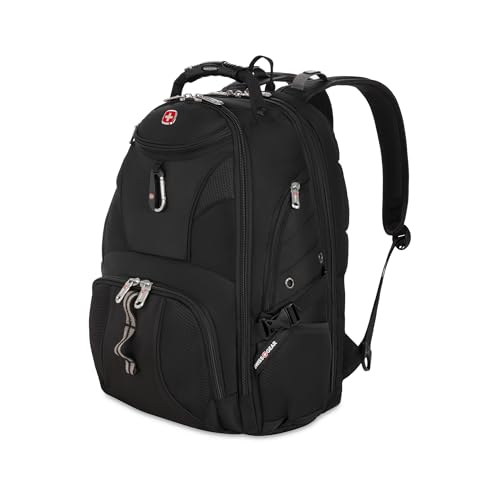
The SwissGear 1900 ScanSmart has been a business-travel favorite for years, and the reason is simple. It fits laptops up to 17 inches, and its ScanSmart section opens flat so the laptop can stay in the bag during airport screening at many checkpoints. That saves time when you are carrying more than one machine.
SwissGear lists the bag at 31 liters and 18.5 x 13.25 x 9 inches, with a laptop compartment measuring 14.25 x 11.5 x 1.5 inches. A separate floating TabletSafe pocket holds a device up to 10 x 7 inches, which works for a tablet or a very small second computer. The multi-panel Airflow back, RFID-blocking pocket, and a sleeve for luggage handles round out a well-thought-out travel bag.
5 Key Features
- 17-inch laptop compartment: Padded storage measuring 14.25 x 11.5 x 1.5 inches.
- ScanSmart lay-flat design: Opens flat for easier checkpoint screening.
- TabletSafe pocket: A floating, padded sleeve for a 10 x 7-inch tablet.
- RFID-blocking pocket: Helps protect cards and passports from wireless scanning.
- Airflow back panel: Multi-panel padding improves ventilation and comfort.
Pros
- Proven design with a long track record.
- Lay-flat section speeds up airport security.
- Well organized, with a file pocket and cord storage.
- Ballistic fabric holds up to daily commuting.
Cons
- The second laptop has to share the main compartment.
- At 3.3 lbs empty, it is not the lightest option.
3. KROSER XXK999 Backpack
Overview
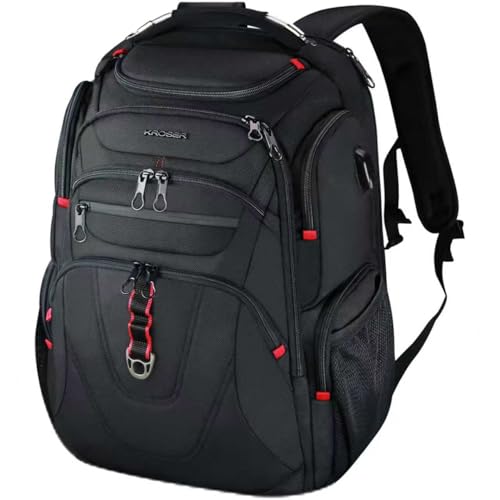
The KROSER XXK999 is the value pick for people who need a large bag without paying premium prices. It is designed for laptops up to 17.3 inches and uses water-repellent ballistic fabric that shrugs off light rain on the walk to the train or the car.
KROSER markets it as TSA-friendly, with an extra-large, multi-compartment layout that gives a second laptop or tablet its own space. RFID-blocking pockets and a built-in USB port add convenience, though the port is simply a pass-through cable, so you need to supply your own power bank. If you want one of the best backpacks for multiple laptops on a budget, this is the place to start.
5 Key Features
- 17.3-inch laptop support: Padded compartment for large laptops.
- TSA-friendly layout: Designed to make checkpoint screening easier.
- Water-repellent ballistic fabric: Resists light rain and everyday wear.
- RFID-blocking pockets: Protects cards and IDs.
- Built-in USB port: Charge your phone from a power bank stored inside.
Pros
- Large capacity for the price.
- Plenty of organizer pockets for small accessories.
- Water-repellent exterior.
- Works for travel, office, and school.
Cons
- Zippers and hardware feel less premium than Everki or SwissGear.
- A power bank is not included for the USB port.
4. KROSER XK989 Backpack
Overview
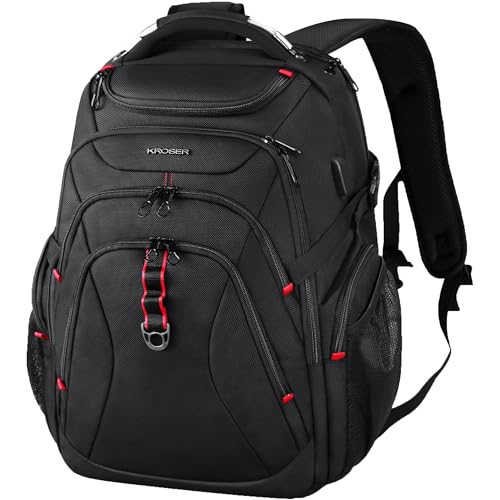
The KROSER XK989 is closely related to the XXK999, but it adds a hard-shell top compartment that KROSER calls a saferoom. It is a molded pocket for small things that crush easily, such as sunglasses, earbuds, or a wireless mouse, and it keeps them away from the weight of your laptops.
KROSER lists the bag at 18.6 x 13.5 x 10.8 inches and 3.08 pounds, with room for a 17.3-inch laptop. Air-flow back padding helps on long walks, a luggage strap slides over a suitcase handle, and a hidden back pocket keeps a passport or wallet out of reach of pickpockets. The extra depth makes it easier to fit two machines and a charger brick without stretching the seams.
5 Key Features
- Hard-shell saferoom: A protective top pocket for glasses and small electronics.
- 17.3-inch laptop compartment: Padded protection for large laptops.
- Generous dimensions: 18.6 x 13.5 x 10.8 inches of usable space.
- Luggage strap: Attaches the bag to a rolling suitcase.
- Hidden back pocket: Secure spot for valuables.
Pros
- The hard-shell pocket protects fragile accessories.
- Deep main compartment for a second laptop.
- Comfortable, ventilated back panel.
- Light for its size at about 3.08 lbs.
Cons
- The structured shape can feel bulky in crowded spaces.
- Overall build quality is a step below the premium brands.
5. KROSER GMK989YX Backpack
Overview
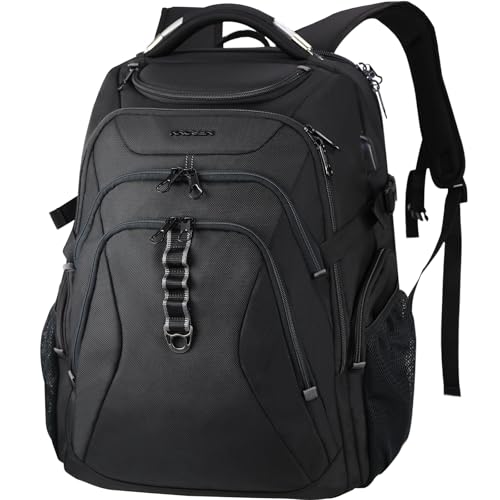
Most laptop backpacks stop at 17.3 inches, which rules out many gaming laptops and mobile workstations. The KROSER GMK989YX is listed for laptops up to 18.4 inches and sized as XXXL, making it the clear choice here if your main machine is unusually large.
It carries over the hard-shell saferoom, RFID pockets, and water-repellent fabric from the other KROSER models. Bigger laptops are heavy, so the padded, breathable back and straps matter more than usual. Since this bag is bigger than airline personal-item limits on many carriers, check your airline’s rules if you plan to fly with it.
5 Key Features
- 18.4-inch laptop support: Fits large gaming and workstation laptops.
- XXXL capacity: Room for a second laptop, power bricks, and peripherals.
- Hard-shell saferoom: Protects glasses, earbuds, and small accessories.
- RFID-blocking pockets: Keeps cards and IDs secure.
- Water-repellent fabric: Helps protect expensive hardware from rain.
Pros
- Fits laptops that most backpacks cannot.
- Large enough for two big machines plus chargers.
- Same useful organization as smaller KROSER bags.
- Good value for an oversized bag.
Cons
- Bulky when only partly packed.
- May exceed some airlines’ personal-item size limits.
How to Choose the Best Backpacks for Multiple Laptops
The best backpacks for multiple laptops all get a few basics right. Use these points to compare them against your own setup.
Measure both devices. Check the laptop compartment’s inside dimensions, not only the advertised screen size. Thick gaming laptops can be too deep for a compartment rated for the right screen size.
Plan where the second laptop goes. If the bag has only one padded laptop slot, put the second machine in a padded sleeve before placing it in the main compartment.
Think about weight. Two laptops plus chargers can easily pass 10 pounds. A sternum strap, padded back, and well-shaped shoulder straps make a real difference over a long commute.
Check travel rules. Lay-flat designs can speed up screening, but security rules vary by airport. Oversized bags may also count as a carry-on rather than a personal item.
Carrying two laptops often means a bigger home or office setup too. You may also like our guides to the best electric standing desk and the best laser pointers for presentations.
Final Verdict
There is no single winner among the best backpacks for multiple laptops, because the right bag depends on the size of your laptops and how often you travel.
- Best premium choice: Everki Atlas. It has the best build quality and warranty, as long as your largest laptop is 15.6 inches or smaller.
- Best for frequent flyers: SwissGear 1900 ScanSmart. The lay-flat section and TabletSafe pocket make it easy to get through security with several devices.
- Best budget option: KROSER XXK999. Plenty of space and pockets for the money.
- Best for fragile accessories: KROSER XK989. The hard-shell saferoom protects small items from being crushed.
- Best for 18-inch laptops: KROSER GMK989YX. One of the few backpacks here that fits an 18.4-inch machine.
Whichever you choose, the best backpacks for multiple laptops are the ones that fit your real devices and carry comfortably when fully loaded.
Best For Table
Use this table to match the best backpacks for multiple laptops to the way you work.
| Buyer scenario | Recommended product | Why |
|---|---|---|
| Two laptops up to 15.6 inches | Everki Atlas | Adjustable, felt-lined compartment |
| Laptop plus tablet for flights | SwissGear 1900 ScanSmart | Lay-flat section and TabletSafe pocket |
| Tight budget | KROSER XXK999 | Large capacity at a lower price |
| Carrying glasses or earbuds | KROSER XK989 | Hard-shell saferoom pocket |
| 18-inch gaming laptop | KROSER GMK989YX | Rated for 18.4-inch laptops |
FAQs
1. Can one backpack really hold two laptops safely?
Yes, if both devices are padded. The best backpacks for multiple laptops give the main machine its own padded compartment, and you can protect the second one with a sleeve or a padded tablet pocket. Avoid stacking two bare laptops together.
2. How much weight is too much in a laptop backpack?
A common guideline is to keep a backpack at around 10 to 15 percent of your body weight. Two laptops, chargers, and accessories can get there quickly, so remove what you do not need for the day.
3. Are TSA-friendly backpacks guaranteed to let laptops stay inside?
No. A lay-flat or checkpoint-friendly design is built to meet common screening guidelines, but officers can still ask you to remove devices.
4. Which backpack is best for an 18-inch gaming laptop?
In this list, the KROSER GMK989YX is the only bag listed for laptops up to 18.4 inches. Always compare the compartment dimensions with your laptop’s measurements, including its thickness.
5. Do laptop backpacks with a USB port charge my phone?
Only when you connect a power bank inside. The port is a pass-through cable that makes charging more convenient; it does not supply power on its own.
6. Is a water-repellent backpack waterproof?
Not fully. Water-repellent fabric handles light rain and splashes, but heavy rain or submersion can still reach your devices. Use a rain cover in bad weather.
Last update on 2026-11-06/Affiliate links / Images from Amazon Product Advertising API