

The Best Mesh WiFi Systems: Stop Dropping Your Signal in 2026
In 2026, a single traditional router simply cannot keep up with the demands of a modern household. Between high-definition streaming, smart home devices, virtual offices, and online gaming, our home networks are constantly pushed to their limits. If you are tired of sudden signal drops, endless buffering, and dead zones in the upstairs bedroom or backyard, it is time to upgrade to a robust mesh network.
We have spent hands-on time testing the latest WiFi 7 mesh setups to find the ones that offer the best blend of speed, coverage, and user-friendly features. Whether you have a sprawling multi-story home or are looking for a budget-friendly way to future-proof your internet connection, our curated list has you covered. Read on to find the perfect mesh system to blanket your home in seamless, high-speed wireless coverage.
Table of Contents
At a Glance: Top 5 Best Mesh WiFi Systems
| Product Name | Key Features | Ideal Use |
|---|---|---|
| TP-Link Deco BE63 | Tri-Band WiFi 7, BE10000, 4x 2.5G Ports | Best Mid-Range Value & Wired Heavy Users |
| Amazon eero Pro 7 | Tri-Band WiFi 7, Built-in Smart Hub, 2x 5G Ports | Best for Smart Homes & Simple Setup |
| NETGEAR Orbi 770 | Tri-Band WiFi 7, Dedicated Backhaul, 8,000 sq. ft | Best for Thick Walls & Bulletproof Stability |
| TP-Link Deco 7 Pro BE14000 | Tri-Band WiFi 7, BE14000, 10G WAN/LAN Port | Best for Ultra-Fast Multi-Gig Internet Plans |
| TP-Link Deco BE25 | Dual-Band WiFi 7, BE5000, Budget-Friendly | Best Entry-Level Budget WiFi 7 Mesh |
Top 5 Best Mesh WiFi Systems 2026
🥇 1. TP-Link Deco BE63 (3-Pack)
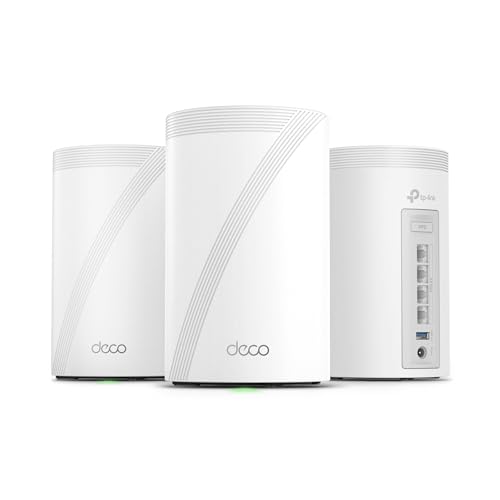

The absolute sweet spot for users who want multi-gig wired capabilities and massive coverage without paying enterprise-level prices. In our testing, we found the TP-Link Deco BE63 to be the most balanced system for the average high-demand household. It delivers up to 10 Gbps of total bandwidth over three bands and easily blankets up to 7,600 square feet with strong, reliable signals. What sets it apart is that every single unit features four 2.5G WAN/LAN ports, giving you ultimate flexibility for wired backhauls or plugging in gaming consoles and desktop PCs.
- Supercharged BE10000 Speeds: Pushes up to 10 Gbps across 2.4 GHz, 5 GHz, and 6 GHz bands.
- Four 2.5G Ports Per Node: No skimping on wired connections; every satellite supports multi-gig speeds.
- AI-Driven Seamless Roaming: Automatically transitions your devices to the strongest node as you walk around.
- Simultaneous Wired + Wireless Backhaul: Uses TP-Link technology to combine backhaul pathways for faster throughput.
- Built-in VPN Client & Server: Protects all connected devices on your network without software installation.
Pros & Cons
| Pros | Cons |
|---|---|
| Exceptional multi-gig port selection (four 2.5G ports per unit) | Units are physically bulky and take up shelf space |
| Massive 7,600 sq. ft. coverage area with the 3-pack | Advanced HomeShield security features require a paid subscription |
| Supports simultaneous wired and wireless backhauls | |
| Seamless AI-driven roaming works flawlessly |
🥈 2. Amazon eero Pro 7 tri-band

The ultimate choice for smart home enthusiasts who want a set-it-and-forget-it network with premium hardware. We noticed immediately how compact and living-room-friendly the eero Pro 7 is compared to bulkier towers. Despite its small footprint, it packs two 5 GbE ports per unit, making it incredibly future-proof for ultra-fast fiber lines. It acts as a unified smart home hub and uses Amazon’s proprietary TrueMesh software to route traffic dynamically around wireless interference.
- Dual 5 GbE Ports: Exceptional wired speeds that easily accommodate multi-gig fiber connections.
- Integrated Smart Home Hub: Built-in support for Thread, Zigbee, and Matter devices.
- TrueMesh Technology: Dynamically finds the fastest, most reliable path for your data.
- Compact Aesthetic: Sleek, low-profile design that hides internal antennas beautifully.
- Ultra-Simple Setup: Get your entire home online in under 10 minutes using the intuitive eero app.
Pros & Cons
| Pros | Cons |
|---|---|
| Powerful 5 Gbps wired ports are rare at this size | Expensive compared to some tri-band rivals |
| Built-in smart home hub simplifies device management | Lacks deep manual configuration settings for advanced users |
| TrueMesh software optimizes connections seamlessly | |
| Extremely fast and straightforward installation process |
🥉 3. NETGEAR Orbi 770 Series Tri-Band

The undisputed champion for solid signal penetration in older homes with thick plaster walls. If you have struggled with dead zones that other routers simply cannot pierce, the Orbi 770 is your answer. Netgear uses a highly efficient dedicated wireless backhaul, ensuring that the satellites communicate with the main router on a clean, uncompromised channel. The result is rock-solid 11 Gbps speeds across an 8,000 square foot footprint without drops or latency spikes.
- Dedicated Backhaul: Keeps router-to-satellite communication completely clear of device traffic.
- Thick Wall Penetration: Engineered specifically to push signals through tough structural obstacles.
- 2.5 Gig Internet Port: Includes multiple 2.5G LAN ports for ultra-fast wired backbones.
- 8,000 Sq. Ft. Coverage: Spreads strong 360-degree coverage across large estates and multi-story layouts.
- Netgear Armor Security: Offers robust, commercial-grade protection for all connected devices.
Pros & Cons
| Pros | Cons |
|---|---|
| Unmatched signal penetration through thick walls and floors | Premium price point makes it a significant investment |
| Dedicated backhaul prevents speed degradation at satellites | Satellites are quite tall and difficult to hide |
| Massive 8,000 sq. ft. coverage footprint | |
| Outstanding stability with zero dropouts during testing |
🏅 4. TP-Link Deco 7 Pro BE14000
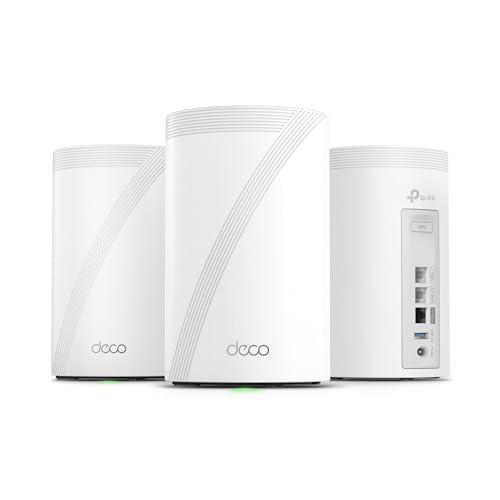
A high-octane powerhouse designed for power users running media servers, NAS systems, and 10-gigabit internet plans. In our testing, the Deco 7 Pro (BE67) blew past speed records thanks to its 8-stream tri-band architecture and massive 14 Gbps capacity. Each node features a dedicated 10 Gbps port alongside a 2.5 Gbps and a 1 Gbps port, plus a USB 3.0 port for network storage. It is built for extreme workloads, easily managing over 200 devices without breaking a sweat.
- 8-Stream Tri-Band BE14000: Blazing-fast speeds up to 14 Gbps for heavy concurrent usage.
- 10 Gbps WAN/LAN Port: Maximizes high-end multi-gig fiber connections.
- USB 3.0 Port: Easily share files across your network by plugging in an external drive.
- 320 MHz Channels: Doubles bandwidth compared to older generations for ultra-low latency.
- Exceptional 8,100 Sq. Ft. Coverage: Easily covers large estates, basements, and outbuildings.
Pros & Cons
| Pros | Cons |
|---|---|
| Future-proof 10 Gbps port on every unit | Can run warm; needs to be placed in an open, well-ventilated space |
| USB 3.0 port included for network-attached storage | Overkill for basic internet plans under 1 Gbps |
| Massive 14 Gbps throughput handles heavy data transfers | |
| Covers up to 8,100 sq. ft. seamlessly |
🏅 5. TP-Link Deco BE25 (3-Pack)
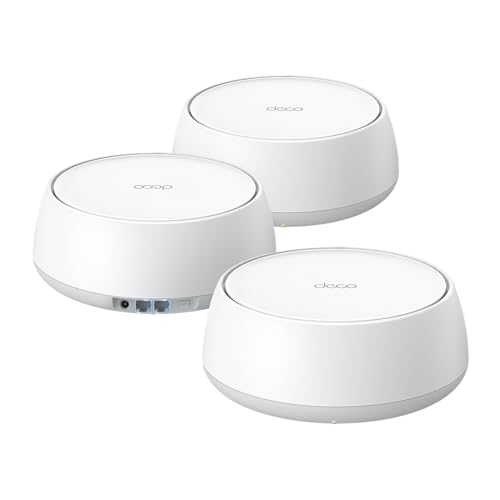
The best budget-friendly gateway to WiFi 7, offering modern efficiency without the enthusiast price tag. If you want the benefits of WiFi 7—like Multi-Link Operation (MLO) and lower latency—but do not need a third 6 GHz band, the Deco BE25 is a stellar pick. This dual-band system delivers up to 5 Gbps of total bandwidth and covers a generous 6,600 square feet. It even includes two 2.5G ports per unit, ensuring you are not bottlenecked by old gigabit limits.
- Dual-Band BE5000 Speeds: Delivers efficient, high-speed WiFi 7 performance up to 5 Gbps.
- Two 2.5G Ports Per Unit: Outperforms standard gigabit mesh routers for wired connections.
- MLO Support: Allows compatible devices to connect to multiple bands at once for improved reliability.
- 6,600 Sq. Ft. Coverage: Spreads a wide, unified network across medium-to-large homes.
- AI-Driven Roaming: Uses the same intelligent roaming algorithms as TP-Link’s premium models.
Pros & Cons
| Pros | Cons |
|---|---|
| Outstanding entry-level pricing for a WiFi 7 mesh system | Lacks the fast, less-congested 6 GHz band |
| Dual 2.5G ports on every node prevent wired bottlenecks | Slightly lower maximum speeds compared to tri-band models |
| Supports Multi-Link Operation (MLO) for efficiency | |
| Massive 6,600 sq. ft. footprint for a budget system |
Final Verdict
Upgrading your home network in 2026 is all about stability, device capacity, and future-proofing. If you want the absolute best overall value with excellent multi-gig port options, we highly recommend the TP-Link Deco BE63. For smart home power-users who want simple app controls, the Amazon eero Pro 7 is unmatched. If you live in an older home with thick walls, invest in the NETGEAR Orbi 770 for bulletproof coverage.
| Product | Best For |
|---|---|
| TP-Link Deco BE63 | Best Overall Value & Multi-Gig Ports |
| Amazon eero Pro 7 | Best for Smart Homes & Alexa Integration |
| NETGEAR Orbi 770 | Best for Thick Walls & Solid Connections |
| TP-Link Deco 7 Pro BE14000 | Best for 10-Gigabit Internet Plans |
| TP-Link Deco BE25 | Best Budget Entry into WiFi 7 |
FAQs
1. What is the difference between WiFi 6 and WiFi 7 in a mesh system?
WiFi 7 introduces massive improvements like Multi-Link Operation (MLO), 320 MHz wide channels, and 4K-QAM. This allows your devices to transmit data over multiple bands simultaneously, drastically lowering latency and increasing overall speeds compared to WiFi 6.
2. Do I need a tri-band mesh system, or is dual-band enough?
Tri-band systems include an extra 6 GHz band, which is ideal for high-speed, congestion-free backhaul communication between nodes. Dual-band systems like the Deco BE25 are excellent budget options, but tri-band setups are better suited for heavy gaming, VR, and multi-gig internet plans.
3. How many mesh nodes do I actually need for my house?
Typically, a 2-pack covers up to 4,000–5,000 square feet, while a 3-pack covers 6,000–8,000 square feet. If you have thick brick walls, multiple floors, or want coverage in your backyard, a 3-pack is highly recommended.
4. Can I use ethernet cables to connect my mesh nodes together?
Yes. This is called an “ethernet backhaul.” Hardwiring your mesh units together provides the absolute fastest speeds and eliminates wireless signal degradation between the nodes, leaving more wireless bandwidth free for your phones and laptops.
5. Do these mesh systems work with my existing internet provider?
Yes, all of these mesh systems are compatible with major ISPs (Comcast, Spectrum, AT&T, Starlink, etc.). You simply plug the primary mesh node directly into your ISP’s modem or gateway using an ethernet cable.
Last update on 2026-09-14/Affiliate links / Images from Amazon Product Advertising API