The 5 Best Flip Phone for Seniors in 2026: No-Stress, Loud, & Easy
As our loved ones age, staying connected shouldn’t feel like a tech support chore. While modern smartphones offer endless features, they often overwhelm seniors with complex touchscreens, constant updates, and tiny icons. That is where a high-quality, physical flip phone comes in—bringing back tactile buttons, extra-loud audio, and zero-drama reliability.
In our hands-on testing, we evaluated the most popular models on the market, focusing on features that make life easier for older adults. From dedicated emergency buttons to convenient desktop charging docks, we found the best flip phone for seniors to keep communication direct, stress-free, and secure. Let’s dive into our top-tested recommendations to help you find the perfect match.
Table of Contents
At a Glance: Top 5 Best Flip Phones for Seniors
| Product Name | Key Features | Ideal Use |
|---|---|---|
| LIVELY Jitterbug Flip2 | 3.2″ Screen, Urgent Response, Alexa Support | Safety-First & Emergency Care |
| artfone G6 Unlocked | Dual Screens, SOS Button, Charging Dock | Budget Unlocked GSM Users |
| artfone G3 Unlocked | Large Tactile Keypad, No Outer Screen, SOS | Talking Keys & No Distractions |
| TracFone TCL Flip 2 | 2.8″ Screen, 4G LTE, Reversible USB-C | Affordable TracFone/Verizon Network |
| TCL FLIP 3 | 3.2″ Display, 14hr Talk Time, Dual-Mic Noise Cancel | Long Battery & Clear Calls |
🥇 1. LIVELY Jitterbug Flip2
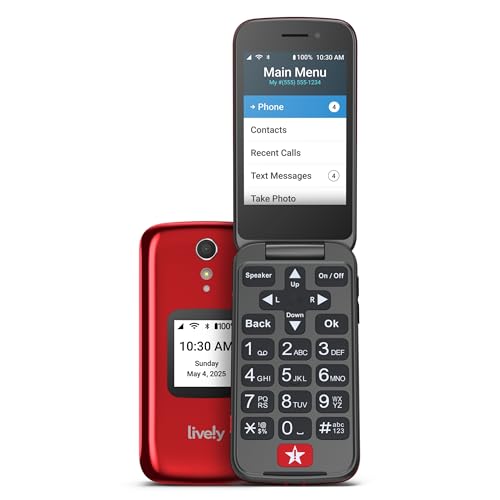
Best Overall for Built-In Emergency Support: If you want absolute simplicity paired with peace of mind, the Jitterbug Flip2 is the ultimate choice. It provides a simple list-style menu and a dedicated Urgent Response button, making it perfect for elderly users who prioritize safety and ease of use.
- Dedicated Urgent Response Button for 24/7 access to trained emergency operators and certified health professionals.
- Generous 3.2-Inch Main Screen featuring high-contrast text and a simplified vertical menu structure.
- Amazon Alexa Voice Control enabling effortless voice dialing and hands-free text-to-speech functionality.
- Front-Facing Powerful Speaker combined with an M4/T4 hearing aid compatibility rating for incredibly loud, clear call audio.
- Integrated 8MP Rear Camera with autofocus and LED flash, plus a handy magnifier tool for reading fine print.
Pros:
- Simple list-based menu eliminates confusing icons.
- Dedicated red Urgent Response button provides unmatched safety.
- Outstanding front-facing speaker and hearing aid compatibility.
- Alexa voice assistant makes dialing hands-free and accessible.
Cons:
- Device is strictly locked to Lively’s network service.
- Setting up the Alexa voice control can be complicated for some.
🥈 2. artfone G6 Unlocked Flip Phone

Best Unlocked Option with Dual Displays: If you prefer the freedom to choose your own carrier and want to check notifications without flipping open the handset, the artfone G6 is an outstanding, budget-friendly choice. It includes a convenient desktop charging cradle, making it incredibly simple for seniors who struggle with standard cords.
- Dual Screen Design with a 2.4″ inner display and a 1.8″ outer screen to check incoming calls and time at a glance.
- Dedicated Rear SOS Button that can be programmed to automatically dial and message up to 5 emergency contacts in sequence.
- Incredible 120,000-Flip Hinge Lifespan ensuring the physical hardware stands up to years of daily use.
- Convenient Desktop Charging Dock and a modern USB-C charging port to eliminate struggles with tiny power cords.
- Physical Side Flashlight Switch and a dedicated keyboard lock button for instant access without menu navigation.
Pros:
- Dual screens allow you to see caller ID without opening the flip phone.
- Durable hinge construction is rigorously tested.
- Desktop charging dock provides hassle-free power connection.
- Physical side controls for the flashlight are extremely user-friendly.
Cons:
- Lightweight plastic build can feel a bit toy-like.
- Struggles with CDMA carrier networks like Verizon.
🥉 3. artfone G3 Unlocked Flip Phone
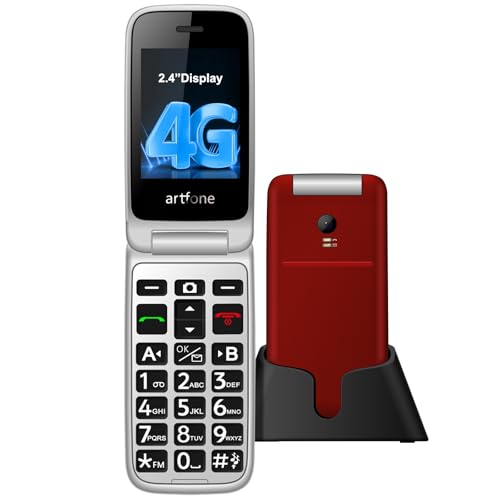
Best for Users Seeking a Simplified Backlit Keypad: For seniors who prioritize easy physical typing over modern smart features, the artfone G3 delivers a high-contrast experience with oversized physical buttons. This clean, distractions-free dumb-phone keeps the focus entirely on clear voice communications.
- Oversized Backlit Keypad with 21 raised, tactile buttons that prevent accidental misdials and simplify typing.
- High-Volume Speaker featuring extra-loud audio output and a talking numbers feature that announces keys aloud.
- Long-Lasting 1200mAh Battery that offers up to several days of standby time and 8 hours of continuous talk time.
- Rear SOS Emergency Button allowing users to reach trusted family members or emergency services with a single touch.
- Unrestricted Carrier Freedom working as a fully unlocked GSM phone compatible with budget-friendly T-Mobile plans.
Pros:
- Extra-large backlit buttons make dialing in low light incredibly easy.
- High-volume speakers and talking keyboard assist those with visual or hearing impairments.
- Built-in rear emergency SOS button supports up to five custom numbers.
- Highly affordable price point for an unlocked device.
Cons:
- Missing an external screen, meaning you cannot see caller ID without opening it.
- Lack of modern predictive text makes sending text messages tedious.
🏅 4. TracFone TCL Flip 2
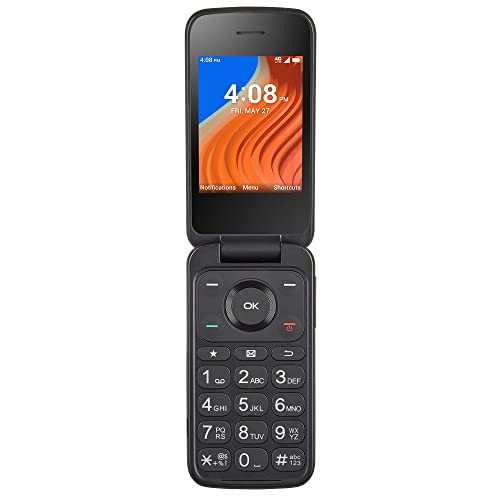
Best Value on a Reliable Network: If you want reliable nationwide coverage without breaking the bank, the TracFone TCL Flip 2 runs seamlessly on Verizon’s stellar tower infrastructure. It pairs basic smart features like Wi-Fi calling with a sturdy, classic design.
- Sturdy 2.8-Inch Internal Screen coupled with a clean, high-contrast, larger-text user interface.
- Reliable 4G LTE Connectivity powered by a snappy quad-core processor on Verizon’s dependable network.
- Dual Displays including a 1.44-inch external screen to view incoming notifications and caller ID quickly.
- Convenient USB-C Interface making charging quick and easy without worrying about plug orientation.
- Hearing Aid Compatible (M4/T4) ensuring clean, clear, interference-free audio directly in the ear.
Pros:
- Reliable voice clarity and strong network coverage using TracFone/Verizon towers.
- Snappy quad-core processor prevents slow, laggy menu navigation.
- Reversible USB-C charging port reduces modern plug frustrations.
- Very affordable purchase price for a solid utility device.
Cons:
- Does not include a dedicated emergency SOS button.
- Device is locked to TracFone network plans out of the box.
🏅 5. TCL FLIP 3

Best Premium Option with Superior Battery Life: As the modern successor in the TCL lineup, the FLIP 3 elevates the basic phone experience with a massive battery, crisp dual displays, and active dual-microphone noise cancellation. It is ideal for active seniors who need loud, clear communication during on-the-go adventures.
- Large 3.2-Inch Main Screen paired with a spacious 1.77-inch external display for clear notifications and texts.
- Massive 1850mAh Battery providing outstanding talk times of up to 14 hours and 17 days of standby.
- Dual-Microphone Noise Cancellation actively filtering out background environment sounds for crystal-clear conversations.
- Expanded 16GB Storage giving you plenty of space for contacts, voicemail, and basic photos.
- Enhanced 5MP Camera with video capture capabilities for sharing simple snapshots with family members.
Pros:
- Industry-leading 1850mAh battery provides exceptional standby and talk times.
- Superior call quality with dual-microphone active noise cancellation.
- Bright, beautiful screens are highly readable in direct sunlight.
- Expanded internal memory supports basic files and photo storage.
Cons:
- Initial activation process can feel a bit tedious.
- Operating system has a learning curve for very basic users.
Final Verdict
Finding the absolute best flip phone for seniors comes down to balancing network preferences, emergency support features, and visual clarity. For those who prioritize comprehensive medical safety and 24/7 care, the LIVELY Jitterbug Flip2 is the undisputed champion. If you want a cost-effective, unlocked alternative with convenient drop-in dock charging and dual displays, the artfone G6 represents the pinnacle of daily usability.
| Product | Best For |
|---|---|
| LIVELY Jitterbug Flip2 | Safety-First Seniors needing 24/7 Urgent Response |
| artfone G6 Unlocked | Unlocked GSM users who want dual displays & a charging dock |
| artfone G3 Unlocked | Visual comfort with an extra-large, backlit keypad |
| TracFone TCL Flip 2 | Low-cost reliability on the robust Verizon tower network |
| TCL FLIP 3 | Outstanding battery life and crystal-clear noise-cancelled audio |
Frequently Asked Questions
Can I use these flip phones with any carrier?
It depends entirely on the model. Fully unlocked devices like the artfone G6 and G3 give you the freedom to choose your own GSM wireless provider, working best on T-Mobile networks. On the other hand, the Lively Jitterbug Flip2 is strictly locked to Lively’s own service, while the TCL Flip 2 and FLIP 3 are tied to TracFone network plans.
How does the emergency SOS button work on senior flip phones?
On phones like the artfone G6 and G3, pressing the physical SOS button on the back automatically triggers consecutive phone calls and text messages to up to five pre-set contacts. The Lively Jitterbug Flip2 takes this a step further with its Urgent Response button, which instantly connects the user to a professional dispatch team for medical assistance.
Are these flip phones compatible with hearing aids?
Yes, most senior-focused models include a high Hearing Aid Compatibility (HAC) rating, typically M4/T4. This ensures that users who wear hearing aids can enjoy static-free, crystal-clear conversation without loud feedback or interference.
Do senior flip phones support voice-to-text messaging?
The Lively Jitterbug Flip2 supports hands-free voice commands and messaging through its built-in Amazon Alexa integration. Other models, like the TCL FLIP 3, use custom simplified operating systems (such as KaiOS) which support basic voice assistance but may require manual T9 texting for standard messages.
Is a charging dock better than a standard cable for older adults?
We highly recommend a desktop charging dock for seniors who experience joint stiffness, arthritis, or visual challenges. Cradle-style charging docks allow the user to simply drop the phone into a designated slot without struggling to align small, delicate charging cords like micro-USB or USB-C.
Do senior flip phones require internet service?
While some basic phones support 4G LTE data for stable calling and basic weather or GPS access, they do not require expensive unlimited smartphone data plans. Most users opt for incredibly budget-friendly talk-and-text plans, keeping ongoing monthly fees very low.
Last update on 2026-10-22/Affiliate links / Images from Amazon Product Advertising API