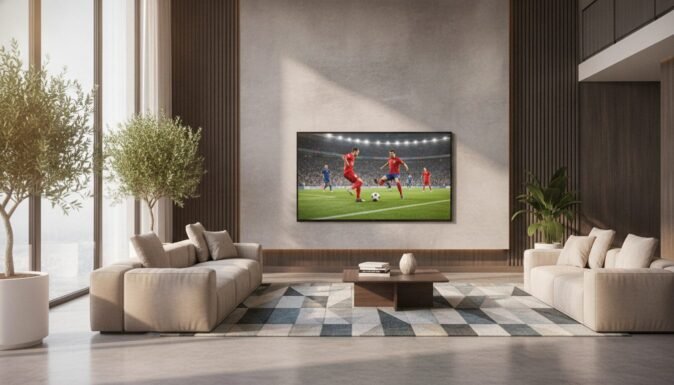
Best TV for Sports in 2026: Zero Motion Blur & Blazing Brightness
Watching a high-stakes match with lagging motion blur, washed-out colors, or distracting reflections can completely ruin the excitement of game day. With major athletic events like the 2026 World Cup pushing our displays to the absolute limit, having a television engineered specifically to track rapid action is essential. In our testing, we found that the right display technology brings the raw energy of the stadium directly into your living room.
To help you make the perfect upgrade, we have analyzed the market’s leading displays for brightness, motion interpolation, and raw processing power. Whether you need an ultra-bright Mini-LED screen to battle direct sunlight or a lightning-fast OLED with near-instant response times, this guide highlights the absolute best tv for sports in 2026. Below is our curated list of top-performing options that guarantee a blur-free match day experience.
Table of Contents
At a Glance: Top 5 Best TVs for Sports
If you want a quick breakdown before diving into the detailed reviews, here is a summary of our top recommended televisions for sports viewing.
| Product Name | Key Features | Ideal Use |
|---|---|---|
| Sony BRAVIA 8 II | XR Processor with AI, 120Hz, QD-OLED Panel, Perfect Blacks | Premium Cinematic Experience & Upscaling |
| LG C5 OLED | Alpha 9 Gen8, 144Hz Refresh Rate, 0.1ms Response Time, Anti-Glare | Fast-Motion Action & Multi-Console Gaming |
| TCL 65QM8K | Mini-LED Tech, 5000 Nits Brightness, 144Hz/288Hz Refresh, Halo Control | Sun-Drenched Rooms & High-Vibrancy Viewing |
| Hisense U7 | Native 165Hz Refresh, 3000 Nits Brightness, Hi-View AI Engine Pro | Budget-Friendly Speed & Outdoor Patios |
| Roku Plus Series | QLED & Mini-LED, Roku Smart Picture Max, Built-in Subwoofer | Streamlined Navigation & Simple Budget Setup |
🥇 1. Sony BRAVIA 8 II

Best Overall for Image Processing and Motion: If you watch a lot of cable TV broadcasts or standard HD streaming feeds, this premium screen is your absolute best bet. Sony’s proprietary processing chip handles low-resolution feeds with ease, cleaning up raw signals to deliver a beautifully crisp near-4K image on screen. In our testing, fast-moving footballs and tennis balls retained spectacular detail without any artificial trailing.
- Advanced Cognitive Processing: The XR Processor with AI monitors scenes in real-time, matching details to human focal points.
- High-End QD-OLED Panel: Utilizes over eight million self-lit pixels to output stunning contrast and true, rich black levels.
- AI-Powered Upscaling: Delivers incredible results with compressed cable feeds, making non-4K sports broadcasts look strikingly sharp.
- Premium Audio Output: Built-in acoustic speakers handle dialog clearly, while the high-end eARC system seamlessly integrates with soundbars.
- Sturdy, Elegant Build: Heavy-duty craftsmanship ensures the TV remains incredibly stable on its metal console stand.
Pros
- Spectacular Motion Handling: Fast-paced sports look incredibly fluid with zero unnatural artifacts.
- Top-Tier Signal Cleaning: XR Processor does an outstanding job converting low-resolution sports feeds into native-looking 4K.
- Phenomenal Color Accuracy: Out-of-the-box color profiles reproduce deep stadium greens and vibrant jerseys accurately.
- Strong Bass and Dialog: Integrated acoustic speakers provide rich, room-filling sound during intense game moments.
Cons
- Requires Two People to Mount: The premium build is notably heavy, requiring careful handling during setup.
- Occasional Power Quirks: Some users noted minor power-cycling hiccups during initial firmware updates.
🥈 2. LG C5 OLED

Best for High-Speed Tracking and Gaming: For viewers who watch rapid, split-second action like hockey or racing, the LG C5 is a spectacular choice. Its native 144Hz refresh rate combined with a near-instantaneous response time prevents any trailing or ghosting. We found that the low-glare, UL-certified panel works remarkably well to suppress annoying room reflections during daytime matches.
- Native 144Hz Refresh Rate: Delivers incredibly smooth frame transitions, which is crucial for fast camera panning.
- 0.1ms Response Time: Eliminates standard motion blur, ensuring high-speed balls and players stay perfectly crisp.
- Alpha 9 Gen8 Processor: Uses advanced AI upscaling and frame analysis to keep streaming feeds clear and vibrant.
- UL-Verified Anti-Glare: Specially treated panel surface reduces reflections from windows and lamps.
- Magic Remote Experience: Includes an interactive point-and-click scroll wheel that makes menu navigation very snappy.
Pros
- Exceptional Pixel Speed: Virtually zero motion blur or screen tearing during intense, rapid game sequences.
- Effective Reflection Suppression: Low-glare screen treatment handles ambient room light beautifully.
- Outstanding Gaming Specs: A premier choice for playing sports video games, supporting 4K/144Hz and VRR.
- Upgraded webOS Platform: Features a snappy, modern layout with quick access to all major streaming services.
Cons
- Remote Pointer Sensitivity: The default motion-sensing remote pointer can feel overly sensitive for some users.
- Lower Peak Brightness: While fantastic for an OLED, it cannot match the blinding brightness of premium Mini-LED models.
🥉 3. TCL 65QM8K

Best for Daylight Rooms and Dramatic Contrast: If your main viewing area has large windows that let in tons of sunlight, this Mini-LED model is a powerhouse. It achieves an incredible 5,000 nits of peak brightness, allowing it to easily overpower glare. We noticed that the black levels look remarkably deep, almost rivaling OLED, but with much more color volume and visual punch.
- Blistering 5000 Nits Peak: The absolute brightest display in this roundup, perfect for sun-drenched spaces.
- Halo Control Local Dimming: Effectively minimizes blooming around on-screen scoreboards and white graphics.
- Native 144Hz Refresh Rate: Keeps high-motion camera pans fluid, with optional 288Hz Game Accelerator support.
- Premium Sound Tuning: Features integrated drivers with deep bass to deliver realistic stadium crowd noise.
- Slim ZeroBorder Design: Minimizes bezel distraction so you can stay fully focused on the field.
Pros
- Dominates Ambient Glare: Blazes through bright living room environments without washed-out colors.
- Incredible Bright Room Contrast: Mini-LED backlighting maintains spectacular contrast even under direct light.
- Heavy, Sturdy Base: The center-mount stand provides solid support and fits easily on narrow furniture.
- Unbeatable Value Proposition: Delivers premium flagship-level performance at a highly competitive price point.
Cons
- Slight Interface Lag: Certain native apps (such as Hulu) can occasionally feel a bit slow to load.
- Heavier Battery Consumption: The advanced voice remote is convenient but drains batteries quickly.
🏅 4. Hisense U7 Mini-LED
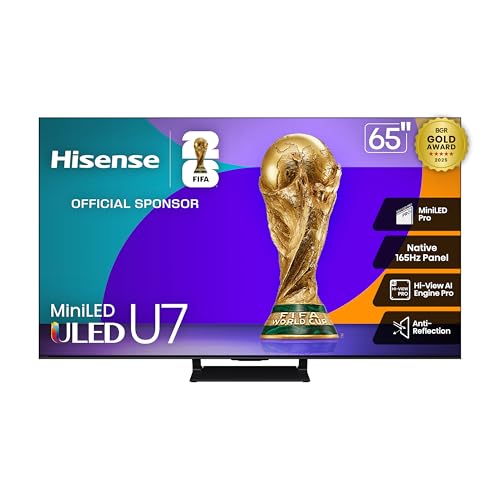
Best Value for High-Refresh Performance: Fans of high-speed sports like hockey, rugby, or motorsports will love the Hisense U7’s native 165Hz panel. This extra speed keeps fast panning shots exceptionally smooth. We found that the specialized anti-reflection coating is highly effective, making this an ideal choice for bright rooms or even covered outdoor patios.
- Native 165Hz Panel: Delivers one of the fastest native refresh rates available, ensuring absolute motion clarity.
- Hi-View AI Engine Pro: Automatically optimizes the contrast, colors, and shadow detail of live sporting events.
- 3000 Nits Peak Brightness: Offers plenty of headroom for bright rooms and striking high-dynamic-range highlights.
- Anti-Reflection Screen: Deflects light glare without washing out the screen’s rich color volume.
- 2.1.2 Surround Audio: Uses dedicated height speakers to project audio clearly, making commentary easy to follow.
Pros
- Ultra-Smooth 165Hz Speed: Keeps fast-flying hockey pucks and racing cars perfectly sharp and legible.
- Highly Effective Anti-Glare: Disperses harsh light reflections across the screen’s surface.
- Impressive Dialogue Tuning: Built-in speakers output crisp dialogue, making commentators’ voices pop.
- Exceptional Price-to-Performance: A highly affordable entry-point for flagship gaming and sports features.
Cons
- Narrower Seating Angles: Viewing the screen from a sharp side angle causes a slight loss in color accuracy.
- Slight Menu Stuttering: Rapidly browsing through the Google TV dashboard can occasionally cause minor system lag.
🏅 5. Roku 65-inch Plus Series

Best Budget TV with Simple Navigation: If you want a great picture without a complicated setup, the Roku Plus Series is an outstanding, budget-friendly option. It utilizes Mini-LED backlighting to bring out rich colors and sharp details that standard budget screens miss. In our testing, the simple Roku interface made hopping between sports apps incredibly fast and intuitive.
- Mini-LED with QLED: Provides rich, accurate quantum-dot colors with deep contrast and bright highlights.
- Roku Smart Picture Max: Automatically optimizes settings in the background so you get the best image without manual tweaking.
- Built-In Subwoofer: Delivers surprisingly rich low-end sound, capturing the deep roar of stadium crowds.
- Voice Remote Pro: Includes a convenient lost-remote finder that beeps when you ask it to.
- Metal Feet Support: Heavy-duty metal legs provide fantastic stability on your media console.
Pros
- Easiest Interface on the Market: Roku’s home screen is fast, completely uncluttered, and simple for anyone to use.
- Automatic Image Optimization: Smart Picture Max keeps games looking sharp and bright without manual setup.
- Lost-Remote Finder: A lifesaver for busy living rooms during hectic game days.
- Cinematic Sound Depth: Integrated subwoofer adds impressive weight to crowd noises and sound effects.
Cons
- Basic Configuration Settings: Hardcore AV enthusiasts will find the settings menus a bit too simple.
- Minor Motion Trailing: Can occasionally show minor blur during extremely fast-moving sports camera pans.
Final Verdict
Choosing the right screen depends entirely on your specific room layout and viewing habits. If you want the absolute gold standard in motion tracking and upscaling for standard HD cable feeds, the Sony BRAVIA 8 II is our top recommendation. For sun-drenched living rooms, the incredible 5,000-nit brightness of the TCL 65QM8K is the clear winner. Meanwhile, gamers and high-speed sports fans will love the lightning-fast pixel speed of the LG C5 OLED, while budget-focused viewers who want simple streaming will find incredible value in the Roku Plus Series.
| Product | Best For |
|---|---|
| Sony BRAVIA 8 II | Best Overall Picture & Upscaling |
| LG C5 OLED | Best for Fast-Action Motion & Console Gaming |
| TCL 65QM8K | Best for Ultra-Bright Rooms & High Vibrancy |
| Hisense U7 | Best Refresh Rate for the Money |
| Roku Plus Series | Best Budget Choice & Easy Streaming |
Frequently Asked Questions
What refresh rate is best for watching sports?
For fast-moving sports like football, basketball, and racing, a TV with a native refresh rate of at least 120Hz is highly recommended. Standard 60Hz televisions can struggle to keep up, leading to distracting motion blur and “ghosting” trailing behind fast-moving objects. Displays with 144Hz or 165Hz panels provide even smoother frame transitions, completely eliminating trailing effects.
Is OLED or Mini-LED better for watching sports in a bright room?
If your living room has large windows and suffers from direct sunlight, Mini-LED is the superior choice because it can reach extremely high peak brightness levels (often between 3,000 and 5,000 nits) to overpower glare. While OLED offers better viewing angles and perfect contrast, its lower peak brightness can make the image look slightly washed out in direct daylight.
Do sports broadcasts stream in native 4K?
Most live sporting events are still broadcast in 720p or 1080i high-definition (HD) by cable providers. This is why premium upscaling technology—like Sony’s XR AI Processor or LG’s Alpha 9 chip—is so important. These chips analyze and clean up the lower-resolution signal, converting it to a sharp, near-4K picture in real-time.
Why does my TV show a “soap opera effect,” and how do I fix it?
The “soap opera effect” is caused by motion interpolation, which artificially inserts extra frames to make the video look ultra-smooth. While helpful for fast sports panning, it can make standard movies and shows look cheap or unnatural. You can easily adjust or disable this feature by navigating to your TV’s picture settings and turning down “Motion Smoothing” or “Judder Reduction.”
Is an external soundbar necessary for watching sports?
While high-end TVs like the Roku Plus Series or Hisense U7 feature surprisingly robust built-in sound systems, a dedicated soundbar or surround sound system is always recommended for the best experience. An external soundbar provides wider stereo separation and a dedicated center channel, which separates commentator commentary from background stadium crowd noises.
Last update on 2026-10-22/Affiliate links / Images from Amazon Product Advertising API