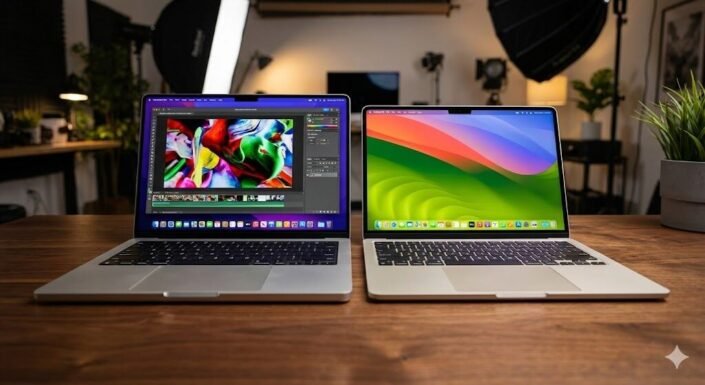
M4 vs. The Rest: The 5 Best MacBooks to Buy in 2025
Whether you are a creative professional, a student, or a business owner, choosing the right Apple laptop is a significant investment. The best MacBooks offer an incredible blend of performance, battery life, and build quality that is hard to match in the Windows world.
With the release of the M4 chips, Apple has widened the gap between its entry-level and pro-tier machines. In this roundup, we break down the top 5 models available in 2025, helping you decide which MacBook fits your specific workflow and budget.
Table of Contents
At a Glance: Top 5 Best MacBooks
| Product Name | Key Features | Ideal Use |
|---|---|---|
| Apple 2024 M4 MacBook Pro | M4 Chip, XDR Display, 120Hz | Heavy Creative Work & Coding |
| Apple 2025 MacBook Air (M4) | M4 Chip, Ultra-Lightweight | Everyday Power Users |
| Apple 2024 M3 MacBook Air | M3 Performance, 13.6″ Retina | Balanced Value & Power |
| Apple 2022 M2 MacBook Air | Modern Design, MagSafe | Students & General Use |
| 2021 Apple MacBook Pro | M1 Pro/Max, HDMI & SD Slots | Budget Professional Work |
Top 5 Best MacBooks 2025
🥇1. Apple 2024 M4 MacBook Pro (14-inch)

Best For: Professionals who push their hardware to the limit with editing, coding, and 3D rendering.
This machine is built for people who need serious power in a portable form factor. The M4 chip delivers incredibly fast CPU and GPU performance, ensuring smoother timelines and quicker exports than previous generations. With a stunning Liquid Retina XDR display, it offers the color accuracy and brightness that creative pros demand.
- M4 Powerhouse: Delivers blazing-fast speeds for heavy multitasking and dedicated media engines for video work.
- Stunning Display: 14-inch Liquid Retina XDR screen with high contrast and ProMotion (120Hz) for fluid scrolling.
- Pro Connectivity: Includes HDMI, SD card slot, and multiple Thunderbolt ports to fit into any desk setup.
- All-Day Battery: Efficient enough to last through a full workday of mixed productivity and creative tasks.
- MagSafe Charging: Quick, safe charging that frees up your Thunderbolt ports for peripherals.
🥈2. Apple 2025 MacBook Air 13-inch (M4)

Best For: Users wanting next-generation performance in the most portable package possible.
The 2025 Air with M4 is perfect for those who want the latest tech without the bulk of a Pro model. It handles everyday workloads—like endless browser tabs, office apps, and light coding—while staying completely silent and cool. It’s the ultimate grab-and-go laptop that doesn’t compromise on speed.
- Next-Gen Chip: The M4 processor handles office work and light editing with ease while remaining cool.
- Ultra-Portable: Retains the incredibly thin and light design that makes the Air famous.
- Vibrant Visuals: 13.6-inch Liquid Retina display offers crisp text and comfortable brightness.
- Extended Battery: Easily powers through a full day of school or work without needing a charger.
- Multi-Display Support: Capable of driving external monitors to anchor a home desk setup.
🥉3. Apple 2024 M3 MacBook Air 13-inch

Best For: Buyers seeking the sweet spot between modern performance and price.
This model strikes an excellent balance, offering the sleek modern design at a better value than the newest release. The M3 chip provides plenty of horsepower for multitasking, streaming, and photo editing without feeling sluggish. It is a fantastic companion for commuting and travel.
- Capable Performance: 8-core CPU and up to 10-core GPU handle multitasking and media effortlessly.
- Modern Design: Features the same flat-edged chassis and MagSafe charging as the newer models.
- Great Media Tech: Includes a 1080p FaceTime camera and a three-mic array for clear video calls.
- Portable Build: Thin and light enough to slip into any bag for campus life or travel.
- Solid Battery: Reliable all-day battery life keeps you untethered from the wall.
🏅4. Apple 2022 MacBook Air (M2)
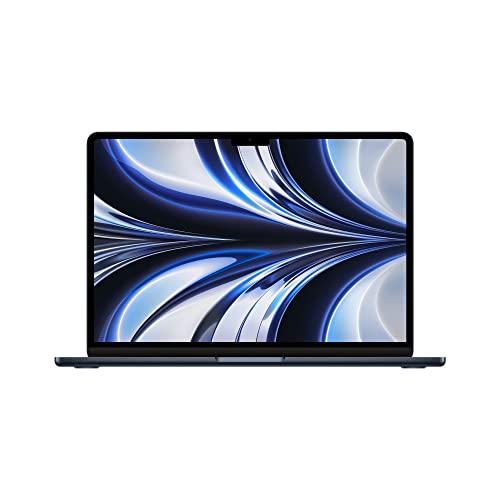
Best For: Students and freelancers looking for the best value-for-money modern MacBook.
The M2 Air was the first to introduce the new flat-edged design, and it holds up incredibly well today. It offers a significant jump over the M1, keeping apps snappy while looking sleek with its slim bezels. If you are shopping on a budget but want the modern look and MagSafe, this is the one to get.
- Redesigned Chassis: The first Air to feature the modern, flat look and larger Liquid Retina display.
- MagSafe Return: Features the beloved magnetic charging port, keeping USB-C ports free.
- Lightweight: Weighs around 2.7 lbs, making it effortless to carry daily.
- Responsive Daily Use: The M2 chip is perfect for documents, browsing, and video calls.
- Silent Operation: Fanless design means it never makes noise, ideal for quiet environments.
🏅5. 2021 Apple MacBook Pro (14-inch)
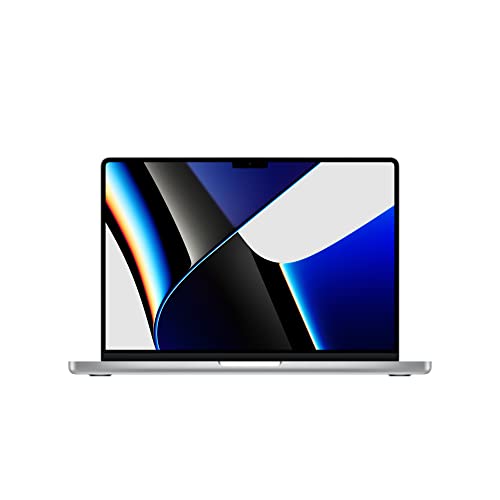
Best For: Budget-conscious creators who need professional ports and sustained performance.
Even a few years later, the M1 Pro and M1 Max chips remain absolute beasts for professional workloads. This generation brought back essential ports like HDMI and the SD card slot, which videographers and photographers love. It is a proven workhorse that offers immense value if you can find it refurbished or new.
- Pro Performance: M1 Pro/Max chips still crush complex audio, video, and 3D tasks.
- Essential Ports: Built-in HDMI and SD card reader eliminate the need for dongles.
- Active Cooling: Fans allow for sustained high performance during long renders.
- XDR Display: Features the same high-end Mini-LED screen tech found in newer Pro models.
- Value Proposition: Offers pro-level specs at a price point often lower than new mid-range options.
Final Verdict
The right MacBook for you depends entirely on your workload. If you are a professional creator needing the fastest render times and best screen, the M4 MacBook Pro is the clear winner. For students and general users, the M4 or M3 MacBook Air offers more than enough power in a design that is easy to carry all day.
| Product | Best For |
|---|---|
| M4 MacBook Pro | Heavy Creative Workflows |
| 2025 M4 MacBook Air | Portability & Speed |
| M3 MacBook Air | Balanced Value |
| M2 MacBook Air | Budget Modern Choice |
| 2021 MacBook Pro | Pro Features for Less |
Frequently Asked Questions (FAQs)
1. What is the main difference between the MacBook Air and MacBook Pro?
The MacBook Pro has active cooling (fans), a better XDR display with 120Hz refresh rate, and more ports like HDMI and SD slots. The Air is fanless, thinner, lighter, and designed for general productivity.
2. Is the M2 MacBook Air still worth buying in 2025?
Absolutely. For general tasks like web browsing, writing, and streaming, the M2 chip is still very fast. It features the modern design and MagSafe charging, making it a great value.
3. Can the MacBook Air handle video editing?
Yes, especially the M3 and M4 models. They can easily handle 4K video editing for social media or YouTube. However, for complex professional timelines or 3D work, the MacBook Pro is better due to active cooling.
4. How long does the battery last on these MacBooks?
Apple Silicon MacBooks have excellent battery life. You can expect most of these models, especially the Air lineup, to last a full 8-10 hour workday or school day on a single charge.
5. Do I need the M4 chip or is M3 enough?
For most users, the M3 is plenty powerful. You should upgrade to the M4 if you want the absolute latest performance efficiency, plan to keep the laptop for 5+ years, or do slightly more demanding work.
Last update on 2026-04-11/Affiliate links / Images from Amazon Product Advertising API