Look Pro in 4K: The 5 Best Business Webcams of 2026
If you are working from home, attending endless virtual meetings, or creating professional content, having a high-quality webcam makes all the difference. Grainy video and poor lighting can distract from your message, while a crisp, clear image commands authority and keeps your audience engaged.
In this guide, I’ve rounded up the top 5 best business webcams of 2025. I have analyzed their video resolution, microphone quality, low-light performance, and AI features to help you find the perfect upgrade for your home office setup. Let’s look at the best options to upgrade your video presence.
Table of Contents
At a Glance: Top 5 Best Business Webcams
| Product Name | Key Features | Ideal Use |
|---|---|---|
| Logitech MX Brio 705 | 4K HDR, AI Auto-Framing | Business Leaders & Executives |
| OBSBOT Tiny 2 4K | AI Gimbal Tracking, Gesture Control | Presenters & Teachers |
| Insta360 Link 2C | 1/2″ Sensor, Whiteboard Mode | Creative Professionals |
| Anker PowerConf C200 | 2K Resolution, Adjustable FOV | Budget-Friendly Home Office |
| Microsoft Modern Webcam | 1080p, Teams Certified | Corporate & Enterprise |
Top 5 Best Business Webcams 2025
🥇1. Logitech MX Brio 705 4K

Best For: The Ultimate Professional Standard
The Logitech MX Brio 705 is widely considered the new gold standard for professional webcams in 2025. Designed for leaders and creators who demand studio-level clarity, it delivers crystal-clear 4K resolution with stunning dynamic range. Thanks to RightLight 5 with HDR technology, you look your best even in tricky lighting conditions, from bright windows to dim rooms.
- Superior Clarity: Delivers 4K resolution with lifelike color accuracy.
- AI Auto-Framing: Keeps you perfectly centered during presentations even if you move.
- Great Audio: Dual beamforming microphones capture precision voice while reducing background noise.
- Certified: Fully certified for Microsoft Teams, Zoom, and Google Meet.
- Sustainable: Built with 62% post-consumer recycled plastic.
🥈2. OBSBOT Tiny 2 4K AI Webcam

Best For: Dynamic Presentations and Teaching
The OBSBOT Tiny 2 4K takes intelligence to a new level with its ultra-smooth gimbal system. It physically pans, tilts, and zooms to follow you, allowing for completely hands-free operation. This is a game-changer for teachers or presenters who need to move around the room while staying sharp and well-lit thanks to the dual native ISO sensor.
- AI Tracking: Advanced gimbal system follows your movement automatically.
- Gesture Control: Start tracking or zoom in/out simply by raising your hand.
- Low Light King: F1.9 aperture lens provides excellent performance in dim settings.
- Presentation Modes: Features DeskView and Whiteboard View for showing materials.
- Voice Control: Built-in voice pickup mics keep speech crisp.
🥉3. Insta360 Link 2C 4K

Best For: Studio Quality and Creative Control
This next-gen AI webcam brings studio production power straight to your desk. The Insta360 Link 2C features a large 1/2-inch image sensor that delivers ultra-sharp 4K clarity and natural skin tones that outperform many standard webcams. It uses phase-detection autofocus to lock onto your face with buttery-smooth precision.
- Large Sensor: 1/2-inch sensor provides rich contrast and professional depth.
- Smart Modes: Includes Whiteboard Mode to flatten text and Overhead Mode for tutorials.
- Clear Audio: Dual noise-canceling mics with directional voice focus.
- DeskView: Instantly shifts to top-down framing for sketches or demos.
- HDR Support: Auto-adjusting brightness keeps you properly exposed.
🏅4. Anker PowerConf C200 2K

Best For: High Performance on a Budget
The Anker PowerConf C200 is a fantastic budget-friendly option that doesn’t sacrifice quality. It captures 2K video, which is noticeably sharper than traditional 1080p, and features reliable autofocus. It is compact, easy to clip onto monitors, and offers a plug-and-play experience that is hard to beat for the price.
- Sharp Video: 2K resolution offers vivid colors and clear details.
- Adjustable View: Choose between 65°, 78°, or 95° field of view to frame your shot.
- Voice Isolation: Built-in dual microphones use noise reduction to isolate your voice.
- Privacy: Comes with a built-in privacy cover for peace of mind.
- Customizable: AnkerWork software lets you tweak brightness and contrast.
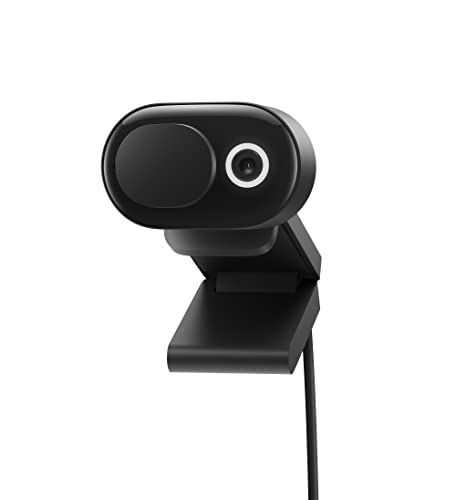
🏅5. Microsoft Modern Webcam
Best For: Corporate Reliability and Teams Users
Rounding out the list is the Microsoft Modern Webcam, a no-nonsense option built for dependability. It captures Full HD 1080p video with True Look image optimization to balance exposure and skin tone naturally. It is designed to be easily deployed in corporate environments and works seamlessly with Microsoft Teams.
- True Look: Optimizes facial light and skin tone for a flattering image.
- HDR Support: Retains detail in both bright and shadowed environments.
- Secure: Features an integrated physical privacy shutter.
- Teams Certified: Ensures seamless compatibility with Microsoft platforms.
- Audio Note: Best paired with a headset or external microphone for optimal audio.
Final Verdict
If you need the absolute best image quality and color accuracy, the Logitech MX Brio 705 is the top choice for 2025. For presenters who move around and need a camera that follows them, the OBSBOT Tiny 2 is unmatched. If you are looking for a massive upgrade on a budget, the Anker PowerConf C200 offers incredible value.
| Product | Best For |
|---|---|
| Logitech MX Brio 705 | Best Overall Professional |
| OBSBOT Tiny 2 4K | Best for Motion/Tracking |
| Insta360 Link 2C | Best Image Sensor |
| Anker PowerConf C200 | Best Budget Pick |
| Microsoft Modern Webcam | Best for Corporate Deployments |
Frequently Asked Questions (FAQs)
Do I really need a 4K webcam for video calls?
While most video conferencing platforms like Zoom and Teams compress video to 1080p, a 4K webcam allows you to crop and zoom in without losing quality. It also provides a sharper, more detailed image that downscales beautifully to 1080p.
What is AI Auto-Framing?
AI Auto-Framing uses the camera’s software to detect your position and automatically zoom or pan to keep you centered in the frame. This is useful if you shift in your chair or move around during a presentation.
Does lighting matter more than the camera?
Lighting is crucial, but modern webcams with HDR (High Dynamic Range) like the Logitech MX Brio and OBSBOT Tiny 2 are designed to compensate for poor lighting. They can balance a bright window behind you or brighten up a dim room significantly better than older cameras.
Are these webcams plug-and-play?
Yes, all the webcams on this list connect via USB and are generally plug-and-play for basic functionality. However, installing their respective software (like Logi Tune or AnkerWork) unlocks advanced features like manual exposure control and firmware updates.
Which webcam is best for privacy?
Most professional webcams now prioritize privacy. The Logitech MX Brio 705, Anker PowerConf C200, and Microsoft Modern Webcam all feature physical privacy shutters that block the lens when not in use.
Last update on 2026-10-23/Affiliate links / Images from Amazon Product Advertising API