5 Best Portable Monitors for Laptops in 2025 (Review & Guide)
If you’re looking to boost your productivity or upgrade your travel setup with a portable second screen, you’ve come to the right place. A portable monitor is one of the best ways to expand your laptop’s screen real estate, whether you’re a remote worker, a frequent traveler, a student, or a gamer.
Today, we’re checking out the top 5 best portable monitors for laptops, carefully chosen for their display quality, portability, connectivity, and overall value. We’ve analyzed their features to help you find the perfect match for your mobile workflow.
Table of Contents
At a Glance: Top 5 Best Portable Monitors for Laptops
| Product Name | Key Features | Ideal Use |
| Lenovo ThinkVision M14t Gen 2 | 14″ 2.2K (2240×1400) Touchscreen, USB-C | Professionals & Artists |
| ASUS ROG Strix XG17AHPE | 17.3″ FHD (1920×1080) 240Hz, Built-in Battery | Mobile Gamers |
| ARZOPA 16″ 2.5K Portable Monitor | 16″ QHD (2560×1600), 500-nits, Lightweight | All-Purpose Users |
| Dell P1424H Portable Monitor | 14″ FHD (1920×1080) IPS, Single USB-C | Mobile Professionals |
| ASUS ZenScreen MB27ACF | 27″ QHD (2560×1440), 2.1 Audio w/ Sub, C-clamp | Hybrid Workspaces |
Top 5 Best Portable Monitors for Laptops 2025
🥇1. Lenovo ThinkVision M14t Gen 2
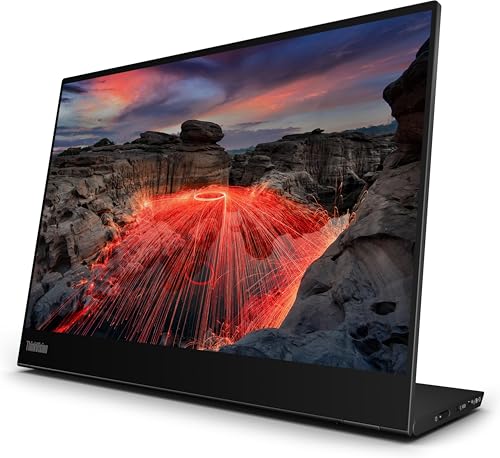
Best for Productivity & Creatives: This 14-inch glossy 2.2K display offers a 16:10 aspect ratio, making it a lifesaver for flipping between apps, hammering out reports, or tweaking graphics. The touch controls add an interactive layer, allowing you to glide through menus or sketch with dead-on precision.
- 14-inch 2240×1400 (16:10) glossy display
- Precise touch and pen support for sketching and navigation
- Extremely thin and lightweight with a rugged build
- Single USB-C for power and video passthrough
- Adjustable stand and wide viewing angles
🥈2. ASUS ROG Strix XG17AHPE

Best for Mobile Gaming: This 17.3-inch portable monitor is a gaming powerhouse, cramming desktop-caliber muscle into a sleek shell. It features a blazing-fast 240Hz refresh rate and 3ms response time for silky-smooth visuals in competitive, edge-of-your-seat battles.
- 17.3-inch Full HD (1920×1080) IPS display
- Incredible 240Hz refresh rate and 3ms response time
- Adaptive-Sync technology eliminates screen tearing
- Built-in battery for up to 3 hours of 240Hz gaming
- Hybrid USB-C and micro-HDMI ports for versatile connectivity
🥉3. ARZOPA 16″ 2.5K Portable Monitor
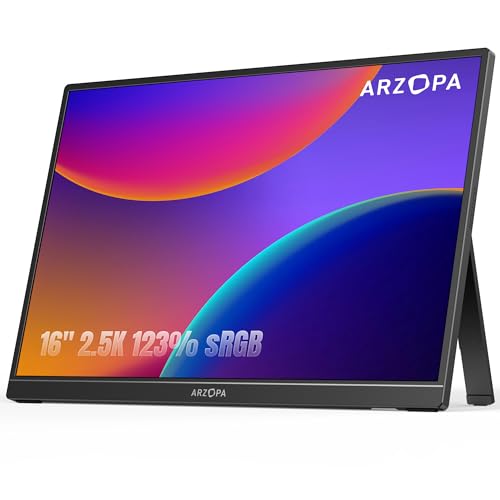
Best All-Rounder: This ARZOPA monitor hits the ideal mix of crisp views and practical perks. Its 16-inch 2.5K QHD display brings content to life with punchy shades and fine lines, while the 16:10 aspect ratio gives you extra vertical space for coding, reading, or spreadsheet wrangling.
- 16-inch 2560×1600 QHD resolution
- Bright 500-nit display with a 1200:1 contrast ratio
- 16:10 aspect ratio for extra vertical screen space
- Ultra-slim (0.36″) and lightweight (1.46 lbs)
- Plug-and-play setup via USB-C or HDMI
🏅4. Dell P1424H Portable Monitor

Best for Mobile Professionals: This Dell monitor is a straightforward, stylish answer for pros chasing that dual-display edge. Tipping the scales at under 1.5 pounds, its slim 14-inch Full HD screen serves up clear shots and broad viewing angles, ideal for juggling windows or group brainstorms.
- 14-inch Full HD (1920×1080) IPS screen
- 16:9 aspect ratio for standard multimedia and decks
- Single USB-C line handles both power and video
- Sturdy yet airy construction packs without bulk
- Intuitive prop adjusts for comfortable marathon sessions
🏅5. ASUS ZenScreen MB27ACF
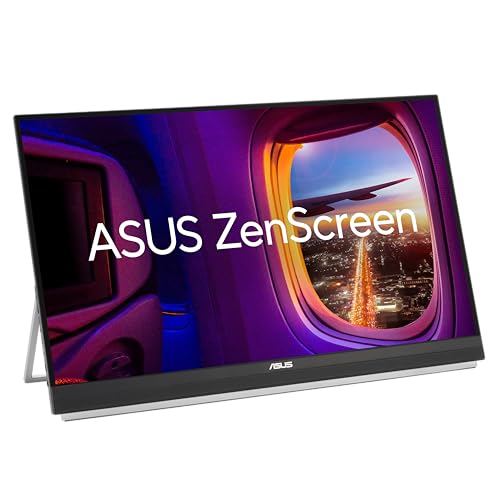
Best Large Portable Display: For those who want a massive screen that can still move, the ZenScreen MB27ACF shakes up the category. Its hefty 27-inch QHD IPS slab nails pinpoint clarity and spot-on colors, yet it stays surprisingly trim and light, making it a cinch to tote and deploy on different desks.
- Massive 27-inch QHD (2560×1440) IPS display
- Versatile mounting: built-in handle, C-clamp, and wall mount
- Full USB-C (w/ 70W power delivery), HDMI, and audio jack
- Powerful 2.1-channel sound system with a subwoofer
- ENERGY STAR certified with eco-friendly packaging
Final Verdict
That wraps up our list of the top 5 best portable monitors for laptops! Whether you’re a gamer needing a high refresh rate like the ASUS ROG Strix, a professional needing the touch-enabled Lenovo M14t, or someone who wants a massive screen like the ZenScreen MB27ACF, there’s a perfect option for your setup.
| Product | Best For |
| Lenovo ThinkVision M14t Gen 2 | Productivity & Touch |
| ASUS ROG Strix XG17AHPE | High-Refresh Rate Gaming |
| ARZOPA 16″ 2.5K Monitor | All-Around Value |
| Dell P1424H Monitor | Ultralight Travel |
| ASUS ZenScreen MB27ACF | Large Hybrid Workspaces |
Frequently Asked Questions (FAQs)
What are the main benefits of a portable monitor for a laptop?
The primary benefit is increased productivity. Studies have shown that having a dual-screen setup can boost productivity by 20-30% by reducing the need to constantly switch between windows. It’s also great for enhancing presentations, improving ergonomics, and enjoying media on a larger screen while traveling.
How do portable monitors connect to a laptop?
Most modern portable monitors connect via a single USB-C cable that supports DisplayPort Alt Mode. This single cable can often handle both the video signal and power. For laptops without this type of USB-C port, monitors also frequently include a mini-HDMI port for video and a separate USB-C port for power.
Do portable monitors need their own power source?
It depends on the model. Many monitors can draw power directly from your laptop via a single USB-C cable. However, this will drain your laptop’s battery faster. Some monitors, especially gaming models like the ASUS ROG Strix, include a built-in battery. Others may require a separate power adapter or a second USB port for power, especially when using an HDMI connection.
Are portable monitors good for gaming?
Yes, some are specifically designed for it! Models like the ASUS ROG Strix XG17AHPE offer high refresh rates (up to 240Hz), low response times, and Adaptive-Sync technology. These features make them excellent for a high-performance gaming setup on the go, whether with a laptop or a console like the Nintendo Switch.
What’s the difference between a 16:9 and 16:10 aspect ratio?
A 16:9 aspect ratio (like 1920×1080) is the standard for most widescreen video content and is great for watching movies. A 16:10 aspect ratio (like 2560×1600) is slightly taller, giving you more vertical screen space. This extra height is often preferred for productivity tasks like reading documents, coding, or browsing websites, as it requires less scrolling.
Last update on 2026-10-24/Affiliate links / Images from Amazon Product Advertising API