Pro Curving System : The 5 Best CNC Router for Woodworking
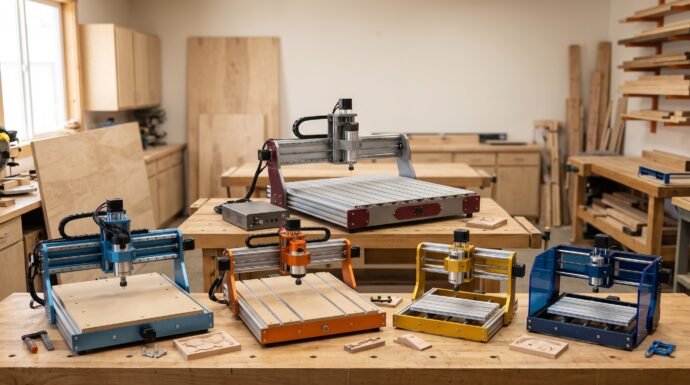
Choosing the best cnc router for woodworking depends on more than spindle power alone. The machine’s working area, frame rigidity, cutting depth, motion system, software compatibility, and upgrade options all influence the projects you can complete and the level of detail you can achieve.
Some woodworkers need a compact desktop CNC for personalized gifts, signs, and decorative engraving. Others need a larger machine with a more rigid motion system for furniture components, relief carving, and repeatable workshop production.
This comparison covers five options across those needs: the Genmitsu 4040-PRO MAX, FoxAlien Masuter Pro, NymoLabs NBS-6040 Router, LUNYEE 3018PRO MAX, and SainSmart 3018-PROVer V2. The goal is to explain their meaningful differences and help you choose a machine that suits your available workspace, project size, and budget.
Table of Contents
At a Glance
| Product | Verified Key Features | Ideal Use Case |
|---|---|---|
| Genmitsu 4040-PRO MAX | 400 × 400 mm working area, 710W router, reinforced platform, GRBL control | Larger woodworking projects and detailed carving |
| FoxAlien Masuter Pro | 400 × 400 mm working area, 60W stock spindle, aluminum frame, linear Z-axis rails | Hobby woodworking and upgrade-friendly projects |
| NymoLabs NBS-6040 Router | 610 × 410 mm working area, 710W spindle, linear guide rails, ball screws | Larger projects and rigidity-focused workshop use |
| LUNYEE 3018PRO MAX | 300 × 180 × 80 mm working area, 500W spindle, six limit switches | Compact woodworking and craft projects |
| SainSmart 3018-PROVer V2 | 290 × 180 × 40 mm working area, 32-bit control board, aluminum spoilboard, Z-probe | Beginners, small signs, and decorative engraving |
Top 5 Best CNC Router for Woodworking
1. Genmitsu 4040-PRO MAX
Overview
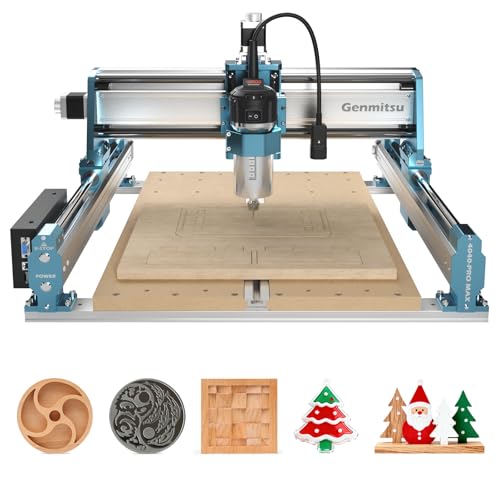
The Genmitsu 4040-PRO MAX is a desktop CNC router for woodworkers who want a relatively large cutting area without moving to a full-size industrial machine. Its 400 × 400 mm working area accommodates projects that would be difficult to fit on a compact 3018-class router.
Its 710W digital-display router, aluminum construction, and reinforced spoilboard make it a compelling option for hobbyists who plan to cut wood regularly rather than limit themselves to light engraving. The manufacturer also specifies GRBL compatibility and support for selected accessories and upgrades.
The key consideration is that a powerful spindle does not automatically guarantee flawless cuts. Tool selection, workholding, cutting depth, feed rate, and machine setup still determine the finished result.
5 Key Features
- 400 × 400 mm working area: The square work envelope gives you room for larger signs, panels, decorative reliefs, and multiple smaller components in one setup.
- 710W digital-display router: The included router provides substantially more rated power than the small stock spindle found on many entry-level desktop CNC machines.
- Mixed linear-rail and lead-screw motion system: The specified drive arrangement helps guide movement across the axes. Good alignment and maintenance remain important for consistent carving.
- Reinforced spoilboard: The platform incorporates a central aluminum support bar and T-tracks, helping support the work surface and providing practical clamping options.
- GRBL compatibility and expansion options: The machine supports compatible CNC software and selected accessories, giving owners room to adapt their workflow as their projects change.
Pros
- Large square working area for a desktop machine.
- More substantial included router than typical low-power engraving machines.
- Reinforced work platform with T-track clamping provisions.
- Supports compatible software and selected expansion accessories.
Cons
- Requires more bench space than compact desktop routers.
- The higher-powered router and larger frame do not eliminate the need for careful feeds, workholding, and setup.
2. FoxAlien Masuter Pro
Overview
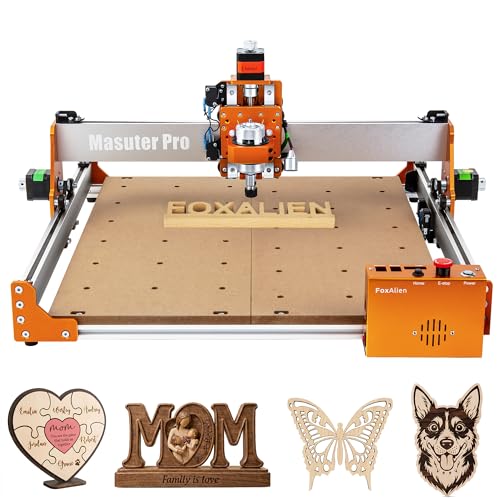
The FoxAlien Masuter Pro is a hobby-oriented CNC router that combines a 400 × 400 mm working area with an aluminum frame and a linear-rail Z-axis. It is particularly interesting for woodworkers who want a sizable cutting area but may eventually upgrade the spindle or add compatible accessories.
The standard configuration documented by FoxAlien uses a 775-type spindle rated at 60W and 10,000 RPM. The machine’s spindle mounts accommodate compatible upgrade configurations, including certain 300W spindle and trim-router options, although those upgrades should not be assumed to be included with every purchase.
Its preassembled components, accessible controller box, and manual adjustment knobs make it worth considering for hobby shops. However, the stock spindle is better approached as an entry-level carving tool than as a substitute for a full-size woodworking router.
5 Key Features
- 400 × 400 mm working area: The square work envelope is suitable for signs, plaques, decorative panels, and other medium-sized hobby projects.
- All-aluminum frame: The metal structure provides a rigid foundation for the machine’s moving components.
- Linear Z-axis rails: The Z-axis uses linear rails rather than relying solely on basic optical-axis rods, an important design consideration for tool guidance.
- Multiple spindle-mount options: The supplied 52 mm and 65 mm clamps support specified compatible configurations, creating a possible upgrade path.
- Accessible controller and manual adjustment knobs: The controller includes accessible emergency-stop and home controls, while the motor knobs allow manual positioning when appropriate.
Pros
- Large working area for signs and decorative woodwork.
- Aluminum frame and linear Z-axis rail arrangement.
- Multiple compatible spindle-mount options.
- Preassembled components can simplify initial setup.
Cons
- The documented stock spindle is only 60W, limiting expectations for heavy material removal.
- More powerful spindle configurations may require separate purchases and compatibility checks.
3. NymoLabs NBS-6040 Router

Overview
The NymoLabs NBS-6040 is the largest machine in this comparison by working area. Its specified 610 × 410 × 120 mm work envelope offers substantially more room than the four-hundred-millimeter-square machines and the compact 3018-class models.
Its 710W spindle, linear guide rails, ball screws on all three axes, and NEMA 23 stepper motors with dedicated DM542 drivers make it the most mechanically substantial option in this group. A touchscreen offline controller is also included in the manufacturer’s documented configuration.
These characteristics make the NBS-6040 worth considering for woodworkers who regularly handle larger workpieces and value a more substantial motion system. Its approximately 60 kg machine weight, however, makes bench placement and workshop layout important purchasing considerations. A larger work envelope also does not guarantee a particular cutting tolerance or production rate.
5 Key Features
- 610 × 410 mm working area: The larger rectangular workspace is useful for wider signs, panels, and multi-part jobs that exceed the capacity of smaller desktop routers.
- 710W adjustable spindle: The spindle operates across a specified speed range of approximately 7,000–30,000 RPM, allowing speed selection for different tools and operations.
- Linear guide rails on every axis: The manufacturer specifies HG15 and HG20 linear guides, providing a more substantial guiding arrangement than the basic motion systems used by many hobby machines.
- Ball-screw drive system: Ball screws on all three axes support controlled movement and are an important consideration for repeatable positioning.
- Touchscreen offline controller: The included controller can operate supported jobs without requiring a computer to remain connected throughout the machining process.
Pros
- Largest documented working area in this comparison.
- 710W spindle with adjustable speed.
- Linear guide rails and ball screws across all three axes.
- Included touchscreen offline controller.
Cons
- Approximately 60 kg machine weight makes relocation difficult.
- Requires more installation space and a suitable supporting bench than compact desktop models.
4. LUNYEE 3018PRO MAX
Overview
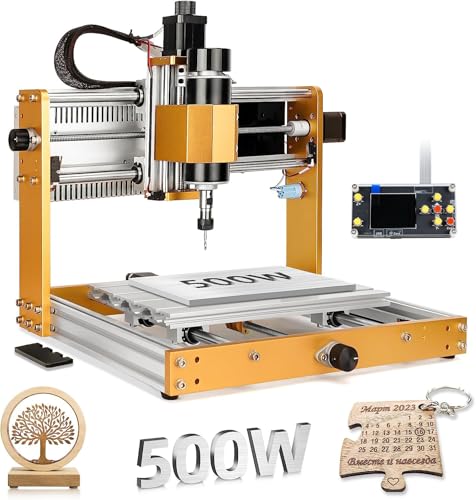
The LUNYEE 3018PRO MAX is a compact CNC router for woodworkers who want a relatively powerful spindle in a small desktop footprint. Its 300 × 180 × 80 mm working envelope is considerably smaller than those of the Genmitsu, FoxAlien, and NymoLabs machines, but it offers useful vertical clearance for a compact router.
The manufacturer specifies a 500W spindle, a combination of aluminum alloy and carbon steel in the frame, T8 lead screws, hardened linear rods, and a GRBL-compatible control system. It also lists six limit switches and compatibility with several common CNC programs.
This configuration makes the machine a candidate for smaller wooden signs, craft components, decorative engraving, and selected cutting tasks. Buyers should still distinguish spindle power from overall cutting capability: the small work envelope and compact motion system are important constraints for larger or demanding jobs.
5 Key Features
- Compact 300 × 180 mm work area: The footprint suits smaller signs, ornaments, engraved panels, and individual craft components.
- 500W spindle: The specified spindle provides a higher power rating than the small stock spindle documented for the SainSmart and standard FoxAlien configurations.
- 80 mm Z-axis working dimension: The stated working envelope provides useful vertical clearance for a compact desktop machine, although actual tool access depends on the workpiece and setup.
- T8 lead screws and hardened linear rods: These components guide movement along the machine’s axes and support controlled positioning.
- Six limit switches and GRBL compatibility: The manufacturer lists switches across the axes and compatibility with programs including Candle, UGS, and supported laser software.
Pros
- Compact footprint for a home workshop.
- 500W spindle in the documented standard configuration.
- Useful 80 mm vertical working dimension for selected projects.
- Six limit switches and broad GRBL-software compatibility.
Cons
- Small X-Y work area restricts panel size.
- Not the natural choice for large signs, furniture panels, or other oversized projects.
5. SainSmart 3018-PROVer V2

Overview
The SainSmart 3018-PROVer V2 is a compact desktop CNC router aimed at beginners, hobbyists, and makers who want to learn CNC carving without committing to a larger machine. Its documented 290 × 180 × 40 mm working envelope is suitable for small projects rather than full-size woodworking components.
SainSmart lists a 32-bit control board, an all-aluminum frame, a one-piece machined and molded aluminum spoilboard, stepper-motor jog wheels, home and limit switches, and a Z-probe connection. Some offline-control accessories are optional, so buyers should check the exact package rather than assume every accessory is included.
Its main appeal is the combination of compact size, setup-oriented features, and a straightforward GRBL-based workflow. For small engraved gifts, nameplates, decorative details, and learning projects, it can be a sensible starting point.
5 Key Features
- Compact 290 × 180 mm work area: The machine is designed for smaller pieces such as plaques, ornaments, tags, and decorative components.
- 32-bit control board: The control electronics support a modernized control architecture for this class of desktop CNC machine.
- One-piece aluminum spoilboard: The machined and molded platform provides a solid surface for mounting small workpieces.
- Stepper-motor jog wheels: Manual adjustment controls make it easier to position the machine during setup and origin-setting tasks.
- Home switches and Z-probe connection: These features support repeatable machine referencing and tool-height setup when used correctly.
Pros
- Compact size suits small workbenches.
- Useful built-in setup and positioning features.
- Aluminum spoilboard provides a practical workholding surface.
- A reasonable entry point for learning CNC workflows.
Cons
- Limited working dimensions restrict project size.
- The compact machine is not intended to replace a higher-power router for heavy material removal.
Final Verdict
There is no single best CNC router for every woodworking project. The right choice depends on whether you prioritize workpiece size, spindle power, mechanical rigidity, upgrade flexibility, or a beginner-friendly setup.
Best for a versatile desktop woodworking setup: Genmitsu 4040-PRO MAX. Its 400 × 400 mm work area and 710W router make it a strong candidate for hobbyists who want to produce a range of signs, panels, and relief carvings without moving to a much larger machine.
Best for upgrade-minded hobbyists: FoxAlien Masuter Pro. Its square work area, linear Z-axis rails, and compatible spindle-mount options make it attractive to owners who expect to customize their setup. Budget for a suitable spindle upgrade if the standard configuration does not meet your needs.
Best for larger workpieces and a substantial motion system: NymoLabs NBS-6040. Its larger work envelope, ball screws, linear guides, and 710W spindle make it the clearest choice for buyers who prioritize mechanical construction and workspace. Its size and weight make workshop planning essential.
Best compact option with a higher-rated spindle: LUNYEE 3018PRO MAX. It combines a 500W spindle with a small footprint and useful vertical clearance. Choose it when the projects are small enough to fit its work area.
Best for learning CNC carving: SainSmart 3018-PROVer V2. Its compact work envelope, jog wheels, Z-probe connection, and setup features make it a sensible choice for small projects and learning the CNC workflow before investing in a larger machine.
Best For Table
| Buyer Type / Scenario | Best Product | Why |
|---|---|---|
| Versatile hobby woodworking | Genmitsu 4040-PRO MAX | Large square workspace and 710W router |
| Future spindle upgrades | FoxAlien Masuter Pro | Compatible spindle-mount options and modular configuration |
| Larger panels and signs | NymoLabs NBS-6040 | Largest documented working area |
| Compact machine with a 500W spindle | LUNYEE 3018PRO MAX | Higher-rated spindle in a small footprint |
| First CNC router | SainSmart 3018-PROVer V2 | Compact format and useful setup features |
| Workpieces requiring more Z clearance | LUNYEE 3018PRO MAX or NymoLabs NBS-6040 | Their documented vertical working dimensions are larger than the SainSmart’s |
| Larger jobs without an industrial machine footprint | Genmitsu 4040-PRO MAX | A 400 × 400 mm working area in a desktop format |
FAQs
1. What should I look for in the best CNC router for woodworking?
Start with the largest workpiece you expect to machine. Then compare the working area, Z-axis clearance, frame and motion system, spindle, workholding, software compatibility, and available upgrades. A more powerful spindle is useful only if the rest of the machine and your tooling can support the intended operation.
2. Is a 3018 CNC router large enough for woodworking?
A 3018-class machine can handle small wooden signs, ornaments, nameplates, decorative engravings, and craft components. Its limited X-Y travel makes it less suitable for large panels or furniture components. If you regularly work with larger pieces, consider a machine with a 400 × 400 mm or larger working area.
3. Is a 500W or 710W spindle better for wood carving?
A 710W spindle has a higher rated power than a 500W spindle, but that alone does not determine cut quality or achievable feed rate. Machine rigidity, cutter geometry, workholding, spindle speed, cutting depth, and feed rate all matter. For detailed engraving, controlled motion and suitable tooling can be just as important as spindle power.
4. Can these CNC routers cut hardwood?
They are marketed for CNC machining and engraving applications that include wood, but suitable cutting conditions depend on the particular machine, tool, wood species, and cut. Start with conservative cutting depths and feed rates, secure the workpiece, and increase cutting demands only when the setup remains stable. Do not assume every model can remove large amounts of hardwood in a single pass.
5. Do I need special software for a desktop CNC router?
You generally need design or CAD software to create the geometry, CAM software to generate toolpaths, and a compatible control program to operate the machine. The specific workflow depends on the controller and firmware. Check the manufacturer’s supported software and operating systems before buying, especially if you plan to use a Mac or Linux computer.
6. Is a larger CNC router always the better choice?
No. A larger machine can handle bigger projects, but it typically requires more space and may cost more to purchase, install, and maintain. A compact router can be the better investment if you mainly produce small signs, ornaments, or engraved gifts. Choose the smallest machine that comfortably accommodates your expected workpieces and foreseeable projects.
Last update on 2026-10-25/Affiliate links / Images from Amazon Product Advertising API