Boost Your Laptop Setup: The 5 Best Portable Monitors of 2026
Working on a cramped laptop screen in coffee shops or hotel rooms kills productivity. Finding the right second display can completely transform your workflow, giving you desktop-level space anywhere you go.
We spent weeks testing the latest screens to find the best portable monitors for every budget and task. From budget single screens to multi-display rigs, these panels actually earned a spot in our travel bags.
Table of Contents
At a Glance: Top 5 Best Portable Monitors
| Product Name | Key Features | Ideal Use |
|---|---|---|
| ARZOPA 15.6 Portable Monitor | 1080p IPS, Built-in Metal Kickstand, 1.6 lbs | Budget-conscious travelers and Switch gamers |
| Cocopar 15.6 Portable Monitor | 85% sRGB Color Gamut, VESA Mountable, Dual USB-C | Creative professionals and desk-docking setups |
| KYY 15.6″ Portable Monitor | Flicker-Free Eye Care, Durable Smart Cover, Full Cable Kit | Students and office workers on long shifts |
| Blackview Ultra-Slim Extender | 14-inch Integrated Clamp, Sturdy Alloy Shell, 2.2 lbs | Digital nomads wanting a gapless, attached setup |
| Venraty Detachable Extender | Triple Display Setup, 72% NTSC, 360-degree Rotation | Power-user Windows developers and data analysts |
Top 5 Best Portable Monitors 2026
🥇 1. ARZOPA 15.6 Portable Monitor

Best No-Nonsense Budget Screen: This ultra-slim display offers a hassle-free setup for anyone needing reliable screen real estate on a budget. During our testing, the built-in kickstand provided excellent stability on cramped coffee shop tables compared to flimsy folding magnetic covers. The matte screen prevents annoying glare, while the durable metal build easily survives daily travel abuse.
- IPS matte panel offers wide 178-degree viewing angles without color shifting.
- Plug-and-play USB-C and Mini HDMI ports require zero software configuration.
- Durable aluminum alloy frame feels premium and resists twisting in backpacks.
- Light 1.6-pound profile makes it as easy to pack as a standard tablet.
Pros
- Built-in adjustable metal kickstand
- Anti-glare matte finish
- True plug-and-play setup
- Highly durable alloy casing
Cons
- Maximum brightness is somewhat dim
- Speakers sound tinny and hollow
🥈 2. Cocopar Portable Monitor

Best for Accurate Color Performance: If you need to edit photos or color-correct videos on the go, this color-accurate panel delivers. Our testing showed that the 85% sRGB color gamut brings visuals to life with far more pop and accuracy than typical budget portable screens. It features built-in VESA holes on the back, allowing you to transition it to a permanent desk arm when you return home.
- Vibrant IPS panel covers 85% sRGB color gamut for accurate design work.
- Dual fully featured USB-C ports support convenient power pass-through and reverse charging.
- Integrated VESA 75x75mm mounting holes expand desktop workstation configurations.
- Ultra-slim 4mm profile keeps the weight down to an effortless 1.43 pounds.
Pros
- Outstanding color accuracy and brightness
- Dual-way power pass-through charging
- Standard VESA mount compatibility
- Clean, thin-bezel modern aesthetics
Cons
- Magnetic smart cover feels floppy
- Controls are awkward to access
🥉 3. KYY 15.6inch Portable Monitor
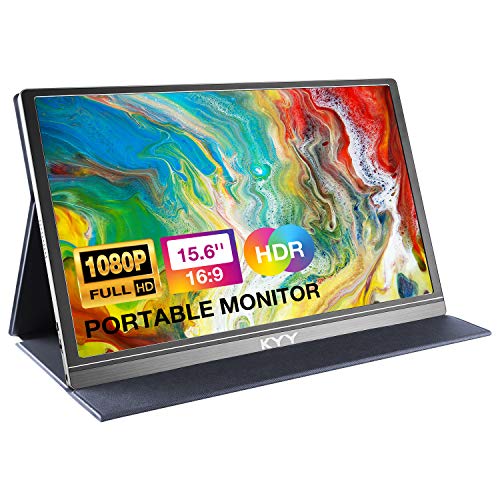
Best Workhorse for Extended Screen Time: Long spreadsheets and reading sessions require a display that protects your eyes from constant strain. This consistent performer integrates blue light filters and flicker-free backlighting to prevent headaches during late-night projects. We liked the included PU leather smart cover because it stays rigid and protects the screen when packed with heavy accessories.
- Advanced eye-care technology minimizes fatigue during long working sessions.
- Ships with a complete set of cables for instant, out-of-the-box connectivity.
- Built-in HDR mode enhances contrast for media viewing and light gaming.
- Textured smart cover doubles as an adjustable, highly protective display stand.
Pros
- Excellent flicker-free eye protection
- Includes full high-quality cable kit
- Rugged protective PU leather smart cover
- Wide compatibility with gaming consoles
Cons
- Colors look slightly washed out
- No VESA mounting holes
🏅 4. Blackview Ultra-Slim Portable Monitor

Best Integrated Clamping Dual Screen: Travelers who hate managing loose screens and stands on their trays will appreciate this smart clamping layout. It uses a strong six-point attachment system to lock directly onto the side of your laptop lid. We loved how the integrated design eliminates the awkward desktop gap, creating a seamless dual-screen desktop wherever you set up.
- Galvanized steel shell resists scratches and protects your laptop during travel.
- Clamping design fits most 13-inch to 17-inch laptop frame sizes.
- Flexible hinge supports mirror, extended, and vertical layout viewing modes.
- Single-cable USB-C connection delivers both video signal and monitor power.
Pros
- Gapless screen alignment with main laptop
- Solid, protective galvanized steel frame
- Eliminates the need for external stands
- Comfort certified by TÜV eye care
Cons
- Noticeably increases laptop lid weight
- Fast battery drain from the laptop
🏅 5. Venraty Detachable Portable Extender

Best Portable Triple Screen Setup: For developers, financial analysts, and programmers, a single extra screen is often not enough to handle heavy multitasking. This advanced aluminum rig locks onto your laptop, adding two independent high-definition side screens to your workstation. Real-world tests showed that the screens rotate up to 360 degrees, making it incredibly easy to share charts with coworkers sitting across from you.
- Dual high-definition 15.6-inch screens expand your workspace into three distinct panels.
- Aluminum alloy structure keeps the frame highly durable without adding excessive weight.
- Wide 72% NTSC color coverage ensures vivid hues and accurate workspace rendering.
- Foldable construction collapses neatly into a high-quality protective travel bag.
Pros
- Professional-grade triple display layout
- 360-degree rotation is perfect for meetings
- Bright, vibrant displays at 300 nits
- Sturdy integrated support kickstand
Cons
- Fails to support Apple M-series chips
- Takes several minutes to pack up
Final Verdict
If you want a highly stable, affordable second screen that handles work and gaming, the ARZOPA 15.6 is our top recommendation due to its built-in metal stand and reliable performance. For creative work demanding rich colors, the Cocopar 15.6 delivers outstanding color accuracy alongside VESA mounting options. Power users seeking an immersive multi-window setup should invest in the Venraty Triple Monitor Extender to maximize their portable screen estate.
| Product | Best For |
|---|---|
| ARZOPA 15.6 Portable Monitor | All-Around Portability and Value |
| Cocopar Portable Monitor | Photo Editing and Desktop Arms |
| KYY 15.6inch Portable Monitor | Spreadsheet Work and Eye Comfort |
| Blackview Ultra-Slim Extender | Integrated Dual Screen Travel |
| Venraty Detachable Extender | Windows Programmers and Analysts |
Frequently Asked Questions
Do these portable monitors require external power?
Most portable monitors run directly off your laptop’s battery through a single, full-featured USB-C cable. If your laptop’s power output is low or you use an older HDMI connection, you will need to plug the monitor into an external wall adapter.
Can I connect these screens to a Nintendo Switch or Steam Deck?
Yes, you can plug gaming consoles directly into these portable monitors. Most options accept a direct USB-C connection from the Switch without requiring the bulky dock, though you must power the monitor separately.
What is the advantage of a matte screen over a glossy screen?
Matte displays scatter ambient light, which dramatically reduces glare and reflections when working near windows or outdoors. Glossy screens often look sharper but act like a mirror in brightly lit office spaces.
Will the triple screen extender work with my Apple MacBook?
While single portable monitors work perfectly with macOS, most triple screen extenders like the Venraty do not support Apple M1, M2, or M3 chips. Check compatibility carefully, as Windows laptops handle dual-extender setups much more easily.
Is a VESA-compatible portable monitor necessary?
VESA compatibility is only required if you plan to mount your portable screen to a desktop monitor arm. If you only intend to use the display on flat tables during travel, standard kickstands or magnetic smart covers are perfectly sufficient.
Last update on 2026-10-10/Affiliate links / Images from Amazon Product Advertising API