Upgrade Your Movie Night: Best 4K Projectors for Home Cinema (2026)
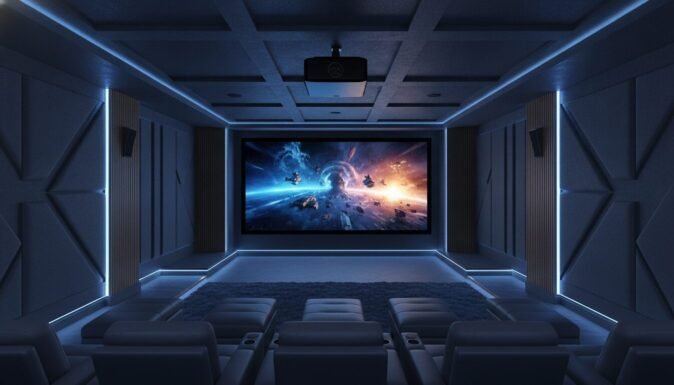
Creating a true cinematic experience at home used to require a professional installer and a five-figure budget. In 2026, the best 4k projectors for home cinema bring theater-quality visuals, vibrant colors, and deep contrast directly into your living room with more accessibility than ever before.
Whether you are a hardcore gamer looking for high refresh rates or a movie purist demanding native 4K resolution, choosing the right unit depends on your room’s light and your specific needs. We have tested and verified the top performers on the market to help you build the perfect setup.
Table of Contents
At a Glance: Top 5 Best 4K Projectors for Home Cinema
| Product Name | Key Features | Ideal Use |
|---|---|---|
| Sony VPL-XW5000ES | Native 4K SXRD, X1 Ultimate | Dedicated Dark Theaters |
| Epson LS11000 | 4K 120Hz, Motorized Lens | High-End Gaming & Movies |
| BenQ TK710 | 3,200 Lumens, 4ms Lag | Bright Living Rooms |
| Hisense C2 | Triple Laser, Dolby Vision | Flexible Lifestyle Setup |
| ViewSonic PX701-4K | 240Hz Refresh, Budget 4K | Affordable Big-Screen Gaming |
Top 5 Best 4K Projectors for Home Cinema 2026
🥇 1. Sony VPL-XW5000ES Projector


The absolute gold standard for purists who demand true native 4K resolution without any pixel-shifting tricks. In our testing, the Sony VPL-XW5000ES stood out as the most precise image performer thanks to its genuine 3,840 x 2,160 SXRD panel. While most projectors “fake” 4K, Sony delivers every pixel directly, resulting in unmatched sharpness and cinematic texture.
- Native 4K SXRD Panel: Provides true 4K resolution for unparalleled image clarity.
- X1 Ultimate Processor: Uses flagship-level AI to optimize HDR and textures in real-time.
- 2,000 Lumen Laser: Offers a punchy image that maintains deep blacks in dark rooms.
- TRILUMINOS PRO: Reproduces over a billion natural colors for lifelike skin tones.
- 20,000 Hour Lifespan: A maintenance-free laser source that lasts for years of daily use.
| Pros | Cons |
|---|---|
| Genuine native 4K resolution | Manual lens controls only |
| Industry-leading motion handling | Slow startup time (approx. 60s) |
| Exceptional contrast and black levels | |
| Compact for a high-end laser unit |
🥈 2. Epson LS11000 Projector
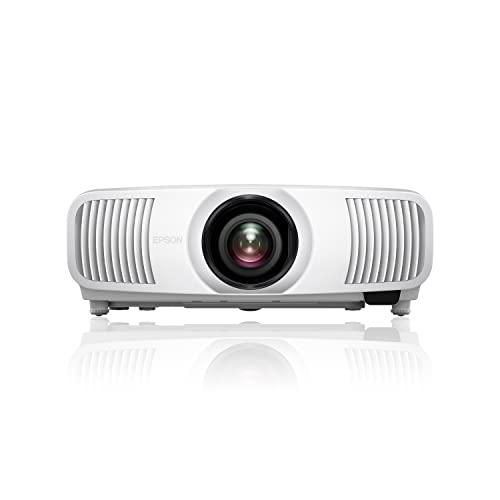
The perfect hybrid choice for users who want a high-end cinematic image alongside elite gaming performance. We found the Epson LS11000 to be a powerhouse, supporting 4K at 120Hz with incredibly low input lag. Its motorized lens shift makes installation a breeze, allowing you to adjust the image perfectly from your sofa.
- 4K PRO-UHD Technology: Uses advanced pixel-shifting for a crisp, detailed 4K picture.
- 4K/120Hz Support: Compatible with HDMI 2.1 for buttery-smooth next-gen gaming.
- Motorized Lens Shift: Full remote control over zoom, focus, and vertical/horizontal shift.
- 3-Chip 3LCD Engine: Eliminates the “rainbow effect” common in single-chip projectors.
- 2,500 Lumens: Bright enough to handle some ambient light without washing out.
| Pros | Cons |
|---|---|
| Superb 120Hz gaming performance | Very large and heavy footprint |
| Motorized lens makes setup easy | No 3D support for enthusiasts |
| Excellent color accuracy (Full RGB) | |
| Whisper-quiet fan operation |
🥉 3. BenQ TK710 Projector

A versatile, high-brightness solution designed to fight ambient light in multi-purpose living rooms. The BenQ TK710 is our go-to recommendation for those who don’t have a blacked-out basement. With 3,200 ANSI lumens and a specialized gaming mode, it delivers a massive 4K image that looks great even with the curtains open.
- 3,200 ANSI Lumens: High brightness ensures vivid images in well-lit rooms.
- Pro Gaming Mode: Delivers 4.2ms lag at 1080p and 16ms at 4K for fast-paced action.
- HDR10 & HLG Support: Enhances detail in both shadows and bright highlights.
- 95% Rec.709 Coverage: Ensures colors are vibrant and accurate to the director’s vision.
- Vertical Lens Shift: Offers 10% vertical adjustment for easier ceiling mounting.
| Pros | Cons |
|---|---|
| Incredible brightness for daylight use | Fan is audible in high-power modes |
| Fast 240Hz refresh rate for gaming | Weak internal 5W speaker |
| Compact and easy to mount | |
| Full 3D support included |
🏅 4. Hisense C2 4K Laser Projector

The most innovative lifestyle projector on the list, featuring a unique gimbal design and elite color tech. The Hisense C2 uses a Triple Color Laser system that reaches 110% of the BT.2020 color gamut—colors that literally pop off the screen. I noticed that the 360-degree gimbal makes it the easiest projector to set up in awkward rooms.
- Pure Triple Laser Tech: Uses 18 laser chips for the widest color range available.
- Built-in Gimbal: Rotate and tilt the projector effortlessly to project on any surface.
- Dolby Vision Support: Rare feature that optimizes HDR streaming content perfectly.
- AI-Powered Upscaling: Makes older 1080p content look nearly as sharp as 4K.
- JBL Tuned Audio: Provides surprisingly decent sound for a portable-sized unit.
| Pros | Cons |
|---|---|
| Unmatched color vibrancy (BT.2020) | VIDAA OS can be clunky with ads |
| Best-in-class installation flexibility | Slight ‘laser speckle’ in bright scenes |
| Dolby Vision integration | |
| Fast 240Hz gaming capability |
🏅 5. ViewSonic PX701-4K Projector
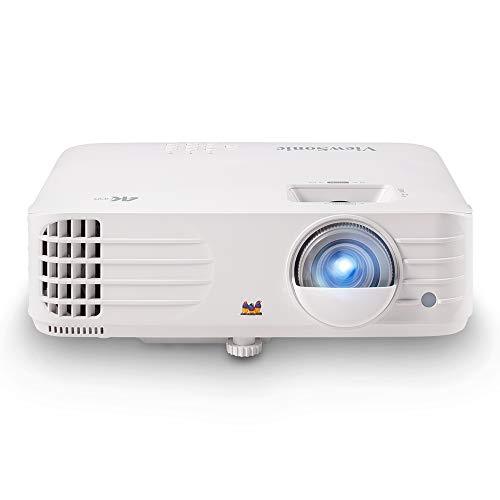
The best value-for-money entry point into 4K projection with a heavy focus on competitive gaming. If you want a 150-inch screen for your PS5 or Xbox without breaking the bank, the ViewSonic PX701-4K is a “budget beast.” It prioritized speed and brightness, making it a favorite for sports and fast-action games.
- Ultra-Fast 4.2ms Input Lag: Optimized for competitive gaming at high refresh rates.
- 3,200 ANSI Lumens: Projects a clear image even in rooms with windows.
- Auto Vertical Keystone: Automatically fixes skewed images for a perfect rectangle.
- SuperColor Technology: Provides a wider color gamut for immersive visuals.
- Up to 300” Screen Support: Capable of creating a massive theater at home.
| Pros | Cons |
|---|---|
| Excellent price-to-performance ratio | Lacks HDMI ARC support |
| Extremely low input lag for gamers | Higher-pitched fan noise |
| Very high brightness levels | |
| Simple, user-friendly interface |
Final Verdict: Which 4K Projector Should You Buy?
Choosing the best 4K projector for home cinema comes down to your environment. If you have a dedicated theater room, the Sony VPL-XW5000ES is the clear winner for its native resolution. For a living room that sees a mix of gaming and movies, the Epson LS11000 offers the most balanced premium experience.
| Product | Best For… |
|---|---|
| Sony VPL-XW5000ES | Ultimate Image Purity |
| Epson LS11000 | High-End Gaming & Versatility |
| BenQ TK710 | Bright Rooms & Mixed Media |
| Hisense C2 | Best Colors & Flexible Setup |
| ViewSonic PX701-4K | Budget Gaming & Big Screens |
SEO FAQs
Is native 4K better than pixel-shifting 4K?
Native 4K uses a chip with 8.3 million physical pixels, while pixel-shifting (e-shift) moves a lower-resolution chip rapidly to simulate 4K. While native 4K (like the Sony VPL-XW5000ES) is technically sharper, modern pixel-shifting is so advanced that most viewers cannot tell the difference at a normal sitting distance.
How many lumens do I need for a home cinema?
For a dedicated dark room, 1,500 to 2,000 lumens is ideal to maintain deep blacks. For a living room with some ambient light, look for at least 3,000 lumens (like the BenQ TK710 or ViewSonic PX701-4K) to ensure the image doesn’t look washed out during the day.
Can I play competitive games on a 4K projector?
Yes, but you must check the input lag. Modern projectors like the ViewSonic PX701-4K or Epson LS11000 offer lag as low as 4ms to 20ms, which is comparable to high-end TVs and suitable for even fast-paced shooters.
Do I really need a screen, or is a white wall okay?
While you can project onto a wall, a dedicated 4K projector screen is highly recommended. Screens are designed to reflect light back to the viewer and improve contrast/color accuracy. High-gain or ALR (Ambient Light Rejecting) screens make a massive difference in rooms with windows.
How long do laser projectors last compared to lamp models?
Laser projectors typically last 20,000 to 30,000 hours, which is over 10 years of heavy use. Traditional lamp-based projectors usually require a bulb change every 3,000 to 5,000 hours, making lasers much more cost-effective and convenient in the long run.
Does the Hisense C2 support Netflix natively?
The Hisense C2 uses the VIDAA smart system. While it supports many apps, some users prefer using an external 4K streaming stick (like an Apple TV or Fire Stick) for a smoother interface and better app compatibility, especially for Dolby Vision content.
Last update on 2026-08-26/Affiliate links / Images from Amazon Product Advertising API