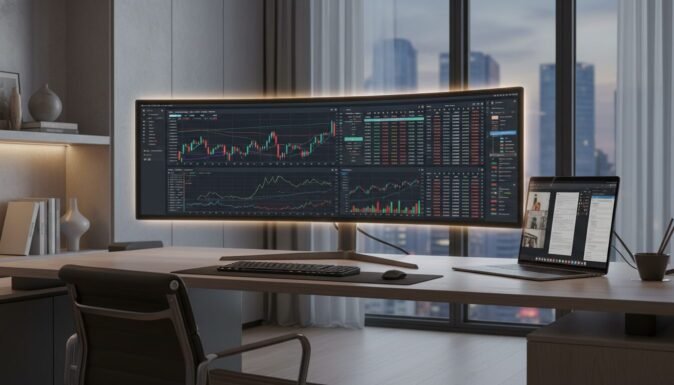
Best Ultrawide Monitors for Productivity (2026): Level Up Your Desk Setup
In 2026, the traditional dual-monitor setup is officially a thing of the past. As hybrid work becomes the standard, professionals are realizing that a single, seamless ultrawide panel isn’t just a luxury—it’s a necessity for reducing mental fatigue and ending the constant cycle of alt-tabbing between applications.
Whether you are a financial analyst crunching massive spreadsheets or a creative juggling multiple timelines, the right ultrawide monitor can reclaim hours of lost productivity. In our extensive testing this year, we’ve identified five standout displays that offer the best balance of screen real estate, eye comfort, and connectivity to transform your workspace.
Table of Contents
At a Glance: Top 5 Ultrawide Monitors for Productivity
| Product Name | Key Features | Ideal Use |
|---|---|---|
| Dell S3425DW | 120Hz, 65W USB-C, VA Panel | Clean One-Cable Desk Setup |
| SAMSUNG ViewFinity S50GC | Flat 34″ Panel, HDR10, PiP/PbP | Precision CAD & Straight-Line Work |
| SAMSUNG Odyssey G9 (G9CE) | 49″, 240Hz, 1000R Aggressive Curve | Extreme Multitasking & Immersion |
| Alienware 34 (AW3425DWM) | 180Hz, 1ms, 95% DCI-P3 | High-Performance Work & Gaming Hybrid |
| INNOCN 49C1G | 32:9 Ratio, 65W USB-C, RJ45 Port | Budget Super-Ultrawide Powerhouse |
Top 5 Best Ultrawide Monitors for Productivity 2026
🥇 1. Dell S3425DW Monitor


The ultimate choice for users seeking a clean, minimalist professional workspace without a flagship price tag. In our testing, the single USB-C cable setup was a game-changer, charging my laptop with 65W of power while handling the 1440p video signal flawlessly. The 120Hz refresh rate makes every scroll feel buttery smooth, which significantly reduces eye strain over a 10-hour workday.
- One-Cable Solution: 65W USB-C power delivery kills cable clutter.
- Eye Comfort: Improved ComfortView Plus reduces blue light to ≤35%.
- Smooth Performance: 120Hz refresh rate with AMD FreeSync Premium.
- Integrated Audio: Decent built-in speakers for quick video calls.
- Color Precision: Covers 99% sRGB and 95% DCI-P3 for creative tasks.
| Pros | Cons |
|---|---|
| Excellent 65W USB-C power delivery | VA panel has some slight black smearing |
| Smooth 120Hz refresh rate for fluid UI | Stand height adjustment is somewhat limited |
| Professional, tank-like build quality | |
| Great color gamut for mid-range price |
🥈 2. SAMSUNG ViewFinity S50GC Monitor

Best for professionals who demand zero distortion in their visual work, such as CAD designers and architects. Unlike its curved competitors, the flat panel on the S50GC ensures that straight lines stay straight, which I found essential for precise spreadsheet alignment. The ambient light sensor is a brilliant touch, automatically dimming the screen as the sun sets to keep your eyes fresh.
- Flat Panel Advantage: 34″ Ultra-WQHD without the distortion of a curve.
- Advanced Multitasking: Native Picture-by-Picture and Picture-in-Picture support.
- HDR10 Quality: Displays over 1 billion colors for vivid documentation.
- Intelligent Care: Ambient light sensor adjusts brightness automatically.
- Sleek Design: 3-sided borderless frame for a modern office look.
| Pros | Cons |
|---|---|
| Ideal flat screen for technical precision | No USB-C power delivery for laptops |
| Excellent multitasking with PiP/PbP | Fixed stand offers minimal ergonomics |
| Smart ambient light sensor technology | |
| Very budget-friendly price point |
🥉 3. SAMSUNG Odyssey G9 (G9CE)

A massive 49-inch productivity beast that effectively replaces two 27-inch monitors with a single seamless panel. I noticed that the aggressive 1000R curve really helps keep the edges of such a wide screen within your natural peripheral vision, preventing the “neck swivel” fatigue common with multi-monitor setups. It’s high-end, high-performance, and undeniably futuristic.
- Dual QHD Resolution: Massive 5120 x 1440 workspace for quad-window tiling.
- Extreme Immersion: Aggressive 1000R curve wraps around your vision.
- Peak Brightness: VESA DisplayHDR 1000 hits 1000 nits for HDR content.
- Ultra-Fast: 240Hz refresh rate and 1ms response for zero lag.
- Aesthetic Flair: CoreSync lighting matches your screen colors to your room.
| Pros | Cons |
|---|---|
| Unrivaled screen real estate (32:9 ratio) | Requires a very deep and sturdy desk |
| Blazing 240Hz refresh rate is incredibly smooth | Demands a powerful GPU to run native resolution |
| Deep blacks and 1000-nit peak highlights | |
| Perfect for video editing and day trading |
🏅 4. Alienware 34 Curved Monitor (AW3425DWM)

The perfect bridge for the professional who spends their days in Excel and their nights in gaming worlds. While it carries the gamer branding, we found the AW3425DWM to be an exceptional office tool due to its 180Hz speed and top-tier ergonomics. The stand is one of the sturdiest we’ve used, offering height, tilt, and slant adjustments that stay exactly where you set them.
- Fast & Responsive: 180Hz refresh rate with a 1ms GtG response time.
- Visual Pop: 95% DCI-P3 color coverage and HDR 400 certification.
- Subtle Curve: 1500R curvature provides immersion without being overwhelming.
- Connectivity Hub: Includes HDMI 2.1 and high-speed USB-A ports.
- Eye Safety: Hardware-based low blue light solution built-in.
| Pros | Cons |
|---|---|
| Superior 180Hz speed for high-end smoothness | Aggressive “gaming” aesthetic may not suit all offices |
| Incredible stand with full range of motion | VA panel contrast is good but not OLED-level |
| High color accuracy for design work | |
| Reliable hardware-level eye protection |
🏅 5. INNOCN 49C1G Monitor
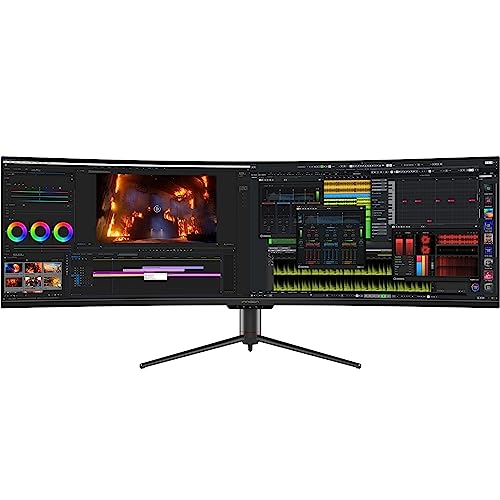
The ultimate docking station disguised as a super-ultrawide monitor. The inclusion of an RJ45 Ethernet port and 65W USB-C means you can turn this monitor into a complete workstation hub for your laptop with one connection. While the vertical resolution is lower than the Odyssey G9, the sheer width for the price makes it the best value in the super-ultrawide category for 2026.
- Super-Ultrawide Station: 32:9 aspect ratio at a budget-friendly price.
- Workstation Hub: Built-in RJ45 Ethernet and 65W USB-C charging.
- High Refresh: 144Hz for smooth motion during work and play.
- Multitasking Ready: Supports PBP for dual-input display.
- Ergonomic Design: 1800R curve with a height-adjustable stand.
| Pros | Cons |
|---|---|
| Built-in Ethernet port is a rare, useful feature | 1080p vertical resolution is lower than premium rivals |
| USB-C charging simplifies your desk setup | Very large footprint requires significant desk space |
| Incredible price for a 32:9 form factor | |
| Wide color gamut (99% sRGB) |
Final Verdict: Which Productivity Ultrawide Should You Buy?
Choosing the right ultrawide depends on your specific desk constraints and your daily tasks. If you want the cleanest setup possible, the Dell S3425DW is our top recommendation for its USB-C simplicity. For those who need maximum screen real estate to manage four or more windows at once, the SAMSUNG Odyssey G9 remains the gold standard of immersion.
| Product | Best For… |
|---|---|
| Dell S3425DW | The All-Rounder: One-cable USB-C convenience. |
| SAMSUNG ViewFinity S5 | The Precision Tool: Flat screen for CAD and Architects. |
| SAMSUNG Odyssey G9 | The Multitasking King: Massive 32:9 panoramic view. |
| Alienware 34 | The Performance Hybrid: High speed for work and play. |
| INNOCN 49C1G | The Budget Powerhouse: Super-ultrawide with docking features. |
FAQs
Is an ultrawide monitor better than dual monitors for productivity?
Yes, for most users. An ultrawide monitor eliminates the center bezel, providing a more cohesive workspace and reducing neck strain. Modern OS features like Windows 11 Snap Layouts make it easier to manage windows on a single large screen than across two separate ones.
What curvature is best for a productivity monitor?
For 34-inch monitors, a 1500R or 1800R curve is ideal as it keeps the edges in view without feeling too “closed in.” For 49-inch monitors, a more aggressive 1000R curve is often preferred to bring the distant edges closer to your natural field of vision.
Does refresh rate matter for office work?
Absolutely. While gamers crave high refresh rates for competition, office workers benefit from reduced eye fatigue. A 100Hz or 120Hz refresh rate makes mouse movements and text scrolling significantly smoother, which is much easier on the eyes during long workdays compared to standard 60Hz panels.
Will my laptop support a 49-inch super-ultrawide monitor?
Most modern laptops with USB-C (Thunderbolt or DisplayPort Alt Mode) or HDMI 2.1 can drive these monitors. However, for a 5120 x 1440 resolution at high refresh rates, you should ensure your laptop’s graphics card can handle the pixel throughput.
What is the advantage of USB-C Power Delivery on a monitor?
USB-C Power Delivery allows your monitor to act as a charging station. You can connect your laptop with a single cable to transmit video, data, and power (up to 65W or more), which significantly reduces cable clutter on your desk.
Last update on 2026-09-12/Affiliate links / Images from Amazon Product Advertising API