Ditch the Clutter: 5 Best Portable Label Makers of 2026
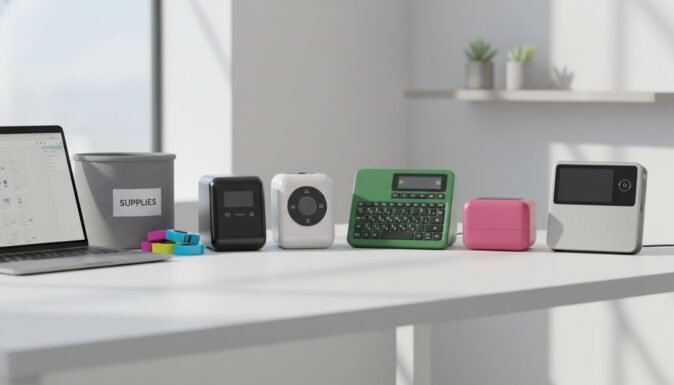
Staying organized in 2026 shouldn’t feel like a chore. Whether you are labeling electrical panels on a rugged job site or organizing your pantry at home, the right portable label maker turns chaos into order in seconds. Modern devices now offer everything from Bluetooth smartphone connectivity to military-grade durability.
In our testing, we found that the best label maker isn’t just about how fast it prints, but how long the labels actually stick and how easy the interface is to navigate. We’ve rounded up the top five performers that balance features, reliability, and value for money.
Table of Contents
At a Glance: Top 5 Portable Label Makers
| Product Name | Key Features | Ideal Use |
|---|---|---|
| Brady M210 | Military-grade durability, 11 design guides | Industrial & Job Sites |
| Brother PT-D210SV | 14 fonts, 600+ symbols, includes hard case | Home & Office |
| DYMO LM 280 | Rechargeable battery, PC/Mac connectivity | Busy Offices |
| Phomemo M110 | Bluetooth App-driven, Thermal printing | Small Businesses |
| DYMO LM 160 | QWERTY keyboard, 228 symbols, affordable | Basic Home Needs |
Top 5 Best Portable Label Makers 2026
🥇 1. Brady M210 Portable Label Maker

The absolute gold standard for industrial environments and professionals who need labels that survive the elements. We found this unit to be incredibly rugged, meeting MIL-STD-810G vibration and shock standards. It’s the tool you want in your bag if you’re an electrician or contractor needing clear, permanent wire wraps and panel IDs.
- Rugged Construction: Built with rubber bumpers to survive drops on concrete.
- Smart Formatting: 11 pre-loaded guides for cables, flags, and patch panels.
- Advanced Coding: Prints 2D DataMatrix and QR codes directly from the keypad.
- Multi-Material Support: Compatible with heat-shrink tubing and self-laminating wire markers.
| Pros | Cons |
|---|---|
| Extreme durability for job sites | Proprietary cartridges are expensive |
| Intuitive auto-formatting for wires | Not compatible with lithium batteries |
| Professional-grade adhesive quality | |
| 20+ years of proven reliability |
🥈 2. Brother PT-D210SV Label Maker
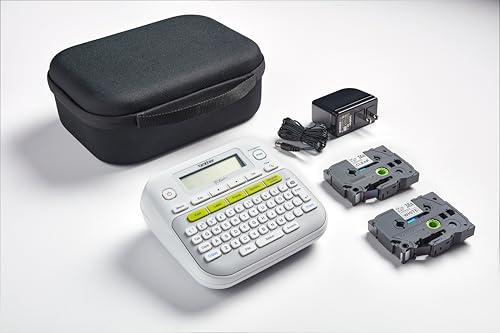
A versatile, all-in-one bundle that is perfect for the organized homeowner or office manager. This specific “SV” version comes with a protective carrying case and an AC adapter, saving you a fortune on batteries. The TZe laminated tapes are some of the toughest we’ve tested, resisting water, fading, and even abrasion.
- Huge Customization: Choose from 14 fonts, 97 frames, and over 600 symbols.
- One-Touch Keys: Quickly access font styles and frames without deep menu diving.
- Laminated Durability: Tapes are resistant to heat, cold, and household chemicals.
- Included Value: Comes with a hard-shell case for easy storage and transport.
| Pros | Cons |
|---|---|
| Incredible value with the included adapter | Display lacks a backlight |
| Extremely user-friendly interface | High tape waste on start of labels |
| Labels are freezer and microwave safe | |
| Lightweight and ergonomic design |
🥉 3. DYMO LabelManager 280 Maker

The bridge between a standalone handheld and a professional computer-connected printer. We noticed that the ability to plug this into a PC or Mac via USB makes it far superior for complex tasks. It allows you to use your system’s fonts and custom graphics for a truly personalized labeling experience.
- Rechargeable Battery: No more hunting for AA batteries; just plug it in.
- Desktop Software: Compatible with DYMO Connect for advanced design features.
- Natural Typing: Features a computer-style QWERTY keyboard for fast entry.
- One-Touch Formatting: Bold, italic, and underline keys located right on the face.
| Pros | Cons |
|---|---|
| Cost-saving rechargeable battery pack | Battery level indicator can be inaccurate |
| PC/Mac compatibility for custom logos | Largest font size is somewhat limited |
| Very fast print speed for long labels | |
| Affordable replacement tape options |
🏅 4. Phomemo M110 Label Maker
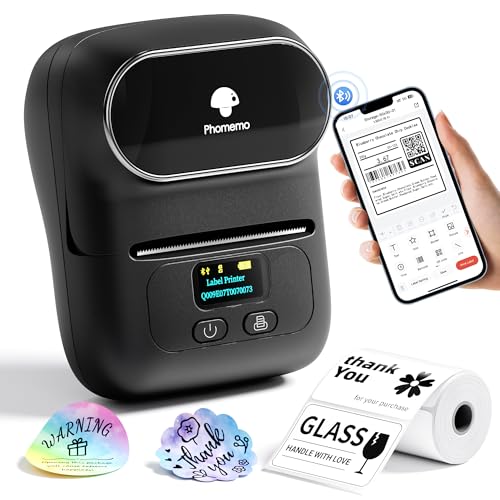
The ultimate choice for the smartphone generation and modern small business owners. This thermal printer ditches the keyboard entirely in favor of a robust Bluetooth app. In our testing, the OCR (Optical Character Recognition) feature was a game-changer for scanning text and turning it into a label instantly.
- Smart App Control: Design everything on your iOS or Android device.
- Thermal Technology: Never requires ink, toner, or ribbon—only thermal paper.
- Batch Printing: Import Excel data to print hundreds of labels in minutes.
- Long-Lasting Battery: 1500mAh battery stays charged for weeks on standby.
| Pros | Cons |
|---|---|
| Ultra-portable, fits in a jacket pocket | 203 DPI resolution is low for photos |
| Powerful app with OCR and batch tools | Bluetooth pairing can be finicky |
| Eco-friendly inkless printing | |
| Great for price tags and address labels |
🏅 5. DYMO LabelManager 160 Maker

The best entry-level label maker for those who want simplicity and affordability above all else. It’s a straightforward device: type your text, format with a single button, and print. While it lacks the high-tech features of the 280 or Phomemo, its ease of use makes it a classic for household organization.
- Keyboard Layout: Familiar QWERTY keys make typing intuitive.
- Style Options: 6 font sizes, 8 text styles, and 4 box options.
- Quick Formatting: dedicated keys for bolding and sizing text.
- Auto-Power Off: Extends battery life by shutting down when idle.
| Pros | Cons |
|---|---|
| Most affordable price point on the list | Consumes batteries quickly |
| Zero learning curve—works out of box | Doesn’t save formatting after power off |
| Compact and lightweight handheld size | |
| Clear, easy-to-read LCD screen |
Final Verdict
Choosing the best label maker depends entirely on your environment. If you are in a workshop or industrial setting, the Brady M210 is unmatched in durability. For the average home or office user, the Brother PT-D210SV offers the best balance of tape quality and features. Small business owners should look no further than the Phomemo M110 for its app-driven efficiency.
| Product | Best For |
|---|---|
| Brady M210 | Heavy-duty Industrial Use |
| Brother PT-D210SV | General Home/Office Organization |
| DYMO LM 280 | Professional PC-Linked Labels |
| Phomemo M110 | Small Business & QR Code Printing |
| DYMO LM 160 | Occasional Use & Tight Budgets |
FAQs
Do portable label makers need ink?
Most modern portable label makers use thermal transfer or direct thermal technology. This means they do not need traditional liquid ink or toner. Instead, they use heat to transfer pigment from a ribbon onto the tape or activate heat-sensitive paper.
What is the difference between D1 and TZe tapes?
D1 tapes are manufactured by DYMO and are known for being flexible and easy to peel. TZe tapes are Brother’s proprietary laminated tapes, which are significantly more durable and resistant to water, UV rays, and chemicals.
Can I print labels from my phone?
Yes, if the label maker has Bluetooth connectivity. Models like the Phomemo M110 are designed specifically to work with mobile apps, allowing you to use custom fonts, icons, and even photos from your phone gallery.
Is a QWERTY keyboard better than an ABC keyboard?
In our experience, QWERTY keyboards are much more efficient because they mimic the layout of a computer or smartphone. ABC keyboards can feel clunky and slow if you are used to modern typing standards.
Are rechargeable batteries worth it for label makers?
Absolutely. Label makers can be surprisingly power-hungry, especially during the printing process. A built-in rechargeable battery like the one in the DYMO 280 saves money over time and is more environmentally friendly than disposable AAs.
Last update on 2026-04-11/Affiliate links / Images from Amazon Product Advertising API