
Buffering Be Gone: Top 5 Best Home Routers to Supercharge Your WiFi in 2025
Is your internet constantly buffering during movie night? Do you experience lag when gaming or dead zones in the back bedroom? These are clear signs your current router is struggling to keep up. Upgrading to one of the best home routers is the most effective way to instantly boost your network speeds, improve coverage, and handle the growing number of smart devices in your life.
Whether you need the cutting-edge performance of WiFi 7, the uncrowded lanes of WiFi 6E, or a mesh system to blanket a large home, the market has a solution. In this guide, we break down the top 5 routers of 2025 that deliver reliable, high-speed connectivity for every type of user.
Table of Contents
At a Glance: Top 5 Best Home Routers
| Product Name | Key Features | Ideal Use |
|---|---|---|
| ASUS RT-BE86U | WiFi 7, 10G Port, Multi-Link Operation | Heavy Gaming & 8K Streaming |
| TP-Link Archer AXE75 | Tri-Band WiFi 6E, 6 GHz Band | Congestion-Free Streaming |
| NETGEAR Nighthawk RAX43 | 5-Stream WiFi 6, NETGEAR Armor | Medium Homes & Families |
| TP-Link Archer AX55 | High-Gain Antennas, Improved Cooling | Budget Reliability |
| Amazon eero 6 Mesh | Mesh Technology, Built-in Zigbee Hub | Large Homes & Dead Zones |
Top 5 Best Home Routers 2025
🥇1. ASUS RT-BE86U

Best For: Power users who need future-proof WiFi 7 speeds and multi-gig wired connections.
The ASUS RT-BE86U is a beast of a machine designed for those who refuse to compromise on speed. It utilizes the latest WiFi 7 technology with Multi-Link Operation to deliver massive throughput for gaming and 8K streaming. With a robust quad-core processor and a 10-Gigabit Ethernet port, it is ready for the fastest fiber internet plans available today and tomorrow.
- Next-Gen WiFi 7: Delivers combined speeds up to 6800 Mbps using 4096-QAM and Multi-Link Operation.
- 10G Connectivity: Features a 10-Gigabit WAN/LAN port for ultra-fast wired networking or NAS setups.
- Guest Network Pro: Allows you to create up to five distinct networks for IoT, guests, or work devices.
- Commercial-Grade Security: Includes subscription-free network security to block threats and filter content.
- Powerful Processing: A 2.6 GHz quad-core CPU ensures smooth performance even under heavy load.
🥈2. TP-Link Archer AXE75

Best For: Tech enthusiasts wanting to escape network congestion using the new 6 GHz band.
If your neighborhood is crowded with WiFi signals, the Archer AXE75 is your escape route. As a tri-band WiFi 6E router, it opens up a pristine 6 GHz band specifically for newer devices, dramatically reducing latency and interference. It manages high-bandwidth activities like VR gaming and 4K streaming effortlessly across multiple users.
- Tri-Band WiFi 6E: Access the exclusive 6 GHz band for interference-free, low-latency connections.
- High Performance: Powered by a 1.7 GHz quad-core CPU to handle data-intensive tasks.
- VPN Support: Supports both VPN server and client roles for secure remote access.
- OneMesh Compatible: Can pairs with range extenders to create a unified mesh network.
- Enhanced Security: TP-Link HomeShield provides network scanning and parental controls.
🥉3. NETGEAR Nighthawk RAX43
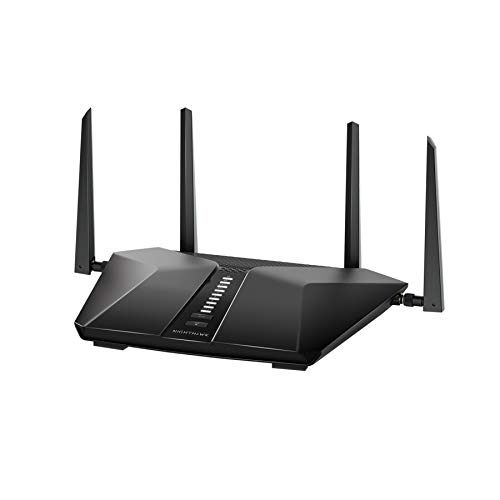
Best For: Families in medium-sized homes needing a reliable balance of speed and coverage.
The Nighthawk RAX43 is a workhorse designed for the modern smart home. Covering up to 2,000 square feet, it comfortably handles around 25 devices, making it perfect for families streaming on multiple screens. Its 5-stream WiFi 6 architecture ensures efficient data delivery, minimizing buffering even during peak hours.
- Broad Coverage: Designed to cover medium homes up to 2,000 sq. ft. reliably.
- AX4200 Speeds: Optimizes bandwidth for smooth 4K UHD streaming and gaming.
- NETGEAR Armor: protecting your connected devices from internet threats (subscription required).
- Wired Options: Includes four Gigabit Ethernet ports for stable wired connections to consoles or PCs.
- Easy Management: Simple setup and network monitoring via the Nighthawk app.
🏅4. TP-Link Archer AX55

Best For: Budget-conscious buyers who want solid WiFi 6 performance without breaking the bank.
You don’t need to spend a fortune to get a fast, modern network. The Archer AX55 offers incredible value, providing gigabit WiFi 6 speeds and improved cooling to prevent overheating during long sessions. Its four high-gain antennas use Beamforming technology to focus the signal directly toward your devices for a stronger connection.
- Efficient Cooling: An improved heat sink design ensures consistent performance under load.
- WiFi 6 Speed: Reach speeds up to 2402 Mbps on the 5 GHz band for lag-free experiences.
- Beamforming Tech: Concentrates wireless signal strength towards connected clients.
- HomeShield: Basic plan included for network protection and parental controls.
- Voice Control: Compatible with Alexa for easy voice management of your network.
🏅5. Amazon eero 6 Mesh
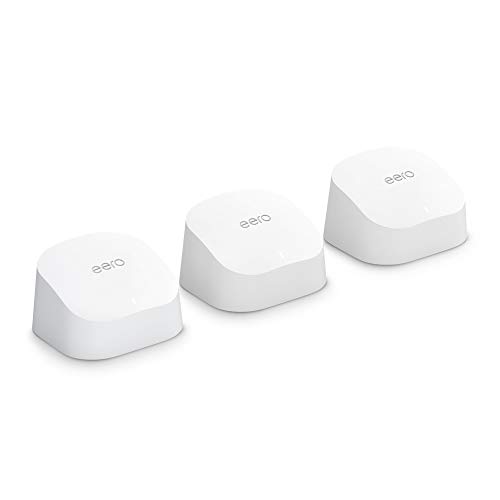
Best For: Eliminating dead zones in larger homes with a system that sets itself up.
If you struggle with weak spots in corners of your house, the eero 6 Mesh system is the answer. Instead of one central router, it uses multiple units to blanket your home in WiFi, covering up to 4,500 sq. ft. It also doubles as a Zigbee smart home hub, allowing you to connect lights and locks directly to your network.
- Whole-Home Coverage: A 3-pack covers up to 4,500 sq. ft., banishing dead zones.
- Smart Hub Built-in: Functions as a Zigbee smart home hub for Alexa-compatible devices.
- TrueMesh Technology: Intelligently routes traffic to avoid congestion and dropouts.
- Set and Forget: Automatic updates keep your network secure and improving over time.
- Simple App Control: manage screen time and guest access easily from your phone.
Final Verdict
Choosing the right router depends on your home size and internet habits. If you want the absolute fastest speeds and future-proofing, the ASUS RT-BE86U with WiFi 7 is unbeatable. For those living in congested areas (like apartments), the TP-Link Archer AXE75 offers the clean 6 GHz band. If you simply need to fix dead zones, the Amazon eero 6 is the simplest, most effective solution.
| Product | Best For |
|---|---|
| ASUS RT-BE86U | Future-Proofing & Speed |
| TP-Link Archer AXE75 | Avoiding Interference |
| NETGEAR Nighthawk RAX43 | General Family Use |
| TP-Link Archer AX55 | Value & Reliability |
| Amazon eero 6 Mesh | Coverage & Simplicity |
Frequently Asked Questions (FAQs)
1. What is the difference between WiFi 6, WiFi 6E, and WiFi 7?
WiFi 6 improves efficiency for many devices. WiFi 6E adds a new 6 GHz band to reduce interference. WiFi 7 is the newest standard, offering significantly faster speeds and lower latency through advanced data transmission techniques.
2. Do I need a mesh system or a single router?
If you have a small to medium home (under 2,000 sq. ft.), a single powerful router like the AX55 is usually enough. For larger, multi-story homes or layout with thick walls, a mesh system like eero 6 is better for eliminating dead zones.
3. Will a new router speed up my internet?
A new router can improve your WiFi speeds if your old router was the bottleneck. However, it cannot exceed the maximum speed provided by your ISP plan. It ensures you get the most out of the speed you pay for.
4. Is the 6 GHz band worth it?
Yes, if you have compatible devices (like newer phones and laptops). The 6 GHz band acts like an express lane with no traffic, perfect for high-bandwidth tasks like gaming or 4K streaming.
5. How hard is it to set up these routers?
Most modern routers, especially the eero and Nighthawk models, use smartphone apps that guide you through the process in minutes. You generally just plug them into your modem and follow the on-screen prompts.
Last update on 2026-04-11/Affiliate links / Images from Amazon Product Advertising API