Upgrade Your Screen Time: The 5 Best Tablets of 2026
If you’re thinking about upgrading your tech setup with a tablet that’s powerful, reliable, and easy to use in 2026, you are in the right place. Today’s tablets have blurred the lines between mobile devices and full-blown laptops, offering incredible speed, stunning displays, and fantastic overall value.
Whether you’re a student taking digital notes, a creative editing videos on the go, or just someone who wants a gorgeous screen for movie marathons, we’ve got you covered. In this guide, I’ve rounded up the top 5 best tablets available right now. Let’s dive in!
Table of Contents
At a Glance: Top 5 Tablets of 2026
| Product Name | Processor | Key Feature | Best For |
|---|---|---|---|
| Apple iPad 11-inch | A16 Bionic | True Tone Display | The Reliable Everyday Workhorse |
| Samsung Galaxy Tab S6 Lite | Not Specified | S Pen Included | Students & Budget Productivity |
| Apple iPad mini | A17 Pro | 8.3″ Compact Size | Travel & One-Handed Use |
| Lenovo Idea Tab Pro | Dimensity 8300 | 12.7″ 3K Display | Massive Screen on a Budget |
| Apple iPad Air 11-inch | M2 Chip | Apple Pencil Pro Support | Power Users & Creatives |
The 5 Best Tablets Reviews
1. Apple iPad 11-inch

Best For: The Reliable Everyday Workhorse
We’re starting with the Apple iPad 11-inch because it’s the gold standard for a reason. It doesn’t overcomplicate things or try to be a full workstation; instead, it handles everyday tasks with zero drama. Powered by the A16 Bionic chip, it feels lightning-fast and responsive, opening apps instantly with buttery-smooth multitasking.
- Display: 11-inch Liquid Retina display with True Tone technology to reduce eye strain during long reading sessions.
- Connectivity: Clean, modern design featuring USB-C for easy hookups to external drives or accessories.
- Battery & Storage: All-day battery life with storage options available up to 512GB.
- Value: The safest, smartest pick for anyone who wants the seamless Apple ecosystem without spending “Pro” level money.
2. Samsung Galaxy Tab S6 Lite

Best For: Students and Budget Productivity
The Samsung Galaxy Tab S6 Lite is the ultimate tablet for people who want to get work done without paying a premium. It’s thin, light, and surprisingly sturdy. The absolute biggest selling point? It comes with the S Pen right in the box, meaning you don’t have to spend extra cash to start taking notes or sketching.
- Productivity: Features Samsung DeX, which transforms the tablet into a desktop-like interface for natural multitasking.
- Media: 10.4-inch clear display paired with Dolby Atmos speakers makes it great for watching movies.
- Battery: Solid battery life delivering about seven hours of constant use.
- Extras: Perfect for commuters and students who need a practical, stylish stylus-enabled device.
3. Apple iPad mini (A17 Pro)

Best For: Travel and One-Handed Use
The new Apple iPad mini is an absolute little beast. It is small enough to hold in one hand but packs enough raw power to run high-end games and intense creative apps. Because it utilizes the cutting-edge A17 Pro chip, it is fully capable of handling Apple Intelligence features to help you write and stay organized on the go.
- Portability: The stunning 8.3-inch Liquid Retina display is the perfect size for travelers or eBook readers who hate heavy slabs.
- Pro Features: Fully compatible with the new Apple Pencil Pro.
- Cameras: 12MP front camera with Center Stage keeps you perfectly framed during video calls.
- Power: Flagship performance without compromise in a highly compact, USB-C equipped frame.
4. Lenovo Idea Tab Pro
Best For: Massive Screen on a Budget
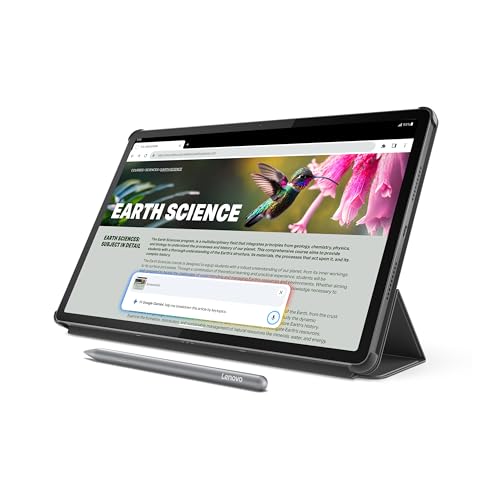
If you want a massive screen without the massive price tag, the Lenovo Idea Tab Pro is the one to watch. It boasts a gigantic 12.7-inch 3K display that rivals the screens of many premium laptops. Paired with quad JBL speakers featuring Dolby Atmos, it offers an immersive media consumption experience that is incredibly hard to beat in this price range.
- Display: Huge, bold 12.7-inch 3K screen makes everything look incredibly sharp.
- Performance: Powered by the MediaTek Dimensity 8300 processor, making heavy multitasking and gaming a breeze.
- Connectivity: Wi-Fi 6E ready to ensure your connection stays fast and stable.
- Build: Impressive thin metal feel that doesn’t weigh too much despite its massive footprint.
5. Apple iPad Air 11-inch (M2)

Best For: Power Users and Creatives
The Apple iPad Air 11-inch is essentially a “Pro-lite” model designed for people who need serious processing power. The leap to the M2 chip is significant, making heavy video editing, 3D modeling, and demanding app usage feel entirely effortless. It is basically a high-end workstation packed into a slim, portable package.
- Raw Power: The M2 chip handles intense creative workflows without breaking a sweat.
- Display: Beautiful 11-inch display offering high brightness and P3 wide color for professional-level accuracy.
- Creative Tools: Supports the Apple Pencil Pro, acting as a complete game-changer for digital artists.
- Value: The ultimate sweet spot—you get top-tier performance without paying for ultra-expensive “Pro” features you might never use.
Final Verdict
If you just need a reliable, fast tablet for browsing, reading, and light work, the standard Apple iPad 11-inch is impossible to beat. If you are a student on a budget who desperately needs a stylus, the Samsung Galaxy Tab S6 Lite offers incredible value. However, if you are a creative professional who needs to edit video or draw on the go, the M2-powered iPad Air is the ultimate portable powerhouse.
Frequently Asked Questions (FAQs)
1. Should I buy an iPad or an Android tablet?
This largely depends on your current ecosystem. If you already own an iPhone or Mac, an iPad will seamlessly sync your messages, photos, and apps. Android tablets (like the Samsung Galaxy Tab or Lenovo Idea Tab) are fantastic if you use an Android phone, often offering more customization and aggressive pricing for larger screens.
2. What is Samsung DeX?
Samsung DeX is a software feature included in many Galaxy tablets that changes the standard Android tablet interface into a traditional desktop layout. It gives you a taskbar, windowed apps that you can resize, and PC-like multitasking—especially useful when paired with a Bluetooth keyboard and mouse.
3. Do I really need the M2 chip in the iPad Air?
If your primary use is watching Netflix, browsing the web, and checking email, the standard iPad’s A16 Bionic chip is more than enough. The M2 chip in the iPad Air is designed for “power users”—those who use their tablet for high-resolution video editing, digital illustration with multiple layers, 3D design, or intense graphic-heavy gaming.
Last update on 2026-10-19/Affiliate links / Images from Amazon Product Advertising API