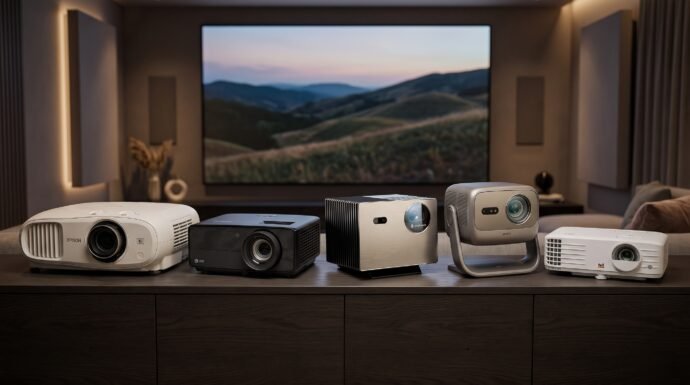
Cinema, Sports and Much More : The 5 Best Home Theater Projector 4K
Choosing the best home theater projector 4K setup involves more than finding the highest resolution or brightness number. Room lighting, screen size, projector placement, HDR support, gaming performance, and whether you prefer a lamp or laser light source all affect the experience. The five models below cover different priorities: the Epson Home Cinema 3800 emphasizes 3LCD color and flexible lens placement; the Optoma UHZ36 and two triple-laser models offer lamp-free operation; and the ViewSonic PX701-4K combines 4K UHD input support with low-latency gaming features.
Specifications and features below are based on manufacturer information where available. Prices can change by seller and region, so check the current Amazon listing before buying. The projectors do not all use identical brightness or contrast measurement methods, so those figures should not be treated as perfectly like-for-like comparisons.
Table of Contents
At a Glance
| Product | Verified key features | Ideal use case |
|---|---|---|
| Epson Home Cinema 3800 4K | 3-chip 3LCD, 3,000 lumens color and white brightness, 4K PRO-UHD pixel-shifting, HDR/HLG, 1.6× optical zoom and lens shift | Movie rooms prioritizing color brightness and flexible placement |
| Optoma UHZ36 | 4K UHD, laser light source, up to 30,000-hour stated light-source life in Eco mode, HDR10, 1.3× zoom | Buyers wanting a lamp-free projector for movies and sports |
| Valerion VisionMaster Pro2 | RGB triple laser, 3,000 ISO lumens, 4K UHD, 110% Rec.2020 color-gamut claim, 0.9–1.5:1 throw ratio | Smart home cinema with broad color and placement flexibility |
| JMGO N3 Ultimate | RGB triple laser, 5,800 ISO lumens, 4K UHD, Dolby Vision, 0.88–1.7:1 throw ratio, motorized gimbal | Bright rooms and installations where projection direction needs flexibility |
| ViewSonic PX701-4K | 4K UHD 3840 × 2160, 3,200 ANSI lumens, HDR/HLG, 1.1× optical zoom, 240 Hz and 4.2 ms claimed gaming performance | Budget-minded buyers and gaming-focused media rooms |
Top 5 Best Home Theater Projector 4K
1. Epson Home Cinema 3800 4K

#### Overview
The Epson Home Cinema 3800 is a lamp-based 3LCD projector that uses Epson’s 4K PRO-UHD pixel-shifting technology rather than a native 4K imaging panel. Its three-chip design displays the full RGB color signal in each frame, avoiding the single-chip DLP rainbow effect that some viewers notice. With 3,000 lumens of both color and white brightness, HDR/HLG support, lens shift, and a 1.6× optical zoom, it suits a dedicated media room or a living room where placement flexibility matters. It does require eventual lamp replacement and has no built-in smart-TV platform.
#### 5 Key Features
- 3-chip 3LCD imaging: Displays the full RGB signal for each frame, helping avoid rainbow artifacts and maintain color brightness.
- 4K PRO-UHD pixel shifting: Enhances perceived detail from 1080p LCD panels; it is not a native 3840 × 2160 imaging panel.
- 3,000 lumens of color and white brightness: Helps maintain a bright picture on larger screens, though room light and screen choice still matter.
- HDR10 and HLG support: Accepts compatible high-dynamic-range content from supported sources.
- Flexible lens and connectivity: A 1.6× optical zoom, vertical and horizontal lens shift, two HDMI 2.0 inputs, and built-in dual 10 W speakers simplify integration.
#### Pros
- 3LCD design avoids the DLP rainbow effect.
- Strong stated color and white brightness.
- Lens shift and optical zoom help with placement.
- Supports HDR/HLG and 4K HDR input up to 60 Hz.
#### Cons
- Lamp eventually needs replacement.
- No built-in streaming platform.
2. Optoma UHZ36 Laser Theater Projector

#### Overview
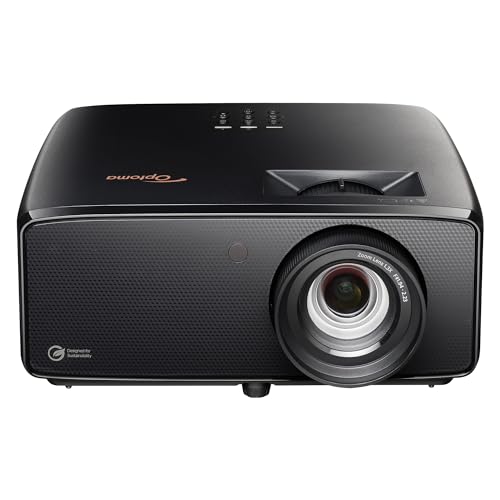
The Optoma UHZ36 is a 4K UHD laser projector for buyers who want to avoid routine lamp changes. Its laser light source is rated for up to 30,000 hours in Eco mode, according to the supplied product information, and the model is presented with HDR10 support and a 1.3× zoom. It is worth considering for movies, sports, and general big-screen viewing, particularly if low-maintenance operation matters. Confirm the exact UHZ36 model and regional specification sheet before purchase, since feature sets and terminology can vary by market.
#### 5 Key Features
- 4K UHD projection: Designed to display UHD content on a large screen.
- Laser light source: Avoids conventional projector-lamp replacement.
- Up to 30,000-hour stated life in Eco mode: A long service-life rating can reduce maintenance frequency; actual life depends on settings and use.
- HDR10 support: Accepts compatible HDR10 content, with the final effect depending on source, settings, and room conditions.
- 1.3× zoom and vertical keystone correction: Offer some flexibility when positioning the projector and aligning the image.
#### Pros
- Laser light source means no routine lamp swaps.
- UHD resolution support for detailed big-screen viewing.
- Zoom gives some installation flexibility.
- A practical option for mixed movie and sports use.
#### Cons
- Confirm regional specifications and included features before ordering.
- Digital keystone correction can reduce effective image detail when used heavily.
3. Valerion VisionMaster Pro2

Overview
The Valerion VisionMaster Pro2 is a 4K UHD RGB triple-laser projector aimed at buyers who want a feature-rich home cinema system. Valerion lists 3,000 ISO lumens, a 15,000:1 viewing-contrast figure, RGB laser color coverage rated at 110% of Rec.2020, and a 0.9–1.5:1 optical throw ratio. Its built-in smart features and lens flexibility make it more integrated than a basic projector, while the laser light source removes the need for conventional lamp replacement. Published contrast figures are manufacturer ratings and should not be directly compared with numbers measured using different methods.
#### 5 Key Features
- RGB triple-laser light source: Designed for broad color reproduction; laser projectors can show speckle or rainbow artifacts depending on the viewer and setup.
- 3,000 ISO lumens: A manufacturer-rated brightness level suitable for many home cinema setups; a darker room still helps improve perceived contrast.
- 4K UHD image support: Supports UHD viewing on screens up to the manufacturer’s stated maximum of 300 inches.
- 0.9–1.5:1 optical throw ratio: Gives more placement flexibility than a fixed-throw lens.
- Smart and gaming features: The manufacturer lists integrated streaming, wireless casting options, and input-lag figures as low as 4 ms at 1080p/240 Hz; confirm supported modes for your device.
#### Pros
- RGB triple-laser source with a wide claimed color gamut.
- Lamp-free light source.
- Optical zoom/throw flexibility for different rooms.
- Built-in smart features reduce reliance on an external streamer.
#### Cons
- Premium pricing compared with lamp-based options.
- Triple-laser artifacts and contrast performance can vary with viewer sensitivity, screen, and room.
4. JMGO N3 Ultimate 4K Projector
#### Overview
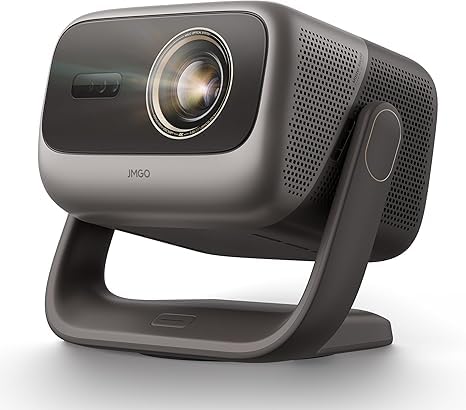
The JMGO N3 Ultimate combines an RGB triple-laser light source with 4K UHD projection and a motorized gimbal. JMGO lists 5,800 ISO lumens, Dolby Vision and HDR10 support, a 0.88–1.7:1 optical throw ratio, and a 360-degree horizontal/150-degree vertical gimbal movement range. Google TV with native Netflix and an integrated 25 W speaker system make it a relatively self-contained entertainment unit. Its high rated brightness is useful when a room cannot be fully darkened, but ambient light still reduces contrast; a suitable screen and controlled lighting remain important.
#### 5 Key Features
- 5,800 ISO lumens rated brightness: The highest stated brightness figure among these five models, although ISO and ANSI ratings should not be assumed to be directly interchangeable.
- RGB triple-laser engine: Supports a broad claimed color gamut of 110% BT.2020.
- 4K UHD with Dolby Vision and HDR10: Provides compatibility with supported HDR formats.
- 0.88–1.7:1 optical throw ratio and lens shift: Help adapt the picture size and position to different rooms.
- Motorized gimbal and Google TV: The gimbal redirects the projection, while Google TV and native Netflix reduce the need for a separate streaming device.
#### Pros
- Highest manufacturer-stated brightness figure in this comparison.
- Optical zoom and lens shift provide placement flexibility.
- Built-in Google TV with native Netflix.
- Integrated 25 W audio system and Dolby Vision support.
#### Cons
- Generally costs more than basic lamp-based 4K projectors.
- The gimbal-style body needs room around it and may not suit every fixed installation.
5. ViewSonic PX701-4K Projector
#### Overview
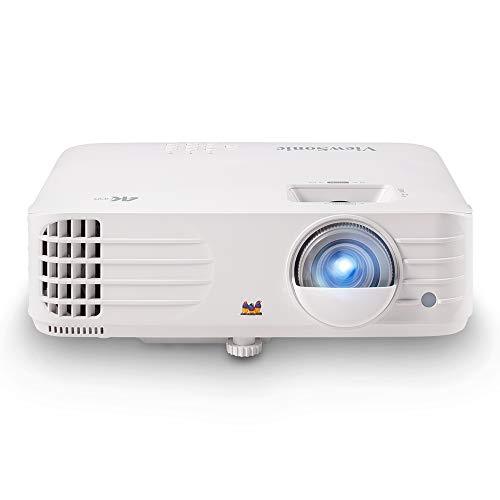
The ViewSonic PX701-4K is a lamp-based DLP projector that supports 3840 × 2160 4K UHD output and is designed to balance brightness, price, and gaming responsiveness. ViewSonic specifies 3,200 ANSI lumens, HDR/HLG support, a 1.1× optical zoom, and input lag as low as 4.2 ms at supported settings with a refresh rate up to 240 Hz. Its lamp lasts up to 20,000 hours in SuperEco mode according to the manufacturer, though the rating varies by operating mode. There is no built-in smart-TV platform, so most users will connect a streaming stick, console, or other source.
#### 5 Key Features
- 4K UHD resolution: Supports a 3840 × 2160 output for detailed UHD content.
- 3,200 ANSI lumens: A high stated brightness rating for a lamp projector, useful in rooms with some ambient light.
- HDR and HLG support: Accepts compatible HDR formats, although actual HDR impact depends on screen size, settings, and room conditions.
- Gaming-focused refresh and latency modes: Manufacturer specifications list up to 240 Hz and 4.2 ms input lag under supported conditions.
- Flexible image alignment: Includes 1.1× optical zoom, auto vertical keystone, horizontal/vertical keystone, and four-corner adjustment.
#### Pros
- 4K UHD support at a comparatively accessible product tier.
- Bright 3,200 ANSI-lumen rating.
- Low-latency and high-refresh gaming modes.
- Up to 20,000 hours of stated lamp life in SuperEco mode.
#### Cons
- Lamp life is finite and varies with operating mode.
- No built-in streaming platform.
- Contrast performance may be less suited to a fully dark cinema room than a projector chosen specifically for black-level performance.
Final Verdict
There is no single best home theater projector for every room.
- For color brightness and lens placement: The Epson Home Cinema 3800 is a sensible choice if you prefer 3LCD and do not mind eventual lamp replacement.
- For lamp-free simplicity: Consider the Optoma UHZ36, after confirming the exact regional model and its current specification sheet.
- For a premium smart laser cinema: The Valerion VisionMaster Pro2 offers a wide claimed color gamut, optical flexibility, and integrated smart features.
- For brightness and adaptable placement: The JMGO N3 Ultimate has the highest manufacturer-stated brightness in this group and a motorized gimbal, making it appealing for more difficult layouts.
- For budget-focused gaming: The ViewSonic PX701-4K combines 4K UHD support with high-refresh, low-latency modes, but uses a replaceable lamp and needs an external streaming device.
Before buying, measure the distance between the intended projector position and screen, decide on your screen size, and consider how much light enters the room. For film-first viewing, room darkening and contrast can matter more than headline brightness. For gaming, verify the resolution and refresh rate at which a quoted input-lag figure applies.
Best For
| Buyer type / scenario | Best fit | Why |
|---|---|---|
| Color brightness and rainbow-effect avoidance | Epson Home Cinema 3800 | Three-chip 3LCD design and 3,000-lumen color brightness |
| Avoiding lamp replacement | Optoma UHZ36 or Valerion VisionMaster Pro2 or JMGO N3 Ultimate | Laser light sources are designed for long service life without conventional lamp swaps |
| Brightness priority | JMGO N3 Ultimate | Highest stated ISO-lumen rating among these five |
| Premium smart projector | Valerion VisionMaster Pro2 | Triple-laser color, optical zoom, and integrated smart features |
| Gaming on a tighter budget | ViewSonic PX701-4K | Supports high refresh rates and low-latency modes under specified conditions |
| Flexible lens placement on a traditional projector | Epson Home Cinema 3800 | 1.6× optical zoom and horizontal/vertical lens shift |
FAQs
Is a 4K projector the same as a native 4K projector?
No. Some projectors use native 3840 × 2160 imaging, while others use pixel-shifting or resolution-enhancement techniques to display more detail than a native 1080p image. The Epson Home Cinema 3800 uses Epson’s 4K PRO-UHD pixel-shifting technology; the ViewSonic PX701-4K and the two laser models listed here are specified for 4K UHD output. Check the manufacturer’s imaging method if native 4K is a priority.
Can I use a projector in a room with daylight?
Yes, but daylight washes out the image and reduces perceived contrast. A brighter projector such as the JMGO N3 Ultimate or ViewSonic PX701-4K may be more practical in a room with some ambient light, but neither can fully overcome direct sunlight. Curtains and a suitable screen can make a substantial difference.
Do laser projectors need lamp replacements?
Laser projectors do not use a conventional replaceable projection lamp. Their light sources still age over time, and the published lifespan is a rating rather than a guarantee of identical brightness for the entire period.
Do these projectors include Netflix or other streaming apps?
The JMGO N3 Ultimate lists Google TV with native Netflix, and the Valerion VisionMaster Pro2 is marketed with an integrated smart platform. The Epson Home Cinema 3800 and ViewSonic PX701-4K do not have a built-in smart-TV platform. For the Optoma UHZ36, verify the exact regional package and specification sheet; an external streaming device is a straightforward alternative.
Is a higher lumen rating always better?
Not necessarily. Brightness matters for larger screens and rooms with ambient light, but it does not alone determine picture quality. Black level, color accuracy, screen gain, HDR tone mapping, room lighting, and the measurement standard used for the rating also matter.
What should I measure before buying?
Measure the available throw distance, the intended screen width, and the mounting height or shelf position. Compare those measurements with the projector’s throw ratio and lens-shift range. Optical lens shift and zoom generally preserve image quality better than relying heavily on digital keystone correction.
Last update on 2026-10-24/Affiliate links / Images from Amazon Product Advertising API