Best DJ Controllers for Beginners: Which One Fits Your Setup?
Choosing your first DJ controller can be harder than it looks. A good beginner controller should make the fundamentals easy to understand while still giving you enough hands-on control to grow your skills. Jog-wheel feel, mixer layout, software compatibility, portability, learning tools, and included accessories can all make a meaningful difference.
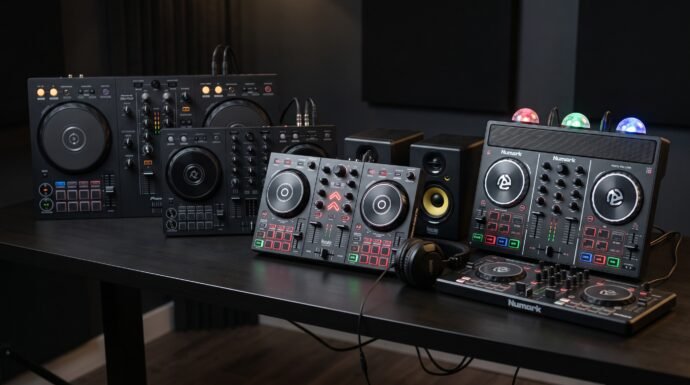
In this comparison of the best DJ controllers for beginners, we’ve looked at five different approaches: a full-featured Pioneer-style setup, an ultra-compact AlphaTheta controller, an all-in-one Hercules learning kit, a party-focused Numark controller, and an extremely portable Numark option. The goal isn’t to name one universal winner, but to show which controller makes the most sense for different types of new DJs.
Table of Contents
At a Glance
| Product | Verified Key Features | Ideal Use Case |
|---|---|---|
| Pioneer DJ DDJ-FLX4 | 2-channel layout, Smart Fader, Smart CFX, performance pads, rekordbox and Serato compatibility | Beginners who want a traditional, expandable DJ setup |
| AlphaTheta DDJ-FLX2 | Compact 2-channel design, Smart Fader, Smart CFX, Bluetooth MIDI, USB-C | Mobile and casual DJs who prioritize portability |
| Hercules DJLearning Kit MK2 | Inpulse 200 MK2, Beatmatch Guide, DJMonitor 32 speakers, HDP DJ45 headphones, DJUCED and Serato DJ Lite | Beginners who want an all-in-one learning package |
| Numark Party Mix Live | Built-in stereo speakers, synchronized LED light show, jog wheels, performance pads, Serato DJ Lite | Bedroom DJs and casual party use |
| Numark MixTrack Go | Ultra-compact design, capacitive jog wheels, Stems, Fade FX, USB-C and Bluetooth MIDI | DJs who want to practice and perform while traveling |
Top 5 DJ Controllers for Beginners
1. Pioneer DJ DDJ-FLX4

Overview
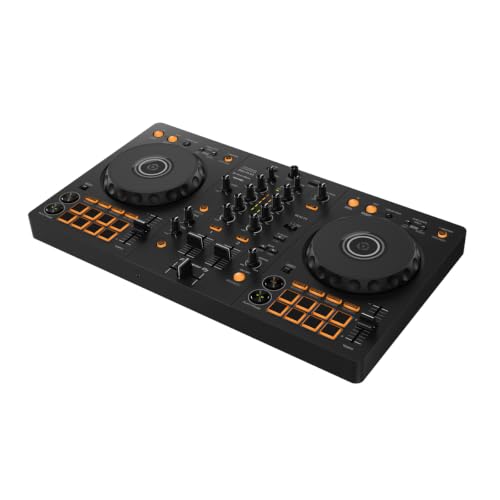
The Pioneer DJ DDJ-FLX4 is the most conventional choice in this group and is particularly well suited to beginners who want a familiar two-deck-and-mixer layout. It provides a substantial control surface without moving into the size and complexity of professional multi-deck equipment.
Its biggest advantage is the combination of straightforward hardware and broad software support. The controller works with rekordbox and Serato DJ Lite, while Pioneer also lists compatibility with other supported DJ applications. Smart Fader can automatically adjust volume, bass and BPM during transitions, while Smart CFX provides simplified access to combinations of effects.
The DDJ-FLX4 also has a microphone input and master/headphone outputs, making it more versatile for users who eventually want to livestream or build a more conventional home DJ setup.
5 Key Features
- Two-channel DJ layout — The two-deck configuration mirrors the basic workflow used on many traditional DJ systems, making it a useful foundation for learning.
- Smart Fader — Automatically adjusts volume, bass and BPM during transitions, helping beginners produce smoother blends while they learn.
- Smart CFX — Applies combinations of effects through simplified controls, giving new DJs an approachable way to experiment with effects.
- Performance pads — The pads provide access to functions including Hot Cues, Pad FX, Beat Jump and sampler functions.
- Broad software compatibility — Support includes rekordbox for Mac/Windows and mobile platforms, Serato DJ Lite and other compatible MIDI-based applications.
Pros
- Familiar two-channel layout for learning core DJ techniques.
- Smart Fader can simplify difficult transitions for beginners.
- Smart CFX provides accessible effects control.
- Strong software flexibility for users who may change DJ applications later.
Cons
- Larger and heavier than the compact controllers in this comparison.
- Requires separate speakers and headphones for a complete basic setup.
2. AlphaTheta DDJ-FLX2
Overview
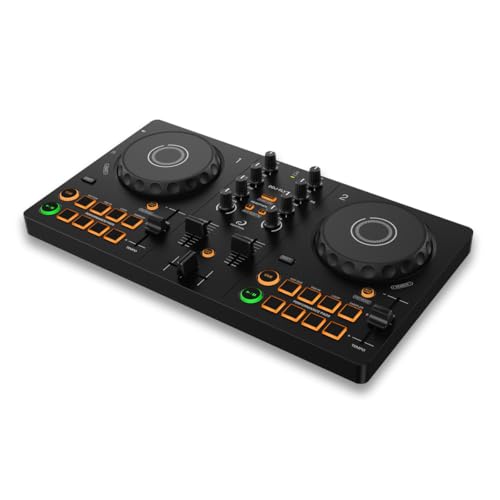
The AlphaTheta DDJ-FLX2 takes the basic two-channel DJ concept and puts it into a much smaller package. It is aimed at beginners who may want to learn from a smartphone, tablet or laptop rather than build a traditional desktop DJ station.
At about 2.6 pounds, it is substantially lighter than the DDJ-FLX4. It supports rekordbox, Serato DJ Lite, djay and Traktor Play, and it can connect to mobile devices using USB-C or Bluetooth MIDI.
The trade-off is connectivity. Bluetooth MIDI is useful for controlling compatible DJ applications, but when the controller is connected to a mobile device via Bluetooth, audio comes from the mobile device rather than the controller’s master and headphone outputs. USB connection is preferable when you want to use the controller’s physical audio outputs.
5 Key Features
- Compact two-channel layout — It retains the fundamental two-deck workflow while taking up considerably less space than a conventional controller.
- Smart Fader — Automatically optimizes volume, BPM and bass during crossfader transitions.
- Smart CFX — Provides simplified effect control for creating more dynamic transitions without mastering complex effect combinations first.
- USB-C and Bluetooth MIDI — The controller can work with compatible smartphones, tablets and computers through wired or wireless control connections.
- Multiple DJ applications — Compatible applications include rekordbox, djay, Serato DJ Lite and Traktor Play.
Pros
- Very portable at about 2.6 pounds.
- Works across several major beginner-friendly DJ applications.
- USB-C makes modern mobile connections straightforward.
- Smart mixing features reduce the initial learning curve.
Cons
- Bluetooth operation has audio-output limitations.
- Its smaller controls and footprint may be less appealing to beginners who want a traditional full-size setup.
3. Hercules DJLearning Kit MK2
Overview
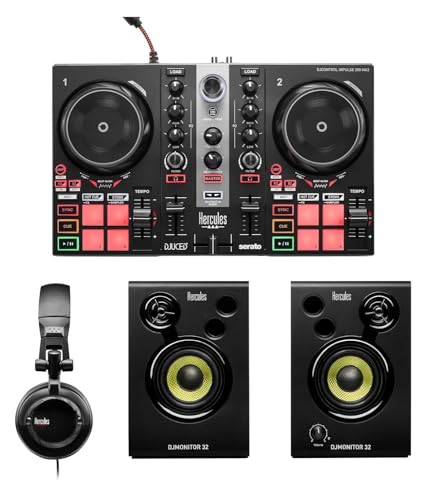
The Hercules DJLearning Kit MK2 takes a different approach by providing much of the equipment a beginner needs in one package. The kit combines the DJControl Inpulse 200 MK2 controller with DJMonitor 32 speakers and HDP DJ45 headphones, along with DJUCED and Serato DJ Lite software.
The controller itself is particularly focused on teaching. Its Beatmatch Guide uses LED indicators to show adjustments for tempo and beat alignment, allowing beginners to learn the mechanics of beatmatching rather than relying exclusively on automatic synchronization. Hercules also provides DJ Academy tutorials.
That makes this a compelling choice for someone starting from zero who doesn’t already own speakers or DJ headphones.
5 Key Features
- Beatmatch Guide — LED indicators guide tempo and jog-wheel adjustments as beginners learn manual beatmatching.
- All-in-one package — The kit includes the controller, DJMonitor 32 speakers and HDP DJ45 headphones.
- DJUCED and Serato DJ Lite — Both software options are included, giving beginners a choice of platforms.
- Stems support — The controller supports separating instrumental and vocal elements for creative mixing.
- DJ Academy tutorials — Hercules provides learning resources covering setup, beatmatching, transitions, scratching and Stems.
Pros
- Includes speakers and headphones as part of the kit.
- Strong learning-oriented features for first-time DJs.
- Supports both DJUCED and Serato DJ Lite.
- Beatmatch Guide provides visual assistance while learning manual mixing.
Cons
- The bundled package is less compact than buying a controller alone.
- Beginners who already own speakers and headphones may not need the additional equipment.
4. Numark Party Mix Live
Overview
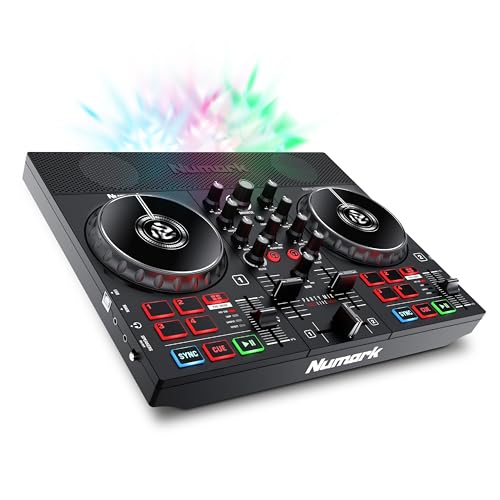
The Numark Party Mix Live is the most entertainment-focused controller in this group. Unlike a conventional controller that expects you to connect separate speakers, it includes built-in stereo speakers and a built-in LED light show.
The controller still provides the fundamental tools needed to learn DJing, including touch-sensitive jog wheels, pitch controls, two-band EQ, filter knobs, performance pads, Sync, Cue and Play controls. It supports Serato DJ Lite and compatible mobile DJ applications.
The built-in speakers are rated at 5 watts each, while the three multicolor LEDs create a beat-synchronized light show. That combination makes the Party Mix Live particularly suited to casual home mixing and small informal gatherings where convenience and entertainment are more important than building a traditional studio setup.
5 Key Features
- Built-in stereo speakers — You can practice and play without immediately adding external powered speakers.
- Beat-synchronized LED lighting — Three multicolor LEDs provide an integrated light show that reacts to the music.
- Touch-sensitive jog wheels — The large jog wheels support scratching, backspins and pitch-bending adjustments.
- Performance pads — Four pads per deck provide access to effects, cue points, loops and samples.
- Serato DJ Lite support — The controller is designed for plug-and-play use with Serato DJ Lite, alongside supported mobile applications.
Pros
- Built-in speakers make it easy to start practicing immediately.
- Integrated lighting adds an entertainment element without separate equipment.
- Full-size-style jog wheels provide hands-on track control.
- Useful combination of beginner controls and creative performance functions.
Cons
- The built-in speakers make the unit less focused on a conventional studio-monitor setup.
- The controller uses an external power adapter for its speakers.
5. Numark MixTrack Go
Overview
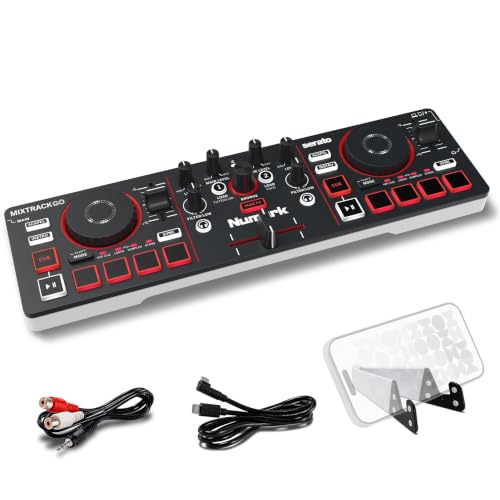
The Numark MixTrack Go is the portability specialist of this comparison. At 1.32 pounds and measuring 12.76 by 3.66 by 1.56 inches, it is designed for DJs who want to carry a controller with minimal luggage.
Despite its small footprint, it includes capacitive touch jog wheels, performance pads, Stems control, Fade FX, headphone cueing and a built-in audio interface. It works with Serato DJ Lite and Algoriddim djay, while Bluetooth MIDI allows wireless control with compatible devices.
The important distinction is that wireless MIDI is a control connection, not a wireless audio connection. When using Bluetooth MIDI, the MixTrack Go’s own audio outputs are disabled, so audio must be monitored through the mobile device. For normal controller-style audio output and headphone cueing, a wired connection is the more appropriate setup.
5 Key Features
- Ultra-compact design — Its 1.32-pound weight and small dimensions make it particularly easy to carry.
- Stems control — Performance controls can isolate vocals, drums, bass and instrumental elements for live remixing.
- Capacitive jog wheels — Touch-sensitive jog wheels provide hands-on control for track manipulation and pitch adjustment.
- Multiple performance-pad modes — The pads support Hot Cue, Loops, FX, Sampler and Stems functions.
- USB-C and Bluetooth MIDI — It can connect to computers and mobile devices through USB-C, while compatible devices can use Bluetooth MIDI.
Pros
- The lightest and smallest controller in this comparison.
- Includes surprisingly broad performance functionality for its size.
- Supports both Serato DJ Lite and Algoriddim djay.
- Can be powered through USB and used with a mobile battery or power source in supported setups.
Cons
- Its compact controls provide less physical workspace than larger controllers.
- Bluetooth MIDI has audio-output limitations, so wired operation is preferable when using the controller’s own audio outputs.
Final Verdict
There isn’t one best DJ controller for every beginner. The right choice depends heavily on how and where you plan to learn.
Best overall for a traditional beginner setup: Pioneer DJ DDJ-FLX4. Its familiar two-channel layout, Smart Fader, Smart CFX and broad software compatibility make it the strongest choice here for someone who wants to learn on a conventional controller and continue developing those skills.
Best for mobile DJing: AlphaTheta DDJ-FLX2. Its 2.6-pound body, USB-C connectivity and Bluetooth MIDI support make it much easier to carry than a conventional controller.
Best complete beginner package: Hercules DJLearning Kit MK2. If you don’t already own headphones or speakers, this kit is the most convenient starting point because those components are included alongside the controller and software.
Best for casual parties: Numark Party Mix Live. Built-in speakers and synchronized lighting make it the most self-contained entertainment option in the group.
Best for extreme portability: Numark MixTrack Go. Its 1.32-pound body and compact dimensions make it the easiest controller here to take almost anywhere, while its Stems, pads and effects give it considerably more functionality than its size suggests.
Best For Table
| Buyer Type / Scenario | Best Product | Why |
|---|---|---|
| Traditional first DJ controller | Pioneer DJ DDJ-FLX4 | Familiar two-channel layout and broad software support |
| Mobile and compact setup | AlphaTheta DDJ-FLX2 | Lightweight design with USB-C and Bluetooth MIDI |
| Complete beginner kit | Hercules DJLearning Kit MK2 | Includes controller, speakers, headphones and software |
| Bedroom parties and casual entertainment | Numark Party Mix Live | Built-in speakers and synchronized lighting |
| Travel and ultra-portable practice | Numark MixTrack Go | Extremely small and lightweight with full DJ controls |
FAQs
Which DJ controller is easiest for a complete beginner?
The Hercules DJLearning Kit MK2 is particularly beginner-oriented because its Beatmatch Guide provides visual assistance while learning tempo and beat alignment, and the package includes speakers, headphones and software.
Is the Pioneer DJ DDJ-FLX4 good for learning DJing?
Yes. Its two-channel layout provides a conventional foundation for learning mixing, while features such as Smart Fader and Smart CFX can simplify the early learning process. It also supports major DJ software including rekordbox and Serato DJ Lite.
Can the AlphaTheta DDJ-FLX2 work with a phone?
Yes. The DDJ-FLX2 supports compatible iOS and Android devices through USB-C and Bluetooth MIDI. However, Bluetooth operation sends audio through the mobile device rather than the controller’s master and headphone outputs, so USB is preferable when you want to use the controller’s physical audio connections.
Does the Numark Party Mix Live need external speakers?
No. The Party Mix Live has built-in stereo speakers. It also provides a main output if you later want to connect it to a separate audio system.
Is the Numark MixTrack Go suitable for learning?
Yes. It has two-deck controls, capacitive jog wheels, cueing, performance pads, effects and software support for Serato DJ Lite and Algoriddim djay. Numark also provides free learning material for the controller.
Which controller is best if portability matters most?
The MixTrack Go is the strongest choice in this group for maximum portability. It weighs 1.32 pounds and measures only 12.76 by 3.66 by 1.56 inches.
Last update on 2026-10-09/Affiliate links / Images from Amazon Product Advertising API