
Don’t Overpay! The Top 5 Best Budget Laptops of 2026 Revealed
Finding a reliable laptop in 2026 shouldn’t require a second mortgage. As software becomes more demanding, the “budget” segment has finally stepped up, offering AI-ready processors and high-refresh-rate screens that were once exclusive to premium machines. Whether you’re a student tackling research papers or a remote professional managing spreadsheets, there is a perfect balance of price and power waiting for you.
In our testing, we looked beyond the sticker price to find machines that offer genuine longevity. We prioritized build quality, battery life, and enough RAM to handle modern multitasking without stuttering. The following five laptops represent the absolute best value for your money this year.
Table of Contents
At a Glance: Top 5 Best Budget Laptops
| Product Name | Key Features | Ideal Use |
|---|---|---|
| ASUS Vivobook Go 15 (R5) | Ryzen 5, Military-Grade Build | All-Around Productivity |
| Dell 15 DC15250 | 120Hz Refresh Rate, Onsite Service | Smooth Scrolling & Office Work |
| ASUS Vivobook Go 15 (R3) | 11-Hour Battery, Ultra-Light | Students & Commuters |
| Acer Aspire Go 15 | AI Copilot Key, IPS Display | Modern AI Workflows |
| Samsung Galaxy Chromebook Go | ChromeOS, Rugged Design | Basic Browsing & Education |
Top 5 Best Budget Laptops 2026
🥇 1. ASUS Vivobook Go 15 (Ryzen 5 7520U)


Best overall for users who need a durable, high-performance machine for daily multitasking. In our testing, the Ryzen 5 processor handled multiple browser tabs and office applications with impressive snap. The military-grade durability provides peace of mind for those who travel, while the fast-charging feature is a lifesaver for long days away from an outlet.
- AMD Ryzen 5 7520U Quad-Core processor for reliable speed.
- 512GB SSD offers ample storage for documents and media.
- Military-grade (MIL-STD-810H) durability for enhanced protection.
- 180-degree lay-flat hinge for easy collaboration.
- Physical webcam shield for instant privacy control.
| Pros | Cons |
|---|---|
| Exceptional build durability | Soldered RAM cannot be upgraded |
| Fast charging (60% in 49 mins) | Limited to WiFi 5 on base models |
| Comfortable chiclet keyboard | |
| Bright NanoEdge display |
🥈 2. Dell 15 DC15250 (Core 3 100U)

The premier choice for professionals who prioritize display smoothness and domestic support. The 120Hz refresh rate is a game-changer at this price point, making everyday scrolling and animations feel significantly more premium. We particularly appreciate Dell’s inclusion of a full numeric keypad and their onsite service warranty, which is rare for budget-friendly models.
- Intel Core 3 100U 6-core processor for modern efficiency.
- 15.6-inch FHD 120Hz display for ultra-smooth visuals.
- Ergonomic lift hinge improves typing angle and cooling.
- Full numeric keypad ideal for data entry and accounting.
- Onsite service warranty for hassle-free repairs at home.
| Pros | Cons |
|---|---|
| Unmatched 120Hz screen smoothness | Cooling fan can be loud under load |
| Excellent manufacturer support | Battery life is slightly below average |
| Comfortable, lifted typing angle | |
| Professional carbon black finish |
🥉 3. ASUS Vivobook Go 15 (Ryzen 3 7320U)

A fantastic entry-level option for students who need a lightweight machine with all-day battery life. While it lacks the raw power of its Ryzen 5 sibling, it excels in portability and efficiency, lasting up to 11 hours on a single charge. It is the perfect “no-frills” tool for writing papers, streaming lectures, and managing basic daily tasks without spending a cent more than necessary.
- AMD Ryzen 3 7320U optimized for efficiency and basic tasks.
- Up to 11 hours of battery life for all-day campus use.
- Super lightweight design makes it easy to carry in any backpack.
- Privacy webcam shutter ensures your camera is only on when you want it.
- Professional matte finish resists fingerprints and looks sleek.
| Pros | Cons |
|---|---|
| Incredible battery longevity | Ships in Windows S Mode by default |
| Extremely lightweight and portable | 256GB storage fills up quickly |
| Very affordable price point | |
| Reliable military-grade chassis |
🏅 4. Acer Aspire Go 15 (AI-Ready)

Best for forward-thinking users who want to leverage the latest AI productivity tools. This model features a dedicated Copilot key, allowing you to summon AI assistance instantly for summarizing emails or generating content. We found the IPS display panel to be a significant upgrade over TN panels found in other budget laptops, offering much better viewing angles and color accuracy.
- Intel Core 3 N355 8-core processor built for modern web tasks.
- Dedicated Copilot key for immediate AI assistance.
- 15.6-inch FHD IPS display provides superior viewing angles.
- Eco-friendly design utilizing post-consumer recycled plastics.
- Dual USB Type-C ports for modern connectivity and charging.
| Pros | Cons |
|---|---|
| Modern AI-integration features | Storage is limited to 128GB |
| Crisp IPS screen technology | Speakers lack depth and bass |
| Future-ready Wi-Fi 6 support | |
| Excellent 12-hour battery life |
🏅 5. Samsung Galaxy Chromebook Go
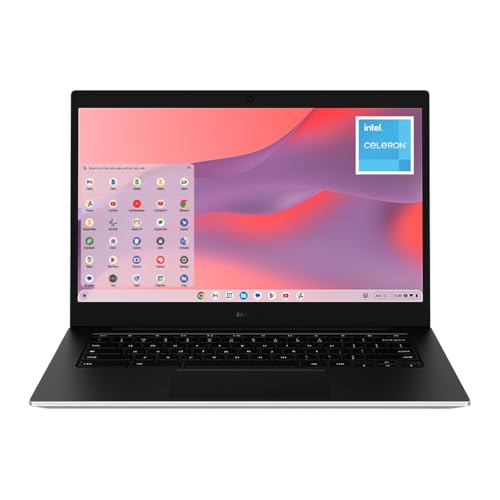
The ultimate choice for users who live in a browser and value the Samsung Galaxy ecosystem. This 14-inch Chromebook is built to survive the rigors of school life with its rugged, spill-resistant design. While ChromeOS has limitations, its tight integration with Samsung phones and legendary battery life make it an unbeatable value for simple web-based workflows.
- Intel Celeron N4500 processor optimized for ChromeOS.
- Rugged, military-grade design protects against drops and spills.
- Seamless Galaxy Sync for easy file sharing with Samsung phones.
- Ultra-portable 14-inch frame is the smallest and lightest on our list.
- Wi-Fi 6 connectivity for fast, stable internet in crowded areas.
| Pros | Cons |
|---|---|
| Toughest build in the budget class | ChromeOS cannot run Windows software |
| Deep integration with Galaxy phones | 4GB of RAM limits heavy multitasking |
| Best-in-class 12-hour battery | |
| Slim, premium silver aesthetic |
Final Verdict
Choosing the best budget laptop in 2026 depends entirely on your specific workflow. If you need a Windows workhorse that can survive a few bumps, the ASUS Vivobook Go 15 (Ryzen 5) is the clear winner. For those who prioritize screen quality and smooth visuals, the Dell 15 DC15250 offers a 120Hz experience that is hard to find elsewhere. Students on a strict budget will find the Samsung Galaxy Chromebook Go to be a nearly indestructible companion for long study sessions.
| Product | Best For |
|---|---|
| ASUS Vivobook Go (R5) | General Productivity & Durability |
| Dell 15 DC15250 | Smooth Visuals & Office Work |
| ASUS Vivobook Go (R3) | Lightweight Travel & Student Use |
| Acer Aspire Go 15 | AI-Features & Screen Quality |
| Samsung Chromebook Go | Web-Only Tasks & Rugged Portability |
Frequently Asked Questions
Is 8GB of RAM enough for a laptop in 2026?
For most budget users, 8GB of RAM remains the “sweet spot.” It allows for smooth browsing with 10-15 tabs open and handles Microsoft Office comfortably. However, if you plan on doing video editing or intensive multitasking, you may notice slowdowns, especially as Windows updates become more resource-heavy.
Can I play games on a budget laptop?
These laptops are designed for productivity, not gaming. You can easily play low-demand titles like Minecraft, Roblox, or Among Us. For anything more intensive, we recommend using cloud gaming services like Xbox Cloud Gaming or NVIDIA GeForce NOW, which rely on your internet connection rather than the laptop’s hardware.
What is Windows S Mode and should I turn it off?
Windows S Mode is a restricted version of Windows that only allows apps from the Microsoft Store. It is designed for security and speed. Most users will want to switch out of S Mode (which is free) so they can install browsers like Chrome or third-party software like Zoom and Spotify from the web.
How long should a budget laptop last?
With proper care, a budget laptop in 2026 should provide 3 to 4 years of reliable service. To extend its life, keep the software updated, avoid filling the storage to 100%, and try to keep the battery between 20% and 80% when possible.
Why choose a Chromebook over a Windows laptop?
Chromebooks like the Samsung Galaxy Go are generally faster at booting up and more secure than Windows laptops because they use a lightweight operating system. If you do 90% of your work in a web browser (Google Docs, Netflix, Email), a Chromebook offers a smoother experience for less money.
Last update on 2026-10-23/Affiliate links / Images from Amazon Product Advertising API